Threat Detection for AI for Enhanced Security Monitoring
AI and Cybersecurity, Detection Engineering



Securonix has released a Value Package with OOTB policies for detecting threats across AI platform, identities, agents, data movement, endpoints, and network activity.
Abhishek Narasimhan, Kumaramanivel Ramanathan, Sachin A B
AI security is often reduced to prompt injection, data leakage, or model safety. Those are real concerns, but they do not describe the full operating environment. Enterprise AI services depend on cloud control planes, human and non-human identities, data repositories, endpoints, APIs, and network paths. An attacker does not need to compromise the model itself if they can modify a guardrail, create a privileged agent, extract data from a knowledge base, or use a legitimate AI API from a compromised host.
That is the initial problem the Securonix Value Package: Threat Detection for AI addresses. The package brings OOTB policies together under the label scx.vp.AI. It gives security teams a practical starting point for monitoring AI-related activity across AWS Bedrock, Microsoft Copilot and Copilot Studio, Microsoft Foundry, Microsoft Entra ID, Google Cloud AI-agent activity, Microsoft 365 and SharePoint, DLP, endpoint telemetry, web proxy, and next-generation firewall data.
The package is designed to expand. As organizations adopt more AI services and those platforms expose usable security telemetry.
An AI application can introduce several potential paths for misuse or compromise:
None of these activities are visible from the model interface alone. This means effective AI threat detection requires signals from the systems around the model:
Individual signals matter, but the investigation is stronger when analysts can place them on the same timeline.
Behavior becomes useful when there is enough history and context around it.
Cloud AI services have administrative settings that directly affect their security posture. Logging can be reduced. Guardrails can be changed. Models can be fine-tuned. New data sources or knowledge bases can be attached. Agents can be created or updated.
The package includes detection policies for activities such as:
These policies focus on the control plane rather than the content of an AI conversation. A legitimate administrator may perform the same action, so the purpose is not to declare every change malicious. The purpose is to make the change visible, attach identity and environmental context, and allow the SOC to determine whether it was expected.
AI agents are identities with access. In some environments, they can call tools, retrieve documents, modify cloud resources, or act through delegated permissions. That makes identity governance part of AI security.
Current policies cover:
AI does not replace established identity security practices. Teams must still monitor valid accounts, service principals, consent grants, role assignments, sign-in context, and device state.
Some risks appear as changes in behavior rather than as a single administrative action. An account may interact with Copilot for the first time, generate an unusually high volume of activity, access it from a rare country, or connect from an IP address associated with malicious activity. A Bedrock identity may repeatedly fail model-listing or invocation operations. A rarely used model may suddenly be invoked.
The package includes behavioral detections for these cases. They are intended to identify activity that deserves review, not to treat rarity as proof of compromise.
Behavioral policies require baselining. A company rolling out Copilot to a new business unit will naturally produce first-time users and unusual volumes. A newly deployed model will be rare until it is not. Teams should tune these policies using the tenant’s users, roles, deployment patterns, approved applications, and operating regions.
AI adoption changes how data moves. Employees can upload files to assistants. Agents can retrieve content from knowledge bases. Public AI sites can become destinations for source code, customer data, or internal documents. The important question is not simply whether an AI service was used, but what data was involved, who sent it, where it went, and whether the activity matched policy.
The package includes detections for:
These detections use telemetry from content management, DLP, network, and cloud platforms. Visibility varies by provider and license. Security teams should not assume that full prompts, responses, or file contents are always available. In many cases, the useful evidence is metadata: user, application, destination, file type, sensitivity label, DLP rule, resource, action, and transfer volume.
AI-related risk is not limited to sanctioned cloud services. Scripts and local agents can connect to AI APIs, resolve AI domains, execute commands, or spawn shells.
The current package includes policies for:
Endpoint detections help distinguish ordinary browser use from programmatic activity on a host. They also provide evidence when an AI tool is being used as part of a larger execution chain.
Proxy and next-generation firewall telemetry can provide broad coverage where application-native logs are incomplete or unavailable. The package includes policies for rare AI destinations, repeated failed connections, and abnormal outbound transfer volume.
Network data has limits. It may show that a host connected to an AI service without explaining the user’s intent or the content transferred. It is still valuable for identifying unsanctioned services, compromised endpoints, unusual data movement, or activity from systems that should not access public AI platforms.
The value package is delivered through OOTB detection content, not through a new data pipeline.
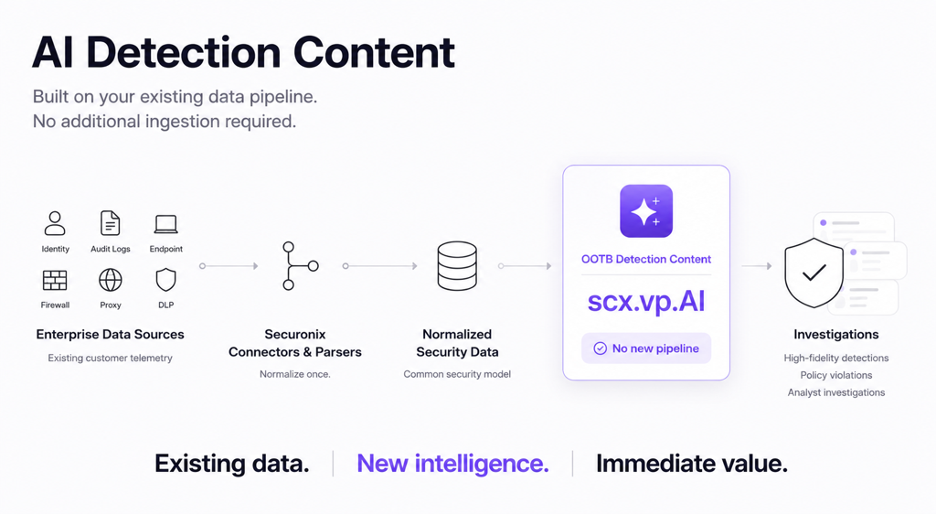
Data Path for AI Threat Detections
This distinction matters. The presence of a policy does not guarantee that the required event exists in the source platform or is mapped by the active parser.
AWS CloudTrail records Bedrock control-plane operations, but selected agent and knowledge-base operations are data events that require explicit event selectors. Microsoft Copilot and AI application activity is exposed through Microsoft Purview auditing, subject to the workload, licensing, and audit configuration. Microsoft Foundry resource logs require Azure diagnostic settings. Google Cloud Admin Activity logs cover configuration and IAM changes, while Data Access logs are disabled by default for most services. Endpoint, proxy, and firewall policies depend on compatible parsers and the event fields produced by the selected source.
The deployment task is therefore not “enable all OOTB policies.” It is to check each policy against a source that is present, configured, collected, parsed, and stable in your environment.
Start with control-plane and permission-change detections for AI services already in production. Logging changes, guardrail modifications, model deployments, app consent, role assignments, and long-lived credentials have clear operational meaning. Scope them to the relevant resources and approved administrative identities. Next, identity and behavioral policies. Baseline first-time users, rare identities, unusual locations, repeated failures, and abnormal interaction volume before tying them to high-severity escalation. This is particularly important during a rollout, when legitimate adoption quickly changes the baseline. Then add data-transfer, DLP, endpoint, proxy, and firewall coverage. These policies can reach a wider set of users and systems, but they also require careful scoping. A large upload may be unauthorized exfiltration or an approved data-science workflow. A connection to an AI API may be malicious scripting or a supported developer tool. Context determines the difference.
For each area, verify that a known administrative or user action produces the expected source event. This separates content tuning from collection failures.
Customers can locate the detections by opening Policy Violations and filtering with the label scx.vp.AI. Review the policies that match the organization’s AI services, confirm the required connectors and parsers, and enable them in stages.
The Securonix OOTB Value Packages documentation(more details for our customers) describes how to enable the value-package workflow in detail. Connectors by Functionality provide the current Securonix collection references.